

LivingWriter
Use LivingWriter as the anchor for a real shortlist.
Instead of returning to a broad directory, jump straight into the strongest adjacent matchups for pricing, workflow fit, and differentiation.
Overview
Overview
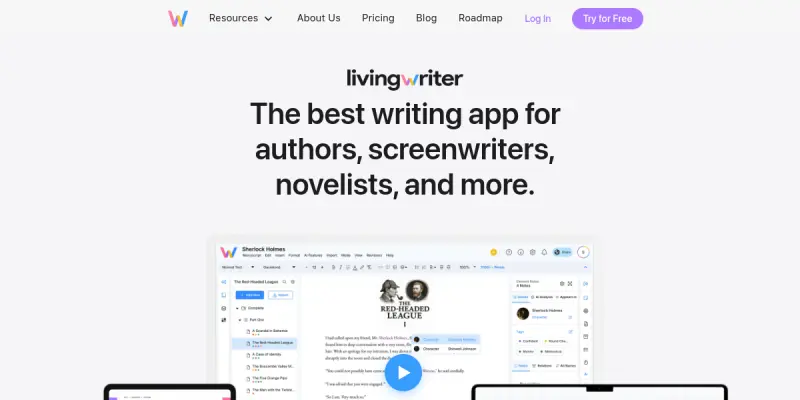
LivingWriter is a cloud-based writing and outlining application that combines structured planning methodologies with AI writing assistance. It is tailored for authors, screenwriters, and creators of long-form documents such as novels, screenplays, and nonfiction manuscripts. The platform is designed to support the entire writing lifecycle from initial concept and outlining to drafting, editing, and final publishing. By integrating classic narrative frameworks with modern digital tools, LivingWriter aims to reduce friction in the writing process and help authors maintain consistency across longer projects.
Key Features
- 27 Chapter Method: A pre-built outlining template inspired by the popular story structure, helping writers break down their narrative into 27 manageable chapters.
- 3 Act Structure: Another built-in outlining option that aligns with the classic three-act narrative framework, useful for screenwriters and novelists alike.
- Boards: A visual, drag-and-drop organization tool that allows writers to arrange chapters, scenes, and notes in a flexible, non-linear way.
- AI Writing Assistant: An integrated AI tool that can help generate content, rewrite sentences, adjust tone, and overcome writer’s block.
- Manuscript Mode: A distraction-free writing environment optimized for long-form documents, including support for formatting and automatic chapter numbering.
- Publishing Export: Direct export options to formats like PDF, Word, and EPUB, simplifying the path to self-publication or submission.
- Collaboration: Features for sharing projects with beta readers, editors, or co-authors, with version control and commenting capabilities.
- Cross-Platform Sync: Cloud-based synchronization allows access to projects from multiple devices, including desktops and mobile browsers.
Use Cases
Novel Writing
Authors writing fiction or nonfiction books can use the 27 Chapter Method or 3 Act Structure to outline their plot, then leverage AI assistance to expand scenes or refine dialogue. The manuscript mode and export options help move from draft to publish-ready file.
Screenwriting
Screenwriters can outline their screenplay using beat sheets or the 3 Act Structure, rearrange scenes on the boards, and use AI to generate dialogue variations or visualize scene transitions.
Academic and Professional Writing
Researchers, students, and business professionals creating long-form reports or theses can organize chapters, track sources, and use AI to paraphrase or summarize content while maintaining a consistent academic tone.
Collaborative Writing Projects
Groups writing a shared document—such as a collaborative novel, anthology, or corporate documentation—can assign sections, leave feedback, and track changes without losing the overall structure.
Pricing & Plans
LivingWriter operates on a freemium model. A free tier offers limited functionality, including the ability to create a small number of projects and access basic outlining tools. Paid subscription tiers unlock unlimited projects, advanced AI features, export options, and priority support. As of this review, specific pricing details (monthly or annual) are not publicly disclosed and may require visiting the website for the latest information.
Integrations & Compatibility
LivingWriter is a web-based application accessible via modern browsers. It also offers desktop apps for Windows and macOS. There are no native integrations with other writing tools or publishing platforms beyond standard file export. The AI features rely on an internet connection and are not available offline.
Who Is It For?
LivingWriter is ideal for aspiring and professional authors, screenwriters, and content creators who need a structured environment to plan and write long-form documents. It is also suitable for groups collaborating on a single writing project, as well as educators teaching narrative structure.
Limitations
- AI Quality: The AI writing assistant can sometimes produce generic or repetitive phrasing, requiring manual refinement to match a specific voice.
- Learning Curve: New users may need time to familiarize themselves with the board and outlining features, especially if they are accustomed to simpler editors.
- Limited Formatting Options: For complex formatting needs (e.g., advanced typography, footnotes, or complex tables), users may need to export to a dedicated word processor.
- No Offline AI: The AI features require an active internet connection, which may be a drawback in low-connectivity environments.
Final Verdict
LivingWriter provides a solid combination of structured outlining, visual organization, and AI writing assistance for long-form writers. Its focus on proven narrative frameworks and the ability to collaborate make it a strong contender for authors and screenwriters who prefer a guided writing process. However, those who need advanced formatting or completely original, brand-perfect AI output may find the tool limited. For its target audience, LivingWriter offers a focused and supportive environment that can help turn a premise into a finished manuscript.
Tool Facts
Screenshots & Interface
Pros
- ✓ Built-in 27 Chapter Method and 3 Act Structure templates help writers plan narratives quickly.
- ✓ AI assistant can generate content, rephrase sentences, and adjust tone to reduce writer's block.
- ✓ Visual board feature allows non-linear organization of chapters and scenes.
- ✓ Cross-platform sync ensures work is accessible from desktop or mobile browser.
- ✓ Export to PDF, Word, and EPUB simplifies the publishing pipeline.
Cons
- × AI-generated text often needs manual editing to match a specific authorial voice.
- × The AI can occasionally produce repetitive or generic phrasing, requiring rewriting.
- × No native integration with popular publishing platforms like Amazon KDP or Draft2Digital.
- × Advanced formatting (footnotes, tables, customized headers) is limited within the editor.
How to Use LivingWriter in Your Workflow
Integrating LivingWriter into your professional toolkit enhances efficiency by automating manual steps. By configuring it to suit your specific project requirements, you can optimize output quality and reduce project cycle times. Standard workflows involve testing the tool on simple tasks before scaling its use to complex operations.
Frequently Asked Questions
What is LivingWriter used for?
LivingWriter is an AI-powered writing platform designed for authors, screenwriters, and long-form document creators. It integrates outlining methods like the 27 Chapter Method and 3 Act Structure with collaborative boards and AI writing assistance. This tool helps users plan, draft, and publish their work from a single interface.
What is the pricing model for LivingWriter?
LivingWriter uses a Freemium pricing model.
What are the main advantages of LivingWriter?
The key benefits of LivingWriter include: Built-in 27 Chapter Method and 3 Act Structure templates help writers plan narratives quickly., AI assistant can generate content, rephrase sentences, and adjust tone to reduce writer's block., Visual board feature allows non-linear organization of chapters and scenes., Cross-platform sync ensures work is accessible from desktop or mobile browser., Export to PDF, Word, and EPUB simplifies the publishing pipeline..
What are the main limitations of LivingWriter?
Some limitations or cons of LivingWriter are: AI-generated text often needs manual editing to match a specific authorial voice., The AI can occasionally produce repetitive or generic phrasing, requiring rewriting., No native integration with popular publishing platforms like Amazon KDP or Draft2Digital., Advanced formatting (footnotes, tables, customized headers) is limited within the editor..
Alternative AI Tools

ConvertKit AI
ConvertKit AI is a text and writing tool designed for content creators and marketers. It streamlines copywriting tasks such as drafting, editing, and adjusting tone. A key differentiator is its integration with ConvertKit's email marketing platform, enabling seamless content workflows.

Sassbook AI
Sassbook AI is an AI-powered writing assistant that generates articles, stories, summaries, and headlines. It helps writers and content creators produce unique content quickly while offering editing and tone adjustment features.

WhiteSmoke
WhiteSmoke is an all-in-one writing software suite that combines grammar checking, spell checking, and style editing. It offers translation capabilities and English learning resources to help users improve their written communication across various languages. The tool functions as a comprehensive writing assistant for professional and academic contexts.
Rating Details
Based on 0 ratings
Related Tools
More AI tools from the same workflow, industry, or category.
fablepilot
FablePilot is a free AI story generator that turns a single prompt into a complete story — no sign-up required. Add illustrations or generate a plot outline.
Ghosts.app
Ghosts is an AI ghostwriter for agencies, creators, and law firms. It produces researched, cited drafts in a specific voice without requiring prompts. Users brief a specialist agent and approve a finished draft.
GrowthBar
GrowthBar is an AI tool for content generation, designed to boost productivity and streamline workflows for writers and content creators, with features like editing and tone adjustment.
GetGenie AI
GetGenie AI is an AI-powered writing and SEO assistant that helps content creators and marketers generate optimized content quickly. It includes built-in keyword research and SERP analysis to improve organic search performance.
Reviews
No reviews submitted yet. Be the first to share your experience.
Write a Review
Share Your Experience
Join the community to write reviews, submit ratings, and bookmark your favorite AI tools.