

Maestra AI
Use Maestra AI as the anchor for a real shortlist.
Instead of returning to a broad directory, jump straight into the strongest adjacent matchups for pricing, workflow fit, and differentiation.
Overview
Overview
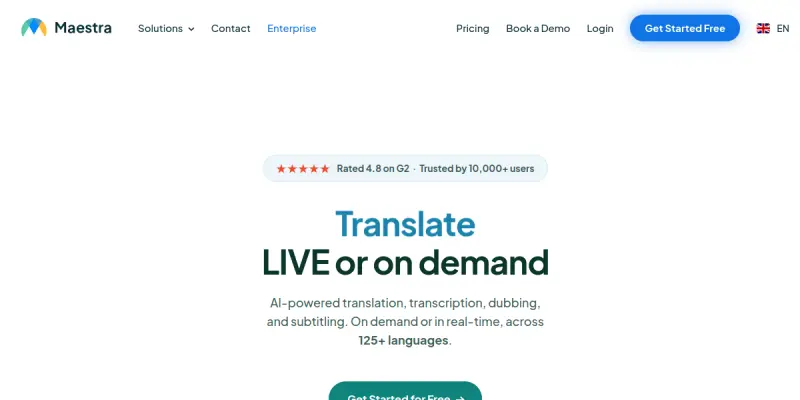
Maestra AI is a cloud-based software designed to simplify the process of transcribing, subtitling, and translating audio and video content. It leverages advanced artificial intelligence to automatically generate subtitles and voiceovers in over 125 languages, allowing content creators and businesses to reach global audiences effortlessly. Unlike traditional editing software, Maestra operates entirely in the browser, requiring no downloads or technical expertise to get started.
Key Features
- AI-Powered Transcription: Utilizes advanced AI models to convert speech into text with high accuracy across multiple languages.
- Multilingual Voiceovers: Generates realistic, human-like voiceovers in over 125 languages and accents.
- Live Captioning: Provides real-time captioning services for live streams and broadcasts to improve accessibility.
- Video Dubbing: Automatically syncs translated audio with video content, creating dubbed versions without manual editing.
- Collaborative Editing: Allows multiple team members to review, edit, and approve subtitles simultaneously online.
- File Format Support: Exports subtitles in standard formats including SRT, VTT, and ASS for easy integration.
Use Cases
Video Content Localization
Marketers and content creators use Maestra to translate YouTube videos, training materials, and marketing assets into multiple languages, significantly expanding their potential market reach.
Podcast Accessibility
Podcasters utilize the platform to generate accurate transcripts and add subtitles to their episodes, improving SEO performance and making content accessible to the hearing-impaired.
Corporate Training
Companies transcribe and translate internal training videos, ensuring that global teams across different regions can understand and learn from the same content.
Live Event Coverage
Journalists and broadcasters use the live captioning feature to provide real-time text overlays for interviews, conferences, and press conferences.
Pricing & Plans
Maestra operates on a Freemium model, allowing users to generate 30 minutes of transcription or subtitling for free. For higher volume needs, paid plans are available starting at $19 per month, depending on the number of minutes processed or the features required. Enterprise-level custom plans are available for large organizations with specific security and workflow requirements.
Integrations & Compatibility
The platform is designed to be compatible with major video hosting platforms like YouTube and Vimeo. It also integrates seamlessly with content management systems and can export files directly to these destinations. The browser-based nature ensures compatibility with all major operating systems (Windows, Mac, Linux) and devices (desktop, tablet).
Who Is It For?
Maestra is ideal for YouTubers, video editors, marketing agencies, language localization professionals, and corporate training departments. It is particularly useful for anyone looking to make video content accessible to a multilingual audience without the high cost of manual translation.
Limitations
- The accuracy of transcription depends heavily on the clarity and quality of the original audio file.
- The free tier is limited to 30 minutes of content per month, which may not suffice for high-volume users.
- Real-time captioning features are restricted to paid subscribers.
- As with all AI tools, context-specific terminology may occasionally be misinterpreted without manual review.
Final Verdict
Maestra AI stands out as a robust solution for automated localization. Its combination of browser-based convenience, multilingual support, and collaborative features makes it a strong contender for content creators and businesses. While the free tier is generous, users handling large volumes of content will need to invest in a paid plan to maximize its potential.
Tool Facts
Screenshots & Interface
Pros
- ✓ Supports over 125 languages for transcription, dubbing, and voiceover generation.
- ✓ Offers a free tier that allows users to generate 30 minutes of content per month.
- ✓ Features a browser-based interface that requires no software installation.
Cons
- × The free tier is limited to 30 minutes of transcription or subtitling per month.
- × Audio quality heavily influences transcription accuracy, requiring clean source files.
- × Real-time captioning features are limited compared to dedicated live-streaming software.
How to Use Maestra AI in Your Workflow
Integrating Maestra AI into your professional toolkit enhances efficiency by automating manual steps. By configuring it to suit your specific project requirements, you can optimize output quality and reduce project cycle times. Standard workflows involve testing the tool on simple tasks before scaling its use to complex operations.
Frequently Asked Questions
What is Maestra AI used for?
Maestra AI converts audio and video into subtitles and voiceovers in 125+ languages. It offers real-time transcription and dubbing features for content creators and enterprises.
What is the pricing model for Maestra AI?
Maestra AI uses a Freemium pricing model.
What are the main advantages of Maestra AI?
The key benefits of Maestra AI include: Supports over 125 languages for transcription, dubbing, and voiceover generation., Offers a free tier that allows users to generate 30 minutes of content per month., Features a browser-based interface that requires no software installation..
What are the main limitations of Maestra AI?
Some limitations or cons of Maestra AI are: The free tier is limited to 30 minutes of transcription or subtitling per month., Audio quality heavily influences transcription accuracy, requiring clean source files., Real-time captioning features are limited compared to dedicated live-streaming software..
Alternative AI Tools

MateCat AI
MateCat AI is a free, cloud-based computer-assisted translation (CAT) tool designed for translators and localization teams. It leverages advanced AI to improve translation memory match rates across supported language pairs.

Transifex AI
Transifex AI is a translation management platform that uses machine learning and neural MT to automate translations for teams. It helps localization managers, developers, and content creators streamline multilingual workflows. A key differentiator is its integration with the broader Transifex translation ecosystem and support for over 500 languages.

DeepL
Explore our AI suite and get more done: Translate speech, text, and media, or integrate the DeepL API.
Rating Details
Based on 0 ratings
Quick Comparisons
Related Tools
More AI tools from the same workflow, industry, or category.
fablepilot
FablePilot is a free AI story generator that turns a single prompt into a complete story — no sign-up required. Add illustrations or generate a plot outline.
Ghosts.app
Ghosts is an AI ghostwriter for agencies, creators, and law firms. It produces researched, cited drafts in a specific voice without requiring prompts. Users brief a specialist agent and approve a finished draft.
GrowthBar
GrowthBar is an AI tool for content generation, designed to boost productivity and streamline workflows for writers and content creators, with features like editing and tone adjustment.
GetGenie AI
GetGenie AI is an AI-powered writing and SEO assistant that helps content creators and marketers generate optimized content quickly. It includes built-in keyword research and SERP analysis to improve organic search performance.
Reviews
No reviews submitted yet. Be the first to share your experience.
Write a Review
Share Your Experience
Join the community to write reviews, submit ratings, and bookmark your favorite AI tools.