

Miro AI
Use Miro AI as the anchor for a real shortlist.
Instead of returning to a broad directory, jump straight into the strongest adjacent matchups for pricing, workflow fit, and differentiation.
Overview
Overview
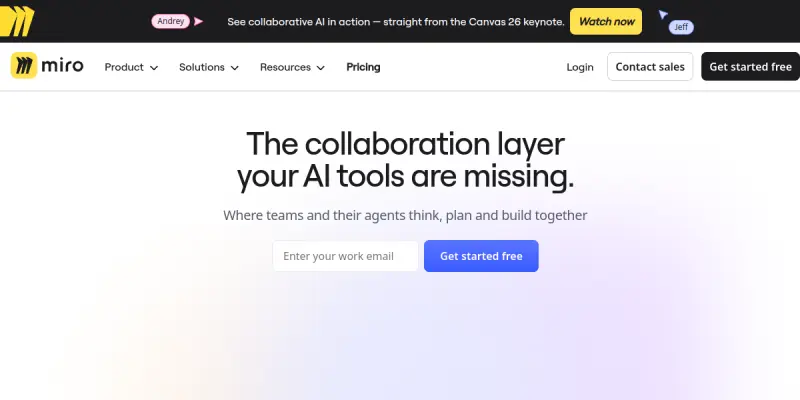
Miro AI is an artificial intelligence extension of the Miro visual collaboration platform. It embeds AI capabilities into Miro's infinite canvas to help teams brainstorm ideas, create diagrams, summarize sticky notes, and automate routine tasks. Designed for cross-functional product teams, Miro AI aims to reduce manual effort and accelerate the move from ideation to execution.
Key Features
- AI-Powered Diagramming: Automatically generate flowcharts, mind maps, and wireframes from text prompts or existing board elements.
- Smart Suggestions: Receive context-aware recommendations for next steps, layout improvements, and content completion.
- Sticky Note Summarization: Condense large clusters of sticky notes into concise summaries, saving time during retrospectives and brainstorms.
- Automated Task Generation: Convert board items into actionable tasks with assignees and due dates, directly synced with project management tools.
- Template Intelligence: Access AI-enhanced templates that pre-populate with relevant data based on your project description.
- Natural Language Search: Find boards, shapes, and content using conversational queries instead of exact keywords.
- Collaborative Editing with AI: Multiple users can co-create on the same board while the AI assists in real time.
- Integration with Miro Apps: Extend functionality by connecting to popular tools like Jira, Confluence, and Slack.
Use Cases
Product Roadmapping
Product managers use Miro AI to create visual roadmaps from rough outlines. The AI fills in timeline estimates, identifies dependencies, and suggests milestones based on historical data.
Design Sprint Facilitation
Design teams leverage AI during design sprints to generate divergent ideas, cluster concepts, and build proto-personas. The tool helps facilitators keep sessions moving without manual note-taking.
Retrospective Analysis
After a sprint, teams import sticky notes from the board and use Miro AI to categorize feedback, highlight recurring themes, and propose actionable improvements.
Technical Documentation
Engineers can draft architecture diagrams and sequence flows using natural language. Miro AI converts descriptions into structured diagrams that can be exported for documentation.
Pricing & Plans
Miro offers multiple tiers: Free (limited boards and AI actions), Team ($8/month per user), Business ($16/month per user), and Enterprise (custom pricing). AI-specific features are currently included in paid plans, though Miro may introduce separate AI add-ons in the future. Check Miro's official website for the latest pricing details.
Integrations & Compatibility
Miro AI works within the Miro ecosystem, which integrates with over 100 tools including Jira, Confluence, Slack, Microsoft Teams, Google Drive, Figma, and Trello. It is available as a web application and has mobile apps for iOS and Android. The platform supports real-time collaboration across devices.
Who Is It For?
Miro AI is ideal for product managers, UX designers, software engineers, agile coaches, and project managers who collaborate on visual boards. It suits teams of any size looking to infuse AI into their existing Miro workflows without learning a new tool.
Limitations
- AI features are only available on paid plans, limiting free-tier users to basic Miro functions.
- The quality of AI outputs depends heavily on the clarity and structure of user inputs.
- Real-time collaboration with AI may introduce latency on very large boards.
- Miro AI is not a standalone product; it requires the main Miro platform and a stable internet connection.
Final Verdict
Miro AI is a practical addition for teams already invested in Miro. It streamlines routine tasks and enhances creativity without disrupting established workflows. However, its value is tied to Miro's subscription model and may not justify a switch for teams not already using the platform.
Tool Facts
Screenshots & Interface
Pros
- ✓ Automates repetitive tasks like diagram generation and note summarization, saving teams significant time.
- ✓ Integrates directly into Miro's familiar interface, reducing the learning curve for existing users.
- ✓ Supports real-time collaboration with AI assistance, enabling synchronous team workflows.
- ✓ Offers natural language search across boards, improving navigation in large projects.
Cons
- × AI features are locked behind paid plans, limiting access for free-tier users.
- × Output quality is highly dependent on the specificity of user prompts, which may require trial and error.
- × Performance can degrade on very large or complex boards with many AI interactions.
- × Miro AI is not available as a standalone product; it requires the full Miro subscription.
How to Use Miro AI in Your Workflow
Integrating Miro AI into your professional toolkit enhances efficiency by automating manual steps. By configuring it to suit your specific project requirements, you can optimize output quality and reduce project cycle times. Standard workflows involve testing the tool on simple tasks before scaling its use to complex operations.
Frequently Asked Questions
What is Miro AI used for?
Miro AI is a visual collaboration platform that uses artificial intelligence to help teams brainstorm, plan, and manage product development workflows. It is designed for product managers, designers, and engineers who need to align on tasks and accelerate delivery. A key differentiator is its integration of AI-powered features like automated diagramming and smart suggestions within the Miro workspace.
What is the pricing model for Miro AI?
Miro AI uses a Paid pricing model.
What are the main advantages of Miro AI?
The key benefits of Miro AI include: Automates repetitive tasks like diagram generation and note summarization, saving teams significant time., Integrates directly into Miro's familiar interface, reducing the learning curve for existing users., Supports real-time collaboration with AI assistance, enabling synchronous team workflows., Offers natural language search across boards, improving navigation in large projects..
What are the main limitations of Miro AI?
Some limitations or cons of Miro AI are: AI features are locked behind paid plans, limiting access for free-tier users., Output quality is highly dependent on the specificity of user prompts, which may require trial and error., Performance can degrade on very large or complex boards with many AI interactions., Miro AI is not available as a standalone product; it requires the full Miro subscription..
Alternative AI Tools

Bigjpg
Bigjpg uses deep convolutional neural networks to upscale anime and photo images without noticeable quality loss.

Remove.bg
Remove.bg automatically removes image backgrounds using artificial intelligence in seconds. It eliminates the need for manual clipping paths in photo editing. The tool is suitable for e-commerce and graphic design projects.

Framer AI
Framer AI helps designers and teams create fully custom websites using a no-code visual builder. It offers a powerful CMS, built-in SEO tools, and real-time collaboration features. The platform combines design freedom with AI-powered layout generation for faster workflows.
Rating Details
Based on 0 ratings
Quick Comparisons
Related Tools
More AI tools from the same workflow, industry, or category.
Createimg.ai
Createimg.ai provides text-to-image generation and photo editing tools including background removal. It is designed for e-commerce sellers and creators needing free visual assets.
JetBrains AI
JetBrains AI is an AI-powered toolset integrated into JetBrains IDEs, offering code completion, debugging assistance, and intelligent suggestions for developers. It leverages large language models to help teams write, understand, and refactor code more efficiently. A key differentiator is its seamless integration with JetBrains' existing development environment.
Stable Diffusion Inpaint
Stable Diffusion Inpaint is an AI-powered tool that uses diffusion models to intelligently fill in or replace parts of an image. It is designed for photographers, designers, and content creators who need precise and context-aware image editing. Its key differentiator is the ability to generate new content that seamlessly blends with the existing image.
Crello AI
VistaCreate (formerly Crello) is a cloud-based design tool using AI to generate graphics from text prompts. It features 100K+ templates for social media and marketing.
Reviews
No reviews submitted yet. Be the first to share your experience.
Write a Review
Share Your Experience
Join the community to write reviews, submit ratings, and bookmark your favorite AI tools.