

Upscale.media
Use Upscale.media as the anchor for a real shortlist.
Instead of returning to a broad directory, jump straight into the strongest adjacent matchups for pricing, workflow fit, and differentiation.
Overview
Overview
Upscale.media is a web-based artificial intelligence tool designed to enhance the resolution of images. It allows users to upscale photos to 2x or 4x their original size while attempting to preserve details and textures that are typically lost during standard resizing. Unlike traditional upscaling methods that simply stretch pixels, this tool utilizes advanced machine learning algorithms to reconstruct image data, making it a useful utility for photographers, graphic designers, and e-commerce professionals who need higher-resolution assets without professional-grade software.
Key Features
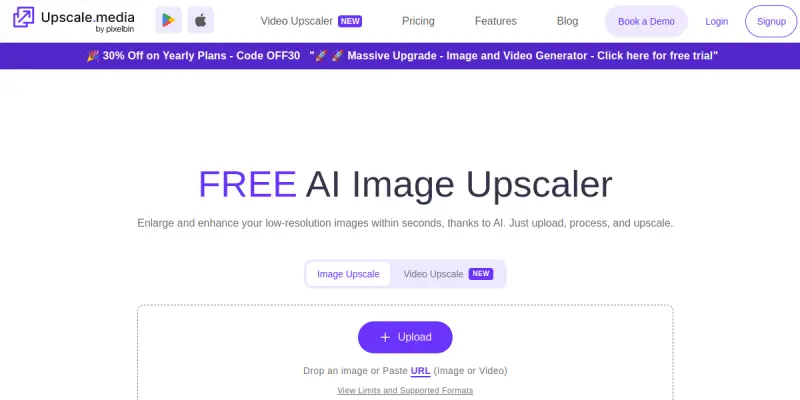
- Browser-Based Processing: The tool operates entirely within a web browser, requiring no software installation or download. Users simply upload their images to the platform and wait for the processing to complete.
- 2x and 4x Upscaling Options: The platform provides specific scaling factors, allowing users to choose between a moderate 2x enlargement for subtle improvements or a dramatic 4x enlargement for significant resizing.
- Texture and Detail Preservation: A core functionality of the tool is its ability to maintain the fine details of an image, such as fabric textures, hair strands, and facial features, during the upscaling process.
- Free Tier Availability: Upscale.media offers a free tier that allows users to process a limited number of images, making the tool accessible to casual users and hobbyists.
- Simple User Interface: The interface is streamlined for ease of use, featuring a drag-and-drop upload area and a clear download button for the processed files.
Use Cases
Photography Enhancement
Photographers often encounter low-resolution images captured from older cameras or web previews. Upscale.media allows these professionals to recover detail and clarity, bringing old photos back to a usable quality for printing or publication without expensive editing suites.
E-Commerce Product Images
Online retailers can use the tool to enhance product photos. By upscaling product images, sellers can ensure that their items look sharp and professional across various platforms and devices, potentially increasing customer trust and sales.
Social Media Content
Content creators and marketers frequently need to resize images for different social media formats. The tool provides a quick way to upscale images to meet the higher resolution requirements of modern screens without significant loss of quality.
Architectural and Interior Design
Designers working with renderings or sketches can use the tool to upscale reference images or blueprints, ensuring that details are clear enough for presentation or client review.
Pricing & Plans
Upscale.media operates on a freemium model. The tool is currently free to use for a limited number of images, which allows users to test its capabilities without financial commitment. While the basic version is free, the provider may offer premium plans with higher limits or faster processing speeds for heavy users, though specific pricing details are typically updated on their website.
Integrations & Compatibility
The tool is designed as a standalone web application. It does not require specific integrations with other software or cloud storage platforms, though it is compatible with any modern web browser (Chrome, Firefox, Safari, Edge). The output images are standard JPEG or PNG files that can be easily imported into any design tool.
Who Is It For?
This tool is ideal for photographers, graphic designers, digital marketers, and e-commerce business owners who need a fast, free way to improve image resolution. It is particularly suited for users who need quick results without the learning curve associated with complex image editing software like Photoshop.
Limitations
- Browser-Only Operation: The lack of a desktop application can be a limitation for users who work offline or need to process large batches of images simultaneously.
- Dependence on Internet Connection: Since the tool processes images on the server side, a stable internet connection is required for both uploading and downloading files.
- Free Tier Restrictions: The free availability is likely capped, which may not be sufficient for professional workflows requiring high volume processing.
- Output Quality Variance: While the AI is effective, the quality of the output is still dependent on the resolution and quality of the original input image.
Final Verdict
Upscale.media is a capable entry-level tool for image upscaling. Its browser-based nature removes technical barriers, and the inclusion of a free tier makes it an attractive option for casual users. However, for professional workflows demanding high volume and offline capability, the limitations of the web interface and potential free-tier caps may necessitate a more robust solution. Overall, it serves as a solid utility for quick, high-quality image resizing needs.
Tool Facts
Screenshots & Interface
Pros
- ✓ No installation required for browser-based processing
- ✓ Free tier allows basic upscaling without payment
- ✓ Maintains image quality and textures at 2x and 4x settings
- ✓ Simple drag-and-drop interface for quick uploads
Cons
- × Limited to browser usage without a desktop application
- × Free tier likely has limits on image file size or quantity
- × Requires a constant internet connection for processing
- × Output quality is directly tied to the resolution of the original image
How to Use Upscale.media in Your Workflow
Integrating Upscale.media into your professional toolkit enhances efficiency by automating manual steps. By configuring it to suit your specific project requirements, you can optimize output quality and reduce project cycle times. Standard workflows involve testing the tool on simple tasks before scaling its use to complex operations.
Frequently Asked Questions
What is Upscale.media used for?
Upscale.media uses AI to enhance image resolution to 2x or 4x without losing quality. This free tool processes images directly in the browser, making it accessible for photographers and designers.
What is the pricing model for Upscale.media?
Upscale.media uses a Free pricing model.
What are the main advantages of Upscale.media?
The key benefits of Upscale.media include: No installation required for browser-based processing, Free tier allows basic upscaling without payment, Maintains image quality and textures at 2x and 4x settings, Simple drag-and-drop interface for quick uploads.
What are the main limitations of Upscale.media?
Some limitations or cons of Upscale.media are: Limited to browser usage without a desktop application, Free tier likely has limits on image file size or quantity, Requires a constant internet connection for processing, Output quality is directly tied to the resolution of the original image.
Alternative AI Tools

RenderNet
RenderNet is an AI video generation tool designed for e-commerce businesses and marketers. It enables users to create studio-quality video ads for platforms like TikTok, Instagram Reels, and YouTube Shorts, without requiring a production crew. Its key differentiator is its focus on product-centric ad creation with automated editing and scripting.

Ucraft AI
Ucraft AI is a drag-and-drop website builder that leverages artificial intelligence to help business owners, entrepreneurs, and creatives quickly build professional websites. Its AI-powered design assistant generates layouts and content, reducing setup time to minutes.

Tailor Brands
Tailor Brands offers an AI-powered platform for creating logos, branding materials, and business assets. It guides entrepreneurs through business formation and brand identity development. The service combines design automation with legal business setup tools.
Rating Details
Based on 0 ratings
Related Tools
More AI tools from the same workflow, industry, or category.
Createimg.ai
Createimg.ai provides text-to-image generation and photo editing tools including background removal. It is designed for e-commerce sellers and creators needing free visual assets.
JetBrains AI
JetBrains AI is an AI-powered toolset integrated into JetBrains IDEs, offering code completion, debugging assistance, and intelligent suggestions for developers. It leverages large language models to help teams write, understand, and refactor code more efficiently. A key differentiator is its seamless integration with JetBrains' existing development environment.
Stable Diffusion Inpaint
Stable Diffusion Inpaint is an AI-powered tool that uses diffusion models to intelligently fill in or replace parts of an image. It is designed for photographers, designers, and content creators who need precise and context-aware image editing. Its key differentiator is the ability to generate new content that seamlessly blends with the existing image.
Crello AI
VistaCreate (formerly Crello) is a cloud-based design tool using AI to generate graphics from text prompts. It features 100K+ templates for social media and marketing.
Reviews
No reviews submitted yet. Be the first to share your experience.
Write a Review
Share Your Experience
Join the community to write reviews, submit ratings, and bookmark your favorite AI tools.