

Opus Clip
Use Opus Clip as the anchor for a real shortlist.
Instead of returning to a broad directory, jump straight into the strongest adjacent matchups for pricing, workflow fit, and differentiation.
Overview
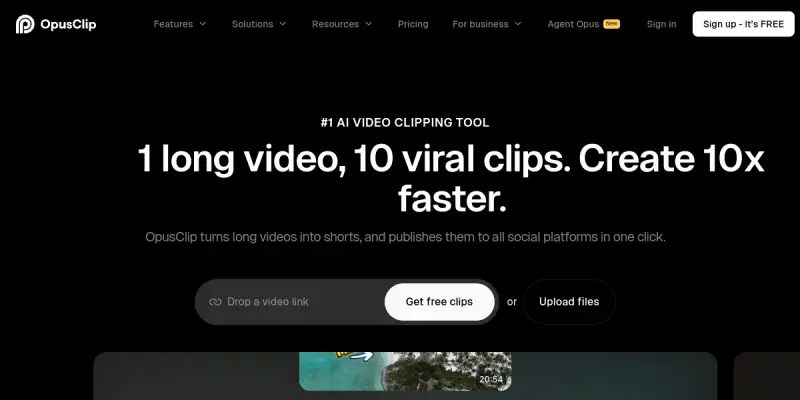
OpusClip is an AI-powered tool designed to streamline the process of repurposing long-form video content into short, engaging clips for social media platforms like TikTok, YouTube Shorts, and Instagram Reels. By leveraging artificial intelligence, it automates the labor-intensive tasks of video editing, ensuring that creators can maintain a consistent content schedule without the need for extensive manual editing skills. The platform focuses on maximizing audience engagement by analyzing video content to identify the most viral moments, thereby helping users grow their social media presence efficiently.
Overview
OpusClip is designed to transform lengthy video assets into optimized vertical content suitable for modern social media consumption. It utilizes advanced algorithms to analyze video pacing, sentiment, and visual interest to select the best segments. This automation is crucial for creators and businesses looking to maintain an active presence across multiple short-form platforms without investing hours in post-production.
Key Features
- AI Cropping and Resizing: Automatically adjusts videos to fit vertical formats (9:16) suitable for mobile screens, ensuring no content is lost in the cropping process.
- Auto-Captions: Generates and syncs subtitles with high accuracy, improving accessibility and viewer retention.
- Virality Score: Analyzes clip segments to predict their potential virality, guiding creators on which parts of their content to prioritize.
- Speaker Detection: Identifies and separates different speakers in videos, making it ideal for podcast editing and interviews.
- Multi-Platform Export: Seamlessly exports clips ready for different social media channels with appropriate aspect ratios.
- Content Repurposing: Transforms long webinars, podcasts, and YouTube videos into digestible short-form content.
- Brand Kit Support: Allows users to maintain consistent branding elements like logos and color schemes across generated clips.
Use Cases
Social Media Management
For social media managers and agencies, OpusClip significantly reduces the time required to produce content for multiple clients. By automating the editing process, teams can focus on strategy and engagement rather than repetitive cutting and pasting tasks.
Content Creators and Influencers
Individual creators who produce long-form content, such as YouTubers or podcasters, can use OpusClip to expand their reach on short-form platforms. It helps them tap into new audiences without having to learn complex video editing software.
Educational Institutions and Corporate Training
Organizations that host webinars or training sessions can utilize OpusClip to create highlight reels and key takeaways. This makes it easier to share educational snippets on internal communication channels or social media.
Podcasters and Interviewers
The tool's ability to detect and separate speakers makes it particularly useful for podcasters who want to create short, punchy clips of their episodes for social sharing.
Pricing & Plans
OpusClip operates on a Freemium model, allowing users to generate a limited number of clips for free to test the platform's capabilities. A paid subscription unlocks higher processing limits, advanced features like longer clip generation, and priority support. Specific pricing tiers are available on their website.
Integrations & Compatibility
OpusClip integrates with major video hosting platforms like YouTube, Vimeo, and Google Drive, allowing users to directly upload their source videos. It supports exporting content to TikTok, Instagram Reels, and YouTube Shorts directly from the dashboard.
Who Is It For?
OpusClip is designed for anyone looking to scale their social media presence through video content. It is particularly beneficial for content creators, marketing agencies, social media managers, and businesses that need to repurpose existing video assets into short-form marketing materials.
Limitations
- The AI cropping algorithm may occasionally cut off important visual details or subjects, requiring manual touch-ups.
- While the auto-captions are generally accurate, they may contain minor spelling errors or misinterpretations of slang.
- The tool relies heavily on internet connectivity and may struggle with very long videos (>60 minutes) depending on the plan.
- Custom branding elements are limited to basic logos and colors, offering less flexibility than dedicated design software.
Final Verdict
OpusClip is a highly effective solution for anyone looking to accelerate their social media video production workflow. Its AI-driven features save considerable time, making it a valuable asset for content teams and individual creators alike. While it may not replace professional video editing tools entirely, it offers an excellent balance of automation and quality for short-form content needs.
Tool Facts
Screenshots & Interface
Pros
- ✓ Automatically resizes videos to fit vertical formats like TikTok and Instagram Reels.
- ✓ Generates AI-powered captions with auto-syncing.
- ✓ Provides a virality score to gauge audience engagement potential.
- ✓ Reduces editing time by up to 90% compared to manual editing.
Cons
- × The AI cropping algorithm may cut off important visual elements.
- × Generated captions can sometimes have synchronization errors.
- × The free tier imposes limits on the number of videos processed.
- × Lack of advanced manual editing tools compared to dedicated software.
How to Use Opus Clip in Your Workflow
Integrating Opus Clip into your professional toolkit enhances efficiency by automating manual steps. By configuring it to suit your specific project requirements, you can optimize output quality and reduce project cycle times. Standard workflows involve testing the tool on simple tasks before scaling its use to complex operations.
Frequently Asked Questions
What is Opus Clip used for?
OpusClip converts long-form videos into short-form clips optimized for TikTok, Reels, and Shorts. It uses AI to resize content, add captions, and maintain audience engagement. Designed for content creators and marketers needing rapid video repurposing.
What is the pricing model for Opus Clip?
Opus Clip uses a Freemium pricing model.
What are the main advantages of Opus Clip?
The key benefits of Opus Clip include: Automatically resizes videos to fit vertical formats like TikTok and Instagram Reels., Generates AI-powered captions with auto-syncing., Provides a virality score to gauge audience engagement potential., Reduces editing time by up to 90% compared to manual editing..
What are the main limitations of Opus Clip?
Some limitations or cons of Opus Clip are: The AI cropping algorithm may cut off important visual elements., Generated captions can sometimes have synchronization errors., The free tier imposes limits on the number of videos processed., Lack of advanced manual editing tools compared to dedicated software..
Alternative AI Tools

Mailchimp AI
Mailchimp AI generates email copy and subject lines directly in the platform using historical campaign data to match your brand voice.
SEOwind
SEOwind is an AI-powered white-label content platform designed for marketing agencies. It automates the creation of SEO-optimized articles that can be published under the agency's own brand. The tool focuses on scaling content production while maintaining editorial quality and search engine performance.

FlexClip
FlexClip is an AI-powered online video maker that provides editable templates and a suite of editing tools. It is designed for content creators, marketers, and small businesses who need to produce videos quickly. A key differentiator is its AI text-to-video and AI script features integrated directly into the editor.
Rating Details
Based on 0 ratings
Quick Comparisons
Related Tools
More AI tools from the same workflow, industry, or category.
fablepilot
FablePilot is a free AI story generator that turns a single prompt into a complete story — no sign-up required. Add illustrations or generate a plot outline.
Ghosts.app
Ghosts is an AI ghostwriter for agencies, creators, and law firms. It produces researched, cited drafts in a specific voice without requiring prompts. Users brief a specialist agent and approve a finished draft.
GrowthBar
GrowthBar is an AI tool for content generation, designed to boost productivity and streamline workflows for writers and content creators, with features like editing and tone adjustment.
GetGenie AI
GetGenie AI is an AI-powered writing and SEO assistant that helps content creators and marketers generate optimized content quickly. It includes built-in keyword research and SERP analysis to improve organic search performance.
Reviews
No reviews submitted yet. Be the first to share your experience.
Write a Review
Share Your Experience
Join the community to write reviews, submit ratings, and bookmark your favorite AI tools.