

Otter.ai
Use Otter.ai as the anchor for a real shortlist.
Instead of returning to a broad directory, jump straight into the strongest adjacent matchups for pricing, workflow fit, and differentiation.
Overview
Overview
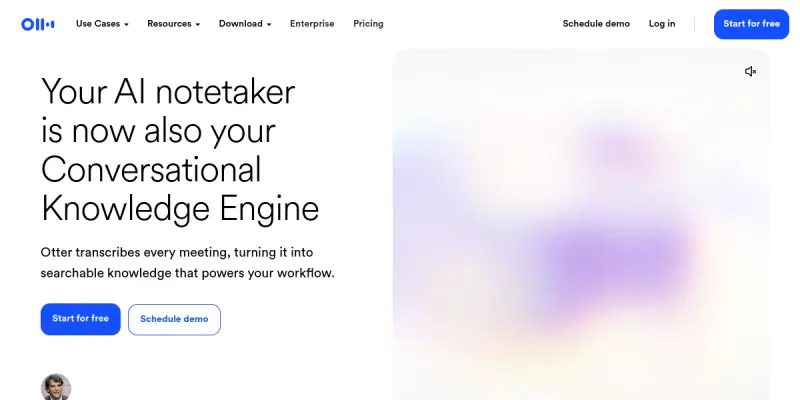
Otter.ai is a cloud-based service designed to record and transcribe audio conversations in real-time. It utilizes advanced artificial intelligence to process speech, distinguish between different speakers, and generate written documents. The platform is primarily utilized for business meetings, educational lectures, and personal interviews, allowing users to focus on the conversation rather than taking manual notes. By automating the documentation process, it ensures that no critical information is lost during verbal exchanges.
Key Features
- Real-time Transcription: Captures speech as it happens, allowing for live viewing of the transcript.
- Live Meeting Integration: Seamlessly connects with Zoom and Google Meet to record and transcribe calls automatically.
- Speaker Identification: Uses AI to identify and distinguish between different participants in the conversation.
- Searchable Transcripts: Allows users to search through past meeting notes and audio recordings for specific keywords.
- AI Meeting Assistant: Summarizes long meetings into concise bullet points and highlights action items.
- Audio File Import: Users can upload pre-recorded audio files for transcription later.
Use Cases
Sales and Business Development
Sales professionals use Otter.ai to transcribe client calls, review agreements, and follow up with accurate notes immediately after the conversation. This ensures that all promises made during the call are documented and can be referenced later.
Education and Research
Students and journalists utilize the tool to record lectures and interviews, creating searchable archives of spoken content for study or reporting purposes. The ability to search within audio files saves hours of manual listening.
Team Collaboration
Project managers use it to ensure all team members have access to a detailed record of decisions made during brainstorming sessions or stand-ups. This promotes transparency and accountability within the team.
Legal and Compliance
The ability to create verbatim records helps in maintaining accurate logs of important discussions for compliance purposes and dispute resolution.
Pricing & Plans
Otter.ai operates on a freemium model. The free tier allows for 300 minutes of transcription per month. The Pro plan, priced at $10 per month, offers 1,200 minutes, unlimited transcription history, and additional sharing features. The Business plan, starting at $20 per user per month, provides centralized management, admin controls, and priority support for larger teams. Enterprise solutions are also available for organizations with specific security and compliance requirements.
Integrations & Compatibility
Otter.ai integrates natively with popular video conferencing platforms like Zoom, Google Meet, and Microsoft Teams. It also connects with calendar applications such as Google Calendar and Outlook to automatically schedule recordings. Third-party integrations are available through Zapier to connect with tools like Slack and Trello, facilitating easy sharing of notes and action items.
Who Is It For?
This tool is designed for professionals who need to document verbal communications, including sales teams, educators, researchers, and project managers. It is also suitable for individuals who want to keep accurate records of personal interviews or lectures without the need for a dedicated scribe.
Limitations
- Audio Quality Sensitivity: The tool's accuracy can be significantly reduced by background noise, poor microphone quality, or audio played over speakers.
- Language and Accent Limitations: While it supports multiple languages, accuracy can vary depending on the speaker's accent or speed.
- Offline Capabilities: The application requires a stable internet connection to function and does not support offline transcription.
- Long-term Storage: The free tier has a limit on how long transcripts can be stored before they might be archived or require a paid upgrade.
Final Verdict
Otter.ai is a reliable and effective solution for automating the tedious task of note-taking during meetings. Its live transcription and AI summarization features save significant time for professionals. While it may not be perfect in noisy environments, its integration with major video conferencing tools makes it a must-have for productivity-focused teams.
Tool Facts
Screenshots & Interface
Pros
- ✓ Live transcription during Zoom and Google Meet calls
- ✓ AI assistant summarizes long conversations into bullet points
- ✓ Searchable archives of past meeting notes and audio files
- ✓ Integrates with calendar apps to auto-generate notes
Cons
- × Accuracy drops significantly with heavy background noise
- × Requires a stable internet connection to function
- × Struggles with fast speakers or multiple people talking simultaneously
How to Use Otter.ai in Your Workflow
Integrating Otter.ai into your professional toolkit enhances efficiency by automating manual steps. By configuring it to suit your specific project requirements, you can optimize output quality and reduce project cycle times. Standard workflows involve testing the tool on simple tasks before scaling its use to complex operations.
Frequently Asked Questions
What is Otter.ai used for?
Otter.ai converts spoken conversations into searchable text and summaries. It leverages AI to create live transcripts for meetings and interviews. The tool helps users stay organized by automatically capturing key points.
What is the pricing model for Otter.ai?
Otter.ai uses a Freemium pricing model.
What are the main advantages of Otter.ai?
The key benefits of Otter.ai include: Live transcription during Zoom and Google Meet calls, AI assistant summarizes long conversations into bullet points, Searchable archives of past meeting notes and audio files, Integrates with calendar apps to auto-generate notes.
What are the main limitations of Otter.ai?
Some limitations or cons of Otter.ai are: Accuracy drops significantly with heavy background noise, Requires a stable internet connection to function, Struggles with fast speakers or multiple people talking simultaneously.
Alternative AI Tools
Voicely
Voicely is an AI-powered text-to-speech platform that generates realistic voiceovers from text. It serves content creators, marketers, and businesses looking for quick audio production without recording studios. Its key differentiator is the ability to produce natural-sounding speech in multiple languages and accents.
Soundraw
Soundraw generates original, royalty-free music using AI. It allows content creators to customize tracks by adjusting tempo, genre, and mood. The tool is designed for video producers, podcasters, and musicians seeking unique background music without licensing concerns.

Fireflies.ai
Automatically transcribe, summarize, and search team meetings across Zoom, Teams, and Google Meet with AI-powered analytics.
Rating Details
Based on 0 ratings
Quick Comparisons
Related Tools
More AI tools from the same workflow, industry, or category.
ClipTrend.ai
ClipTrend.ai is an AI image-to-video workspace for creators, marketers, and short-form video teams.
SongR
SongR is a text-to-song app that generates custom music tracks from a few keywords. It is designed for content creators and social media users who need quick, royalty-free songs in genres like pop, rock, hip-hop, and chant. Its key differentiator is instant generation without requiring musical expertise.
Quantum Capture
Quantum Capture generates AI-powered talking head videos from text input. It is designed for content creators and marketers who need quick, studio-quality video clips without expensive equipment. The platform specializes in creating realistic avatars with consistent lip-sync and facial expressions.
Kaltura AI
Kaltura is an enterprise video platform that combines cloud hosting with AI tools for content creation, marketing, and learning management. It helps businesses create branded video experiences for webinars, social media, and internal training.
Reviews
No reviews submitted yet. Be the first to share your experience.
Write a Review
Share Your Experience
Join the community to write reviews, submit ratings, and bookmark your favorite AI tools.