

Outwrite
Use Outwrite as the anchor for a real shortlist.
Instead of returning to a broad directory, jump straight into the strongest adjacent matchups for pricing, workflow fit, and differentiation.
Overview
Overview
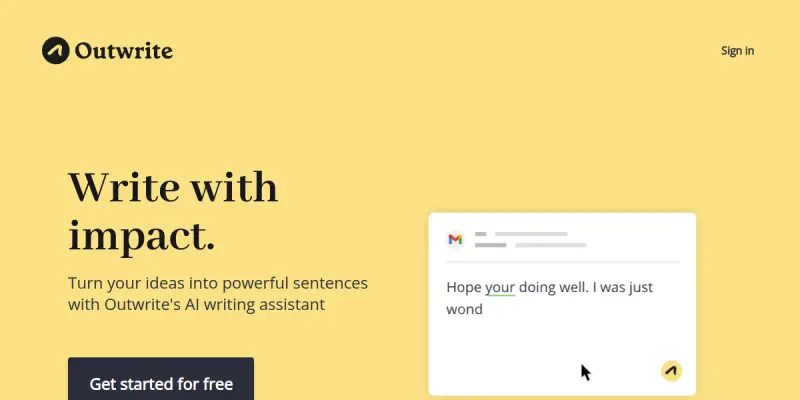
Outwrite is a cloud-based AI writing assistant designed to help users improve their writing across multiple online platforms. It goes beyond basic grammar checking by offering features such as paraphrasing, tone adjustment, and real-time suggestions. Outwrite aims to support a wide range of users, including students, professionals, and content creators, in producing clear, engaging, and error-free text. The tool integrates seamlessly into browsers and popular web applications, making it convenient to use wherever you write.
Key Features
- Grammar and Spell Check: Outwrite identifies and corrects grammatical errors, punctuation mistakes, and spelling issues in real-time.
- Paraphrasing Tool: Users can rephrase sentences or paragraphs to improve clarity, vary sentence structure, or avoid plagiarism.
- Tone Adjustment: The tool offers suggestions to adjust the tone of your writing, whether you need a formal, professional, or casual voice.
- Word Choice Enhancements: Outwrite recommends stronger, more precise vocabulary to elevate your writing.
- Plagiarism Checker: (If available) Outwrite can scan text against web sources to detect potential plagiarism.
- Browser Extension: A lightweight extension supports the tool across Google Docs, Gmail, social media, and other online platforms.
- Multi-Language Support: The assistant provides corrections and suggestions in multiple languages.
- Real-Time Feedback: Suggestions appear as you type, allowing for immediate improvements without disrupting your workflow.
Use Cases
Academic Writing
Students can use Outwrite to polish essays, research papers, and dissertations. The grammar checker ensures error-free submissions, while the paraphrasing tool helps avoid accidental plagiarism and rephrase complex ideas.
Professional Communication
Professionals can refine emails, reports, and proposals. Tone adjustment ensures the message matches the intended audience, whether it's a formal business client or an internal team.
Content Creation
Bloggers, copywriters, and marketers can enhance website content, social media posts, and ad copy. Word choice enhancements and real-time feedback speed up the editing process and improve engagement.
Non-Native English Speakers
For individuals who do not speak English as their first language, Outwrite provides clear explanations for corrections, helping them learn and improve their language skills over time.
Pricing & Plans
Outwrite operates on a Freemium model. The free tier includes basic grammar and spell checking with limited suggestions. Premium plans unlock full access to features such as paraphrasing, tone adjustment, advanced word choice, and a plagiarism checker. Team and enterprise pricing is not publicly disclosed; interested users can contact sales for custom quotes.
Integrations & Compatibility
Outwrite offers a browser extension compatible with Chrome, Firefox, and Edge. It also integrates with Google Docs, Gmail, LinkedIn, Twitter, and other web-based platforms via the extension. The web app can be accessed from any modern browser without installation.
Who Is It For?
Outwrite is designed for students, professionals, content creators, and non-native English speakers who want to improve their writing quality and efficiency. It is suitable for individuals and teams that produce written content regularly.
Limitations
- Outwrite's suggestions may not always preserve the user's specific brand voice, requiring manual adjustment.
- The free tier is limited; full functionality requires a paid subscription.
- Factual claims generated or checked by the tool may need independent verification, as it is not a fact-checking service.
- The plagiarism checker may not have access to all proprietary or subscription-only databases.
Final Verdict
Outwrite is a versatile AI writing assistant that fills the gap between basic grammar checkers and full-featured style editors. Its real-time suggestions, paraphrasing capabilities, and tone adjustment make it valuable for a broad audience. While the free version offers limited utility, the premium features are competitively priced for the value provided. Overall, Outwrite is a solid choice for anyone looking to improve their writing efficiency and quality.
Tool Facts
Screenshots & Interface
Pros
- ✓ Real-time grammar and spell checking reduces editing time.
- ✓ Paraphrasing tool helps rephrase sentences without changing meaning.
- ✓ Tone adjustment feature allows writers to match different audiences.
- ✓ Browser extension works across multiple popular web platforms.
- ✓ Supports multiple languages for diverse user needs.
Cons
- × Suggestions may not always preserve the user's brand voice, requiring manual refinement.
- × Free tier functionality is limited and requires a paid subscription for full features.
- × Plagiarism checker may not cover all databases, limiting its reliability.
- × Tool does not verify factual accuracy, so users must fact-check independently.
How to Use Outwrite in Your Workflow
Integrating Outwrite into your professional toolkit enhances efficiency by automating manual steps. By configuring it to suit your specific project requirements, you can optimize output quality and reduce project cycle times. Standard workflows involve testing the tool on simple tasks before scaling its use to complex operations.
Frequently Asked Questions
What is Outwrite used for?
Outwrite is an AI-powered writing assistant that helps users craft clear and impactful sentences. It is suitable for students, professionals, and content creators who want to improve their writing quality. Unlike basic grammar checkers, Outwrite also offers paraphrasing and tone adjustment features.
What is the pricing model for Outwrite?
Outwrite uses a Freemium pricing model.
What are the main advantages of Outwrite?
The key benefits of Outwrite include: Real-time grammar and spell checking reduces editing time., Paraphrasing tool helps rephrase sentences without changing meaning., Tone adjustment feature allows writers to match different audiences., Browser extension works across multiple popular web platforms., Supports multiple languages for diverse user needs..
What are the main limitations of Outwrite?
Some limitations or cons of Outwrite are: Suggestions may not always preserve the user's brand voice, requiring manual refinement., Free tier functionality is limited and requires a paid subscription for full features., Plagiarism checker may not cover all databases, limiting its reliability., Tool does not verify factual accuracy, so users must fact-check independently..
Alternative AI Tools

Biteable
Create stunning videos in minutes with Biteable’s AI online video maker & generator. Turn ideas into professional videos with Biteable AI.
Reedsy AI
Reedsy AI helps authors and publishers generate story ideas, edit manuscripts, and refine writing tone. It offers specialized tools for plot development and character creation, making it a focused creative writing assistant.

Unbounce
Unbounce is an AI-powered landing page builder that helps marketers create, test, and optimize high-converting pages using Smart Copy and Smart Traffic features.
Rating Details
Based on 0 ratings
Quick Comparisons
Related Tools
More AI tools from the same workflow, industry, or category.
fablepilot
FablePilot is a free AI story generator that turns a single prompt into a complete story — no sign-up required. Add illustrations or generate a plot outline.
Ghosts.app
Ghosts is an AI ghostwriter for agencies, creators, and law firms. It produces researched, cited drafts in a specific voice without requiring prompts. Users brief a specialist agent and approve a finished draft.
GrowthBar
GrowthBar is an AI tool for content generation, designed to boost productivity and streamline workflows for writers and content creators, with features like editing and tone adjustment.
GetGenie AI
GetGenie AI is an AI-powered writing and SEO assistant that helps content creators and marketers generate optimized content quickly. It includes built-in keyword research and SERP analysis to improve organic search performance.
Reviews
No reviews submitted yet. Be the first to share your experience.
Write a Review
Share Your Experience
Join the community to write reviews, submit ratings, and bookmark your favorite AI tools.