

Panopto AI
Use Panopto AI as the anchor for a real shortlist.
Instead of returning to a broad directory, jump straight into the strongest adjacent matchups for pricing, workflow fit, and differentiation.
Overview
Overview
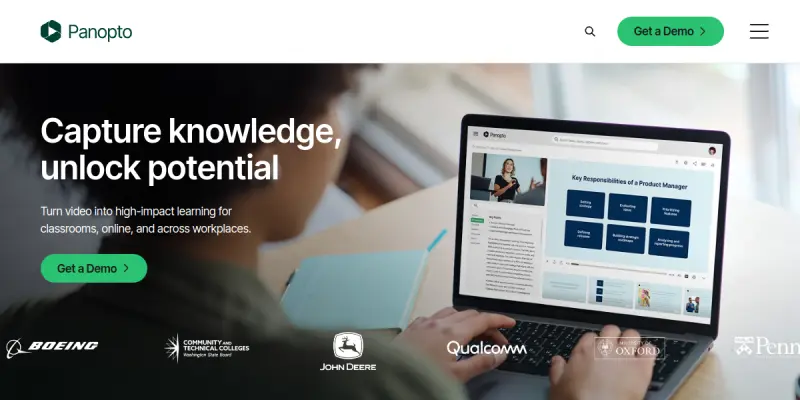
Panopto AI is a video capture and management platform that enhances screen recording with artificial intelligence. It enables users to record, stream, and manage video content while automatically generating transcripts and making recordings searchable. Originally developed for enterprise and educational settings, Panopto AI focuses on making video as easy to search and manage as text documents.
Key Features
- AI-Powered Search: Automatically transcribes spoken words in videos and makes the entire recording searchable by keyword or phrase.
- Smart Recording: Captures screen activity, webcam feed, and audio simultaneously with minimal setup.
- Automated Transcription: Generates accurate captions and transcripts in multiple languages using machine learning models.
- Video Management: Organizes recordings into folders, adds metadata, and controls access permissions.
- Live Streaming: Broadcast presentations or training sessions in real time with integrated chat and Q&A.
- Content Integration: Imports existing video files and syncs with learning management systems (LMS) and content repositories.
- Analytics Dashboard: Tracks viewer engagement, watch time, and search queries within recorded videos.
- Multi-Platform Support: Works on Windows, macOS, iOS, Android, and web browsers.
Use Cases
Corporate Training and Onboarding
Organizations use Panopto AI to record training sessions and onboarding materials. New employees can search through recorded content to find specific procedures or policies without watching entire videos.
Lecture Capture in Education
Universities and schools deploy Panopto AI to capture classroom lectures. Students can review material by searching for specific terms, making study sessions more efficient.
Product Demos and Webinars
Sales and marketing teams record product demonstrations and webinars. The AI-powered search allows prospects to jump to specific features or pricing discussions within the recording.
IT Support and Knowledge Base
IT teams record troubleshooting walkthroughs and system demonstrations. The searchable video library serves as a dynamic knowledge base for support staff.
Compliance and Audit Documentation
Industries with regulatory requirements use Panopto AI to record and archive procedures, making it easy to locate specific compliance-related content.
Pricing & Plans
Panopto offers a Freemium model with a limited free tier. Paid plans are typically quote-based and scale by storage, users, and features. Specific pricing for team and enterprise plans is not publicly disclosed and requires contacting sales.
Integrations & Compatibility
Panopto AI integrates with major Learning Management Systems such as Canvas, Blackboard, and Moodle. It also supports single sign-on (SSO) providers like Okta and Azure Active Directory. Video files can be exported in standard formats including MP4 and are compatible with popular video platforms through embed codes.
Who Is It For?
Panopto AI is designed for enterprise teams, educators, IT departments, and content creators who need to produce, manage, and retrieve video content at scale. It is especially useful for organizations with large video libraries where manual searching is impractical.
Limitations
- Free Tier Constraints: The free plan has limited storage and recording duration, which may not suit heavy users.
- No Mobile Recording on Free Plan: Mobile app recording features are restricted to paid tiers.
- Language Coverage: Transcription accuracy varies by language and accent, and not all languages are supported.
- No Built-In Advanced Video Editing: Panopto AI focuses on capture and search rather than complex editing capabilities.
Final Verdict
Panopto AI stands out as a practical solution for organizations that need to capture and manage large volumes of video content. Its AI-powered search feature transforms video from a passive medium into a searchable asset. While it is not a full video editing suite, its strengths lie in accessibility, automation, and integration with existing learning and content management systems. It is best suited for enterprise and educational users who prioritize searchability and content management over advanced editing tools.
Tool Facts
Screenshots & Interface
Pros
- ✓ AI-powered search makes recorded video content instantly searchable by keyword or phrase.
- ✓ Automated transcription generates accurate captions and transcripts in multiple languages.
- ✓ Integrates with major LMS platforms like Canvas, Blackboard, and Moodle for streamlined content management.
- ✓ Supports live streaming with interactive features such as chat and Q&A.
- ✓ Works across multiple platforms including Windows, macOS, iOS, Android, and web browsers.
Cons
- × Free tier has limited storage and recording duration, restricting heavy usage.
- × Transcription accuracy varies by language and may not support all dialects or accents.
- × Mobile app recording is only available on paid plans.
- × Lacks advanced video editing features found in dedicated editing suites.
- × Pricing for paid plans is not transparent and requires direct sales contact.
How to Use Panopto AI in Your Workflow
Integrating Panopto AI into your professional toolkit enhances efficiency by automating manual steps. By configuring it to suit your specific project requirements, you can optimize output quality and reduce project cycle times. Standard workflows involve testing the tool on simple tasks before scaling its use to complex operations.
Frequently Asked Questions
What is Panopto AI used for?
Panopto AI uses artificial intelligence to record, capture, and search video content. Designed for IT teams and content creators, it offers automated transcription and smart search across recorded videos. Its key differentiator is AI-powered video capture that makes content instantly searchable.
What is the pricing model for Panopto AI?
Panopto AI uses a Freemium pricing model.
What are the main advantages of Panopto AI?
The key benefits of Panopto AI include: AI-powered search makes recorded video content instantly searchable by keyword or phrase., Automated transcription generates accurate captions and transcripts in multiple languages., Integrates with major LMS platforms like Canvas, Blackboard, and Moodle for streamlined content management., Supports live streaming with interactive features such as chat and Q&A., Works across multiple platforms including Windows, macOS, iOS, Android, and web browsers..
What are the main limitations of Panopto AI?
Some limitations or cons of Panopto AI are: Free tier has limited storage and recording duration, restricting heavy usage., Transcription accuracy varies by language and may not support all dialects or accents., Mobile app recording is only available on paid plans., Lacks advanced video editing features found in dedicated editing suites., Pricing for paid plans is not transparent and requires direct sales contact..
Alternative AI Tools

Wisecut
Wisecut is an AI video editor that automatically removes silence and adds captions to create short-form clips for social media. It streamlines the editing process for content creators.
Live2D AI
Live2D AI provides a 2D animation and real-time expression tool used by professional creators worldwide. It enables artists to rig and animate static illustrations for use in apps, games, VTuber avatars, and videos. Its key differentiator is the Cubism editor that allows natural, fluid motion without frame-by-frame animation.

Lionbird AI
Lionbird AI generates talking head videos from text using AI avatars. It streamlines content creation for marketers and educators who need quick explainer videos.
Rating Details
Based on 0 ratings
Quick Comparisons
Related Tools
More AI tools from the same workflow, industry, or category.
ClipTrend.ai
ClipTrend.ai is an AI image-to-video workspace for creators, marketers, and short-form video teams.
SongR
SongR is a text-to-song app that generates custom music tracks from a few keywords. It is designed for content creators and social media users who need quick, royalty-free songs in genres like pop, rock, hip-hop, and chant. Its key differentiator is instant generation without requiring musical expertise.
Quantum Capture
Quantum Capture generates AI-powered talking head videos from text input. It is designed for content creators and marketers who need quick, studio-quality video clips without expensive equipment. The platform specializes in creating realistic avatars with consistent lip-sync and facial expressions.
Kaltura AI
Kaltura is an enterprise video platform that combines cloud hosting with AI tools for content creation, marketing, and learning management. It helps businesses create branded video experiences for webinars, social media, and internal training.
Reviews
No reviews submitted yet. Be the first to share your experience.
Write a Review
Share Your Experience
Join the community to write reviews, submit ratings, and bookmark your favorite AI tools.