

Screencastify AI
Use Screencastify AI as the anchor for a real shortlist.
Instead of returning to a broad directory, jump straight into the strongest adjacent matchups for pricing, workflow fit, and differentiation.
Overview
Overview
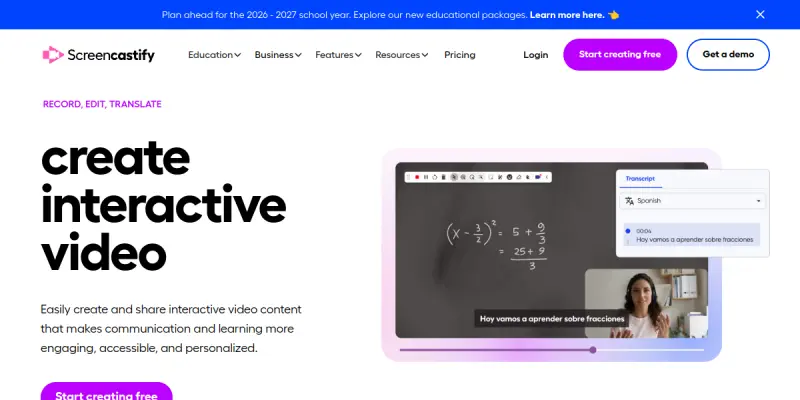
Screencastify is a web-based screen capture tool designed to simplify video creation for education and business. It runs directly in the Chrome browser, eliminating the need for complex software downloads. The platform focuses on ease of use, allowing users to record their screen, webcam, and audio simultaneously. It is widely adopted by educators for remote learning and by professionals for creating tutorials and meeting recaps.
Key Features
- Browser-Based Recording: Records screen, webcam, and audio directly in Chrome without installation.
- Google Workspace Integration: Seamless integration with Google Drive, Classroom, and Meet.
- Free Plan: Generous free tier allowing unlimited recordings up to 10 minutes.
- Simple Editor: Built-in trimming, annotation tools, and visual effects.
- Video Hosting: Direct export to YouTube and Google Drive.
- Educational Tools: Integrated quizzes, captions, and lesson management.
Use Cases
Online Education
Teachers and professors use Screencastify to record lectures, explain homework assignments, and create video feedback for students. The integration with Google Classroom streamlines the distribution of educational content.
Business Training and Onboarding
Companies utilize the tool to create software walkthroughs, employee onboarding videos, and product tutorials. It allows HR departments to standardize training materials without needing professional video production skills.
Meeting Documentation
Professionals record Zoom or Google Meet sessions to create accurate meeting notes or share recordings with absent team members. The browser-based nature ensures it works on most modern computers and operating systems.
Content Repurposing
Content creators can record a long webinar or presentation and use the simple editor to create short, engaging clips for social media platforms like Instagram Reels or TikTok.
Pricing & Plans
Screencastify operates on a freemium model. The free plan allows unlimited recording up to 10 minutes, with basic editing tools. Paid plans (Start, Pro, and Enterprise) offer longer recording limits (up to 6 hours), advanced editing features, and administrative controls for teams.
Integrations & Compatibility
Screencastify integrates deeply with the Google Chrome ecosystem, including Google Drive, Google Classroom, Google Meet, and YouTube. It also offers integrations with Zapier for automating workflows.
Who Is It For?
This tool is ideal for educators, students, business trainers, HR professionals, and content creators who need a lightweight, accessible solution for screen recording. It is specifically suited for those who already use Google Workspace.
Limitations
- Browser Dependency: Performance can vary depending on the specific browser and hardware resources.
- Editing Capabilities: The built-in editor is basic and lacks advanced features found in dedicated video editing software.
- Recording Time: The free plan has a strict 10-minute limit, which may not suffice for longer meetings or lectures.
Final Verdict
Screencastify is the go-to tool for anyone needing quick, browser-based screen recording without the hassle of installing desktop software. While it lacks the power of professional editing suites, its simplicity and deep Google integration make it a superior choice for educational and business communication.
Tool Facts
Screenshots & Interface
Pros
- ✓ Runs entirely in the Chrome browser, requiring no software installation.
- ✓ Deep integration with Google Workspace makes it ideal for educators and businesses.
- ✓ Offers a robust free plan with unlimited recordings up to 10 minutes.
- ✓ Simple built-in editor allows for quick trimming and annotation.
Cons
- × The free plan has a strict 10-minute recording limit.
- × Advanced video editing features are limited compared to standalone professional software.
- × Browser-based recording can be resource-intensive on older computers.
How to Use Screencastify AI in Your Workflow
Integrating Screencastify AI into your professional toolkit enhances efficiency by automating manual steps. By configuring it to suit your specific project requirements, you can optimize output quality and reduce project cycle times. Standard workflows involve testing the tool on simple tasks before scaling its use to complex operations.
Frequently Asked Questions
What is Screencastify AI used for?
Browser-based screen recorder for creating lessons and training videos. Includes free recording tools and simple editing for educators and professionals.
What is the pricing model for Screencastify AI?
Screencastify AI uses a Free pricing model.
What are the main advantages of Screencastify AI?
The key benefits of Screencastify AI include: Runs entirely in the Chrome browser, requiring no software installation., Deep integration with Google Workspace makes it ideal for educators and businesses., Offers a robust free plan with unlimited recordings up to 10 minutes., Simple built-in editor allows for quick trimming and annotation..
What are the main limitations of Screencastify AI?
Some limitations or cons of Screencastify AI are: The free plan has a strict 10-minute recording limit., Advanced video editing features are limited compared to standalone professional software., Browser-based recording can be resource-intensive on older computers..
Alternative AI Tools

Rokoko
Rokoko is a motion capture system for 3D animators that captures body, finger, and facial movements using sensors. It is designed for professionals in game development, film, and virtual production who need accurate, real-time animation data. The key differentiator is its wireless sensor-based approach that offers high-fidelity tracking without a dedicated studio.

Filmora AI
Filmora is an all-in-one video editing platform for desktop and mobile, leveraging AI tools like text-to-video and automatic scene detection. It helps content creators, marketers, and educators produce professional-looking videos with minimal effort. Its key differentiator is the seamless integration of AI-powered features within a traditional timeline editor.
HeyGen
HeyGen is an AI video platform that creates professional spokesperson videos with realistic avatars. It is designed for marketers and content creators who need rapid video production without complex editing.
Rating Details
Based on 0 ratings
Related Tools
More AI tools from the same workflow, industry, or category.
ClipTrend.ai
ClipTrend.ai is an AI image-to-video workspace for creators, marketers, and short-form video teams.
SongR
SongR is a text-to-song app that generates custom music tracks from a few keywords. It is designed for content creators and social media users who need quick, royalty-free songs in genres like pop, rock, hip-hop, and chant. Its key differentiator is instant generation without requiring musical expertise.
Quantum Capture
Quantum Capture generates AI-powered talking head videos from text input. It is designed for content creators and marketers who need quick, studio-quality video clips without expensive equipment. The platform specializes in creating realistic avatars with consistent lip-sync and facial expressions.
Kaltura AI
Kaltura is an enterprise video platform that combines cloud hosting with AI tools for content creation, marketing, and learning management. It helps businesses create branded video experiences for webinars, social media, and internal training.
Reviews
No reviews submitted yet. Be the first to share your experience.
Write a Review
Share Your Experience
Join the community to write reviews, submit ratings, and bookmark your favorite AI tools.