

Peech
Use Peech as the anchor for a real shortlist.
Instead of returning to a broad directory, jump straight into the strongest adjacent matchups for pricing, workflow fit, and differentiation.
Overview
Overview
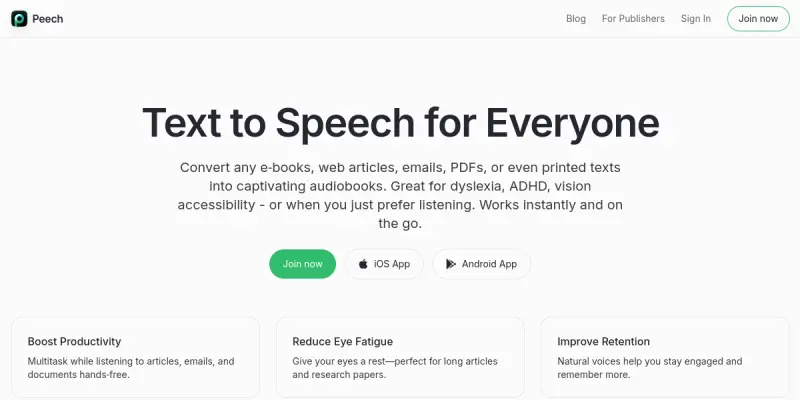
Peech is a text-to-speech (TTS) solution designed to convert written text into spoken audio. Available on iOS, Chrome, and enterprise environments, the tool allows users to listen to content across various devices and platforms. It aims to improve accessibility and productivity by enabling hands-free consumption of text-based information.
Key Features
- Cross-Platform Availability: Accessible on iOS mobile devices, Chrome web browsers, and integrated into enterprise ecosystems.
- Multi-Format Support: Capable of processing different types of text content for conversion into audio.
- Enterprise Integration: Designed for use within organizational environments, likely supporting Single Sign-On (SSO) and team management features.
- Mobile Accessibility: Optimized for iOS, allowing users to listen to content on the go.
- Web Accessibility: Works as a Chrome extension or web service for easy access on desktops.
- Text-to-Speech Conversion: Core functionality to render digital text into natural-sounding spoken words.
- Multi-Language Support: Supports multiple languages to cater to diverse user bases.
Use Cases
Accessibility for Reading
Peech serves as a valuable assistive technology for individuals with visual impairments or dyslexia. It allows users to consume articles, documents, and web content without needing to read text directly, making digital information more accessible.
Productivity and Multitasking
Professionals can use Peech to listen to emails, reports, or articles while commuting, exercising, or performing other tasks. This converts downtime into productive listening time, improving workflow efficiency.
Content Consumption on the Go
For users who prefer audio over text, Peech provides a seamless experience on mobile devices. This is particularly useful for absorbing long-form content like white papers, blogs, or books while away from a computer.
Language Learning
Students and language learners can utilize the multi-language support to hear correct pronunciation and intonation of foreign text, aiding in vocabulary acquisition and listening comprehension.
Pricing & Plans
Peech operates on a paid pricing model. While specific tiered pricing is not publicly disclosed in the current data, enterprise versions typically offer custom quotes based on team size and feature requirements. A free tier is generally available for basic usage or limited functionality to test the service.
Integrations & Compatibility
- iOS Ecosystem: Native integration with Apple devices.
- Chrome Web Store: Available as an extension for Google Chrome users.
- Enterprise Systems: Compatible with business software and workflows (implied by 'enterprise' mention).
Who Is It For?
Peech is ideal for students, professionals, and content creators who prefer auditory learning or need to consume text while multitasking. It is also suitable for businesses looking to improve document accessibility for their employees.
Limitations
- Internet Connectivity: Most TTS features require an active internet connection to process and render audio.
- Voice Quality: While improving, machine-generated voices may lack the natural nuance of human speech in certain contexts.
- Customization: Advanced voice control options may be limited compared to specialized, high-end TTS software.
Final Verdict
Peech offers a practical solution for converting text to speech across key platforms like iOS and Chrome. Its enterprise focus and multi-format support make it a viable option for both individual productivity and organizational accessibility needs. However, users seeking highly customized voice synthesis may need to evaluate if the tool's standard voices meet their requirements.
Tool Facts
Screenshots & Interface
Pros
- ✓ Supports text-to-speech across iOS, Chrome, and enterprise environments.
- ✓ Offers multi-language support for diverse content consumption.
- ✓ Compatible with various content formats.
- ✓ Accessible on mobile and desktop platforms.
Cons
- × Voice quality and naturalness may vary depending on the selected voice.
- × Internet connectivity is required to access cloud-based TTS features.
- × Advanced voice customization options may be limited compared to specialized software.
How to Use Peech in Your Workflow
Integrating Peech into your professional toolkit enhances efficiency by automating manual steps. By configuring it to suit your specific project requirements, you can optimize output quality and reduce project cycle times. Standard workflows involve testing the tool on simple tasks before scaling its use to complex operations.
Frequently Asked Questions
What is Peech used for?
Peech is a text-to-speech tool available on iOS, Chrome, and enterprise platforms. It converts written text into spoken audio across devices. It supports multiple content formats.
What is the pricing model for Peech?
Peech uses a Paid pricing model.
What are the main advantages of Peech?
The key benefits of Peech include: Supports text-to-speech across iOS, Chrome, and enterprise environments., Offers multi-language support for diverse content consumption., Compatible with various content formats., Accessible on mobile and desktop platforms..
What are the main limitations of Peech?
Some limitations or cons of Peech are: Voice quality and naturalness may vary depending on the selected voice., Internet connectivity is required to access cloud-based TTS features., Advanced voice customization options may be limited compared to specialized software..
Alternative AI Tools

Ginger
Ginger is an AI-powered writing assistant that helps users improve grammar, style, and clarity across desktop and mobile devices. It is suited for professionals, students, and non-native English speakers who need real-time editing support. Its key differentiator is seamless integration into everyday applications like email and social media.

PaperRater
PaperRater is an AI proofreading and editing assistant for students, academics, and professionals. It analyzes text for grammar, spelling, style, and originality, providing instant feedback to improve writing quality.

Bertha AI
Bertha AI is an AI-powered writing assistant that integrates directly into WordPress and Chrome. It helps content creators, marketers, and businesses generate, edit, and optimize written content without leaving their browser or CMS. Its key differentiator is its native WordPress plugin that enables seamless editing within the block editor.
Rating Details
Based on 0 ratings
Quick Comparisons
Related Tools
More AI tools from the same workflow, industry, or category.
fablepilot
FablePilot is a free AI story generator that turns a single prompt into a complete story — no sign-up required. Add illustrations or generate a plot outline.
Ghosts.app
Ghosts is an AI ghostwriter for agencies, creators, and law firms. It produces researched, cited drafts in a specific voice without requiring prompts. Users brief a specialist agent and approve a finished draft.
GrowthBar
GrowthBar is an AI tool for content generation, designed to boost productivity and streamline workflows for writers and content creators, with features like editing and tone adjustment.
GetGenie AI
GetGenie AI is an AI-powered writing and SEO assistant that helps content creators and marketers generate optimized content quickly. It includes built-in keyword research and SERP analysis to improve organic search performance.
Reviews
No reviews submitted yet. Be the first to share your experience.
Write a Review
Share Your Experience
Join the community to write reviews, submit ratings, and bookmark your favorite AI tools.