

Piktochart AI
Use Piktochart AI as the anchor for a real shortlist.
Instead of returning to a broad directory, jump straight into the strongest adjacent matchups for pricing, workflow fit, and differentiation.
Overview
Overview
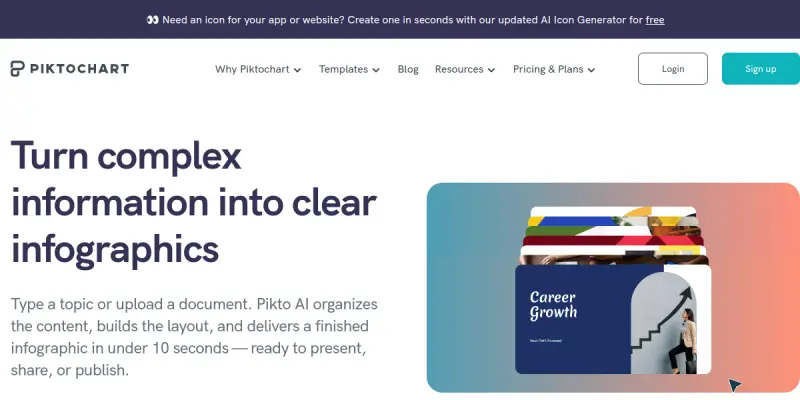
Piktochart AI is a visual content creation platform that leverages generative AI to help users produce infographics, reports, presentations, posters, flyers, and other marketing collateral in seconds. Originally launched as a traditional design tool, Piktochart now integrates AI features that allow users to generate entire designs from simple text prompts. The tool is aimed at marketers, educators, small business owners, and anyone who needs professional-looking visuals without hiring a designer or learning complex software.
Key Features
- AI Infographic Generator: Describe your topic in a sentence and receive a fully designed infographic with charts, icons, and layout.
- AI Report Generator: Input key data points or a brief outline, and Piktochart AI structures and designs a multi-page report.
- AI Presentation Generator: Create slide decks with consistent branding by describing the presentation topic.
- Brand Kit Integration: Upload your brand colors, logos, and fonts once; the AI automatically applies them to all generated assets.
- Drag-and-Drop Editor: After AI generation, fine-tune any element using the familiar Piktochart editor with hundreds of templates.
- Export Flexibility: Download designs as PNG, PDF, or interactive HTML, or share them via a public link.
- Collaboration Tools: Invite team members to edit or comment on designs in real time.
- Template Library: Access over 4,000 professionally designed templates as a starting point.
Use Cases
Internal Communication Reports
Marketing and HR teams can quickly turn monthly metrics or survey results into polished infographics or one-pagers for internal newsletters, all while maintaining brand consistency.
Educational Materials
Teachers and trainers can generate visually engaging handouts, lesson summaries, and posters from lesson notes or curriculum outlines without spending hours on layout.
Client Proposals and Presentations
Freelancers and consultants can produce branded proposal decks and status reports in minutes, customizing each version for different clients using the brand kit feature.
Social Media Graphics
Small business owners and social media managers can create a series of branded quote cards, announcement posts, or carousel graphics from a single topic description.
Pricing & Plans
Piktochart offers a free tier with limited AI generations and basic templates. Paid plans start at approximately $14 per month (billed annually) for the Pro plan, which unlocks unlimited AI generations, premium templates, and brand kit features. A team plan is available with additional collaboration seats and administrative controls. Enterprise pricing is available on request.
Integrations & Compatibility
Piktochart AI is a web-based SaaS application and works on any modern browser. It does not currently offer native integrations with other tools, but users can export designs to PDF, PNG, and HTML for use in other platforms such as Google Drive, Slack, or email. No API is publicly documented for developers.
Who Is It For?
- Marketers and communicators who need quick, on-brand visual content.
- Educators and trainers looking for an easy way to create classroom materials.
- Small business owners and freelancers who cannot afford a dedicated designer.
- Non-designers in any department who produce reports, proposals, or presentations.
Limitations
- AI-generated designs sometimes require manual tweaking for alignment or element placement.
- The free tier is limited in the number of AI generations per month, pushing users toward a paid plan.
- No desktop or mobile app; requires a stable internet connection.
- Collaboration features are only available on paid team plans.
Final Verdict
Piktochart AI is a solid choice for anyone who needs to produce branded visual content quickly without design expertise. Its AI generators save significant time compared to starting from scratch or manually adjusting templates. The main trade-off is that the free tier is quite restrictive, and heavy users will need to subscribe to unlock the full feature set. For teams and individuals who produce presentations, infographics, or reports regularly, the paid plans offer good value for the time saved.
Tool Facts
Screenshots & Interface
Pros
- ✓ Generates complete infographics, reports, and presentations from simple text prompts, saving hours of manual work.
- ✓ Brand Kit feature ensures all AI-generated content matches company colors and fonts automatically.
- ✓ Drag-and-drop editor allows easy manual refinement of AI output without restarting.
- ✓ Free tier is available to test core functionality without upfront payment.
Cons
- × Free tier limits the number of AI generations per month, pushing frequent users toward a paid plan.
- × AI-generated designs sometimes require manual tweaking for alignment or element placement.
- × No offline desktop or mobile app is available, requiring a constant internet connection.
- × Collaboration and team features are locked behind the team plan.
How to Use Piktochart AI in Your Workflow
Integrating Piktochart AI into your professional toolkit enhances efficiency by automating manual steps. By configuring it to suit your specific project requirements, you can optimize output quality and reduce project cycle times. Standard workflows involve testing the tool on simple tasks before scaling its use to complex operations.
Frequently Asked Questions
What is Piktochart AI used for?
Piktochart AI helps users create infographics, reports, and presentations quickly using natural language prompts. It is designed for professionals and teams who need branded visual content without design skills. A standout feature is its one-click brand kit application.
What is the pricing model for Piktochart AI?
Piktochart AI uses a Free pricing model.
What are the main advantages of Piktochart AI?
The key benefits of Piktochart AI include: Generates complete infographics, reports, and presentations from simple text prompts, saving hours of manual work., Brand Kit feature ensures all AI-generated content matches company colors and fonts automatically., Drag-and-drop editor allows easy manual refinement of AI output without restarting., Free tier is available to test core functionality without upfront payment..
What are the main limitations of Piktochart AI?
Some limitations or cons of Piktochart AI are: Free tier limits the number of AI generations per month, pushing frequent users toward a paid plan., AI-generated designs sometimes require manual tweaking for alignment or element placement., No offline desktop or mobile app is available, requiring a constant internet connection., Collaboration and team features are locked behind the team plan..
Alternative AI Tools

Mural AI
Mural AI is an AI-powered visual workspace that enhances team collaboration, planning, and execution. It helps distributed teams brainstorm, organize tasks, and manage projects using intelligent templates and real-time co-creation. Its key differentiator is the deep integration of AI to automate facilitation and synthesis of ideas.
Clipdrop
Clipdrop is an AI-powered image editing suite that lets users clean up photos, remove backgrounds, and upscale images. It is designed for designers, marketers, and content creators who need fast, high-quality visual edits without complex software.

DesignBold AI
DesignBold AI is an AI-powered graphic design tool that generates marketing visuals and social media content. It focuses on template-based editing to speed up content creation.
Rating Details
Based on 0 ratings
Quick Comparisons
Related Tools
More AI tools from the same workflow, industry, or category.
Createimg.ai
Createimg.ai provides text-to-image generation and photo editing tools including background removal. It is designed for e-commerce sellers and creators needing free visual assets.
JetBrains AI
JetBrains AI is an AI-powered toolset integrated into JetBrains IDEs, offering code completion, debugging assistance, and intelligent suggestions for developers. It leverages large language models to help teams write, understand, and refactor code more efficiently. A key differentiator is its seamless integration with JetBrains' existing development environment.
Stable Diffusion Inpaint
Stable Diffusion Inpaint is an AI-powered tool that uses diffusion models to intelligently fill in or replace parts of an image. It is designed for photographers, designers, and content creators who need precise and context-aware image editing. Its key differentiator is the ability to generate new content that seamlessly blends with the existing image.
Crello AI
VistaCreate (formerly Crello) is a cloud-based design tool using AI to generate graphics from text prompts. It features 100K+ templates for social media and marketing.
Reviews
No reviews submitted yet. Be the first to share your experience.
Write a Review
Share Your Experience
Join the community to write reviews, submit ratings, and bookmark your favorite AI tools.