

VanceAI
Use VanceAI as the anchor for a real shortlist.
Instead of returning to a broad directory, jump straight into the strongest adjacent matchups for pricing, workflow fit, and differentiation.
Overview
Overview
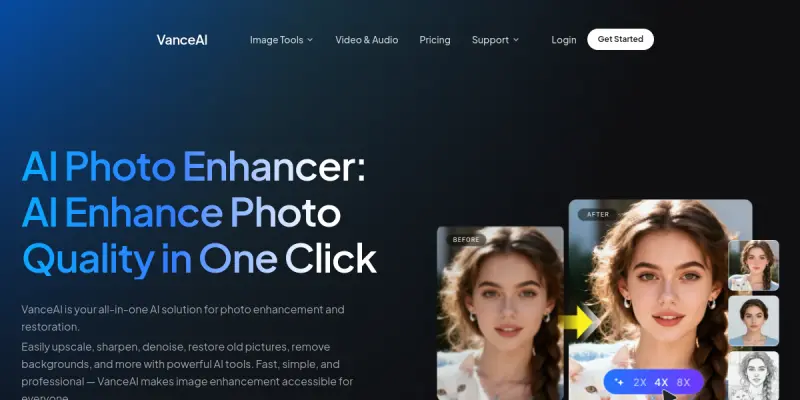
VanceAI is a web-based AI photo editing platform that simplifies complex image enhancement tasks. It leverages deep learning models to automatically upscale resolution, remove noise, sharpen details, and remove or change backgrounds. The platform is designed for photographers, e-commerce sellers, and digital artists who need to process large volumes of images quickly without sacrificing quality.
Key Features
- AI Image Upscaler: Increases image resolution up to 4x and 8x while preserving textures and details, ideal for print and web use.
- AI Image Sharpener: Corrects blur caused by camera shake or motion, applying intelligent sharpening to restore clarity.
- AI Denoiser: Removes grain and noise from low-light or high-ISO photos without softening important details.
- Background Remover: Accurately detects and removes backgrounds in portraits and product photos, supporting batch export.
- AI Portrait Generator: Generates realistic human portraits from scratch using text prompts or reference images.
- Batch Processing: Upload and process multiple images simultaneously to save time on repetitive tasks.
- Web-Based Workflow: No software installation required; works entirely in the browser across all major operating systems.
Use Cases
E-Commerce Product Photography
Online sellers can use VanceAI to upscale product images for high-resolution listings, remove distracting backgrounds, and sharpen details to improve conversion rates. The batch processing feature helps manage large catalogs efficiently.
Social Media Content Creation
Content creators can enhance low-quality smartphone photos before posting, apply denoising to night shots, and generate unique AI portraits for avatars or promotional graphics.
Print and Publishing
Photographers preparing images for print can upscale and sharpen their work to meet high-resolution output requirements, ensuring sharp reproduction on posters or magazines.
Digital Art and Design
Digital artists can rapidly generate AI portraits for concept art, use the denoiser to clean up renders, and leverage the background remover to isolate subjects for further compositing.
Pricing & Plans
VanceAI operates on a freemium model. Free users get limited credits for trying features with lower resolution output. Paid subscription credits can be purchased in packs or as a monthly plan, starting at around $9.90/month for standard access, with higher tiers offering more credits and priority processing. Detailed pricing is available on the official website.
Integrations & Compatibility
VanceAI is a fully web-based platform and does not offer native integrations with software like Photoshop or Lightroom. However, it supports drag-and-drop file uploads from any device and outputs standard image formats (JPEG, PNG, WebP). It works on all modern browsers (Chrome, Firefox, Safari, Edge) without plugins.
Who Is It For?
VanceAI is best suited for non-technical users who need quick, one-click fixes for common photo problems. Professional photographers and graphic designers may use it as a supplement to manual editing tools for batch processing or when working with very large sets of images.
Limitations
- No desktop app: Requires a stable internet connection; workflows are browser-dependent.
- Limited advanced controls: Options are mostly automatic presets rather than granular sliders for expert users.
- Credit system: Free tier offers very few credits; heavy use requires purchasing credits or a subscription.
- No direct API: Not suitable for developers wanting to integrate the service into custom pipelines.
Final Verdict
VanceAI is a practical choice for anyone who needs fast, automated photo enhancements without learning complex editing software. Its batch processing and range of AI tools cover most common needs. While it lacks advanced manual controls and integrations for professionals, its ease of use and accessibility make it a solid utility for e-commerce, social media, and casual photography work.
Tool Facts
Screenshots & Interface
Pros
- ✓ Batch processing allows multiple images to be enhanced in one go, saving significant time.
- ✓ The web-based platform requires no installation and works on any device with a browser.
- ✓ AI denoiser effectively reduces high-ISO noise while preserving important image details.
- ✓ Background removal handles complex edges like hair and fur with reasonable accuracy.
Cons
- × Free tier offers very limited credits, making the tool nearly unusable without payment.
- × No local desktop app means users are fully dependent on internet connectivity and browser performance.
- × The tool lacks manual fine-tuning controls, which may disappoint advanced editors.
- × Output resolution on the free plan is capped, limiting use for high-quality prints.
How to Use VanceAI in Your Workflow
Integrating VanceAI into your professional toolkit enhances efficiency by automating manual steps. By configuring it to suit your specific project requirements, you can optimize output quality and reduce project cycle times. Standard workflows involve testing the tool on simple tasks before scaling its use to complex operations.
Frequently Asked Questions
What is VanceAI used for?
VanceAI is a web-based photo enhancement platform that uses AI to upscale, sharpen, denoise, and remove backgrounds. Designed for photographers and designers, it offers batch processing to streamline creative workflows.
What is the pricing model for VanceAI?
VanceAI uses a Freemium pricing model.
What are the main advantages of VanceAI?
The key benefits of VanceAI include: Batch processing allows multiple images to be enhanced in one go, saving significant time., The web-based platform requires no installation and works on any device with a browser., AI denoiser effectively reduces high-ISO noise while preserving important image details., Background removal handles complex edges like hair and fur with reasonable accuracy..
What are the main limitations of VanceAI?
Some limitations or cons of VanceAI are: Free tier offers very limited credits, making the tool nearly unusable without payment., No local desktop app means users are fully dependent on internet connectivity and browser performance., The tool lacks manual fine-tuning controls, which may disappoint advanced editors., Output resolution on the free plan is capped, limiting use for high-quality prints..
Alternative AI Tools

Deep Dream Generator
Deep Dream Generator is an AI-powered art platform offering over 30 models for image and video generation. Designers and content creators can create unique visuals and edit images without prior artistic skills. Its key differentiator is the combination of text-to-image and AI video within a single tool.

Playground AI
Playground AI is an online image generation tool that helps users create custom designs, logos, and social media graphics. It offers a text-to-image workflow suitable for designers and content creators seeking quick visual assets. Its key differentiator is a large library of community-created styles and models.

GraphicSprings
GraphicSprings generates professional logos and brand assets using AI. It offers a free trial and customizable templates for freelancers and small businesses.
Rating Details
Based on 0 ratings
Quick Comparisons
Related Tools
More AI tools from the same workflow, industry, or category.
Createimg.ai
Createimg.ai provides text-to-image generation and photo editing tools including background removal. It is designed for e-commerce sellers and creators needing free visual assets.
JetBrains AI
JetBrains AI is an AI-powered toolset integrated into JetBrains IDEs, offering code completion, debugging assistance, and intelligent suggestions for developers. It leverages large language models to help teams write, understand, and refactor code more efficiently. A key differentiator is its seamless integration with JetBrains' existing development environment.
Stable Diffusion Inpaint
Stable Diffusion Inpaint is an AI-powered tool that uses diffusion models to intelligently fill in or replace parts of an image. It is designed for photographers, designers, and content creators who need precise and context-aware image editing. Its key differentiator is the ability to generate new content that seamlessly blends with the existing image.
Crello AI
VistaCreate (formerly Crello) is a cloud-based design tool using AI to generate graphics from text prompts. It features 100K+ templates for social media and marketing.
Reviews
No reviews submitted yet. Be the first to share your experience.
Write a Review
Share Your Experience
Join the community to write reviews, submit ratings, and bookmark your favorite AI tools.