

Plask
Use Plask as the anchor for a real shortlist.
Instead of returning to a broad directory, jump straight into the strongest adjacent matchups for pricing, workflow fit, and differentiation.
Overview
Overview
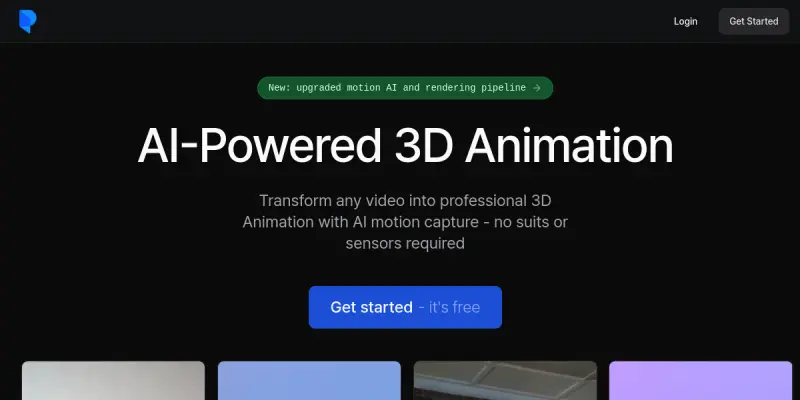
Plask is a web-based platform that leverages artificial intelligence to perform motion capture (mocap) directly from a webcam or uploaded video files. By analyzing the user's movements, the tool generates rigged 3D character models and animations in real-time. This technology democratizes access to professional-grade animation tools, allowing users to bypass the need for expensive motion capture suits and specialized hardware studios.
Key Features
- Webcam Capture: Record real-time movements directly in the browser.
- Text-to-Animation: Generate character movements from descriptive text prompts.
- 3D Rigging: Automatically applies skeletal rigs to the captured characters.
- Format Export: Supports exporting rigged models in industry-standard formats like FBX and OBJ.
- Animation Timeline: Provides a timeline editor to adjust timing and keyframes.
- Browser-Based: Runs entirely in the browser without heavy software downloads.
Use Cases
Indie Game Development
Game developers can use Plask to prototype character animations quickly without hiring a motion capture studio, significantly speeding up the development cycle for indie titles.
Marketing and Content Creation
Marketers can transform static 2D videos into dynamic 3D assets for social media campaigns or product showcases, adding a layer of visual depth that standard video editing cannot achieve.
Character Design and Prototyping
3D artists can use the tool to rapidly test character poses and movements, refining their designs before moving to high-fidelity modeling software.
Education and Training
Educators in animation and motion graphics can use the tool to demonstrate the principles of rigging and animation without the technical barrier of setting up a mocap suite.
Pricing & Plans
Plask offers a free tier that allows users to perform basic motion capture and animation tasks. For more advanced features, higher processing power, and longer render times, users can subscribe to paid monthly plans. Detailed pricing tiers are available on their official website.
Integrations & Compatibility
The tool exports compatible 3D files that integrate with popular engines like Unity and Unreal Engine. It also supports standard video rendering formats suitable for direct use in video editing software such as Premiere Pro and After Effects.
Who Is It For?
Plask is designed for indie game developers, 3D artists, content creators, and marketing professionals who need to create character animations but lack access to expensive motion capture hardware or software.
Limitations
- Lighting Sensitivity: The quality of the capture is highly dependent on the lighting conditions of the room.
- Rigging Fidelity: The automatic rigging may not be perfect for highly complex or dynamic poses.
- Hardware Requirements: While browser-based, a powerful computer is still recommended for smooth processing of high-resolution videos.
Final Verdict
Plask represents a significant step forward in making motion capture accessible to the masses. While it may not replace high-end professional rigs for AAA game development, it is an incredibly powerful tool for prototyping, indie projects, and quick content creation. The browser-based interface lowers the barrier to entry, making 3D animation more approachable for beginners.
Tool Facts
Screenshots & Interface
Pros
- ✓ Eliminates the need for expensive motion capture hardware
- ✓ Exports rigged 3D models compatible with Unity and Unreal Engine
- ✓ Enables real-time animation creation directly in the browser
Cons
- × Rigging quality can degrade with complex or highly dynamic poses
- × Capture accuracy is highly sensitive to room lighting conditions
- × Processing heavy videos requires a powerful computer to avoid lag
How to Use Plask in Your Workflow
Integrating Plask into your professional toolkit enhances efficiency by automating manual steps. By configuring it to suit your specific project requirements, you can optimize output quality and reduce project cycle times. Standard workflows involve testing the tool on simple tasks before scaling its use to complex operations.
Frequently Asked Questions
What is Plask used for?
Plask performs AI motion capture using a webcam or video files, creating rigged 3D characters without hardware.
What is the pricing model for Plask?
Plask uses a Free pricing model.
What are the main advantages of Plask?
The key benefits of Plask include: Eliminates the need for expensive motion capture hardware, Exports rigged 3D models compatible with Unity and Unreal Engine, Enables real-time animation creation directly in the browser.
What are the main limitations of Plask?
Some limitations or cons of Plask are: Rigging quality can degrade with complex or highly dynamic poses, Capture accuracy is highly sensitive to room lighting conditions, Processing heavy videos requires a powerful computer to avoid lag.
Alternative AI Tools

Wisecut
Wisecut is an AI video editor that automatically removes silence and adds captions to create short-form clips for social media. It streamlines the editing process for content creators.

Vizard AI
Vizard AI helps content creators, marketers, and social media managers repurpose long-form videos into short, shareable clips. It uses AI to identify key moments and automatically generate optimized cuts for platforms like TikTok, Instagram, and YouTube Shorts.

Point-E
Point-E is an AI tool that generates 3D point clouds from text prompts, enabling rapid 3D asset creation for developers and designers. It uses a diffusion-based approach to produce colored point clouds from a single text description.
Rating Details
Based on 0 ratings
Quick Comparisons
Related Tools
More AI tools from the same workflow, industry, or category.
ClipTrend.ai
ClipTrend.ai is an AI image-to-video workspace for creators, marketers, and short-form video teams.
SongR
SongR is a text-to-song app that generates custom music tracks from a few keywords. It is designed for content creators and social media users who need quick, royalty-free songs in genres like pop, rock, hip-hop, and chant. Its key differentiator is instant generation without requiring musical expertise.
Quantum Capture
Quantum Capture generates AI-powered talking head videos from text input. It is designed for content creators and marketers who need quick, studio-quality video clips without expensive equipment. The platform specializes in creating realistic avatars with consistent lip-sync and facial expressions.
Kaltura AI
Kaltura is an enterprise video platform that combines cloud hosting with AI tools for content creation, marketing, and learning management. It helps businesses create branded video experiences for webinars, social media, and internal training.
Reviews
No reviews submitted yet. Be the first to share your experience.
Write a Review
Share Your Experience
Join the community to write reviews, submit ratings, and bookmark your favorite AI tools.