
Playground AI
Use Playground AI as the anchor for a real shortlist.
Instead of returning to a broad directory, jump straight into the strongest adjacent matchups for pricing, workflow fit, and differentiation.
Overview
Overview
Playground AI is a browser-based image generation platform that enables users to create custom visuals from text prompts. Launched in 2021, it provides access to a variety of AI models—including Stable Diffusion and DALL·E—for generating illustrations, product mockups, logos, and social media graphics. The platform emphasizes ease of use with a visual editor and a library of community-sourced styles, making it accessible to both beginners and experienced designers.
Key Features
- Text-to-Image Generation: Convert natural language descriptions into high-resolution images using supported AI models.
- Canvas Editor: Fine-tune generated images by adjusting composition, applying filters, and layering elements directly in the browser.
- Style Library: Browse thousands of user-uploaded style presets to apply unique aesthetics to your creations.
- Aspect Ratio Control: Choose from standard social media dimensions (e.g., 1:1, 4:5, 16:9) or set custom sizes.
- Batch Generation: Generate multiple image variations at once to speed up creative exploration.
- History & Remixing: Access your generation history and use any past image as a starting point for new designs.
- Public Gallery: Share your creations with the Playground community or browse others’ work for inspiration.
- Export Options: Download images in PNG or JPG format at up to 1024×1024 resolution.
Use Cases
Social Media Content Creation
Design eye-catching posts, banners, and story visuals for platforms like Instagram, Twitter, and Facebook. The built-in aspect ratio presets ensure your images fit perfectly without manual cropping.
Logo and Branding
Generate logo concepts for small businesses or personal projects. Use the style library to explore different design directions before committing to a final look.
Product Visualization
Create mockups of products—such as T‑shirts, mugs, or packaging—by generating images with text prompts that describe the item and its environment.
Artistic Exploration
Use Playground as a creative sandbox for generating artwork, experimenting with prompts, and discovering new visual styles through the community gallery.
Education & Prototyping
Teachers and students can quickly produce visual aids for presentations or prototypes without requiring advanced graphic design skills.
Pricing & Plans
Playground AI operates on a freemium model. A free tier provides a limited number of daily image generations with basic resolution. Paid subscriptions (e.g., Pro plan) offer higher generation limits, faster processing, and access to advanced models. Enterprise pricing is not publicly disclosed; users can contact sales for custom plans.
Integrations & Compatibility
Playground AI is a fully web‑based tool compatible with modern browsers (Chrome, Firefox, Safari, Edge). It does not offer native integrations with third‑party design software, but images can be downloaded and imported into tools like Adobe Photoshop, Canva, or Figma.
Who Is It For?
- Freelance designers and graphic artists looking for rapid ideation.
- Social media managers needing quick visual assets.
- Small business owners and entrepreneurs without a dedicated design team.
- Hobbyists and hobbyist artists exploring AI‑generated imagery.
Limitations
- Dependent on a stable internet connection; no offline functionality.
- Free tier has daily generation caps and limited resolution.
- Accuracy of outputs relies heavily on prompt quality; occasional irrelevant or low‑quality results.
- Does not support vector export (SVG) or native file formats for professional printing.
Final Verdict
Playground AI offers a solid entry‑point for casual and professional users to experiment with AI image generation. Its user‑friendly interface and community styles make it approachable, while the batch generation and remix features support efficient creative workflows. However, advanced users may miss integration with design suites, and the free tier’s limitations could be restrictive. For straightforward visual content creation, Playground AI is a practical choice.
Tool Facts
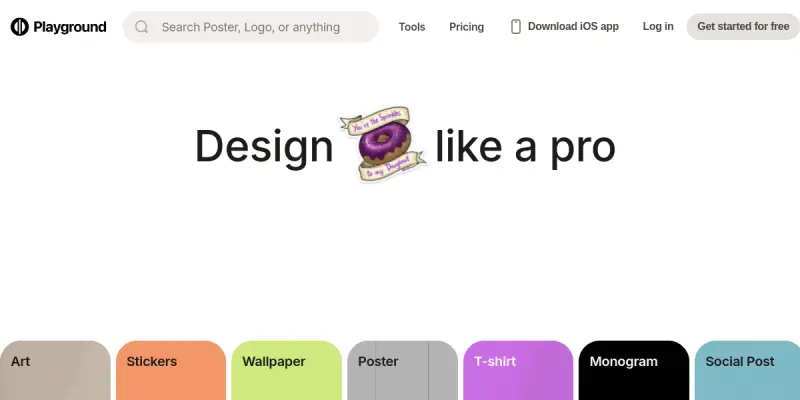
Screenshots & Interface
Pros
- ✓ Offers a large library of community-created styles and presets for rapid design iteration.
- ✓ Browser-based platform requires no installation and works on all major operating systems.
- ✓ Batch generation feature lets users create multiple image variations in one go.
- ✓ Supports multiple AI models including Stable Diffusion and DALL·E for versatile output.
- ✓ Free tier provides a daily quota of generations without requiring a credit card.
Cons
- × Maximum export resolution is limited to 1024×1024 pixels even on paid plans.
- × No native integration with design software like Adobe Creative Cloud or Figma.
- × Free tier has a daily cap on generations and no access to the fastest processing queue.
- × Occasional offline or slowdown issues during peak usage hours.
How to Use Playground AI in Your Workflow
Integrating Playground AI into your professional toolkit enhances efficiency by automating manual steps. By configuring it to suit your specific project requirements, you can optimize output quality and reduce project cycle times. Standard workflows involve testing the tool on simple tasks before scaling its use to complex operations.
Frequently Asked Questions
What is Playground AI used for?
Playground AI is an online image generation tool that helps users create custom designs, logos, and social media graphics. It offers a text-to-image workflow suitable for designers and content creators seeking quick visual assets. Its key differentiator is a large library of community-created styles and models.
What is the pricing model for Playground AI?
Playground AI uses a Paid pricing model.
What are the main advantages of Playground AI?
The key benefits of Playground AI include: Offers a large library of community-created styles and presets for rapid design iteration., Browser-based platform requires no installation and works on all major operating systems., Batch generation feature lets users create multiple image variations in one go., Supports multiple AI models including Stable Diffusion and DALL·E for versatile output., Free tier provides a daily quota of generations without requiring a credit card..
What are the main limitations of Playground AI?
Some limitations or cons of Playground AI are: Maximum export resolution is limited to 1024×1024 pixels even on paid plans., No native integration with design software like Adobe Creative Cloud or Figma., Free tier has a daily cap on generations and no access to the fastest processing queue., Occasional offline or slowdown issues during peak usage hours..
Alternative AI Tools

MarkMaker
MarkMaker is an AI-powered logo design tool for creators, streamlining workflow productivity with automated design capabilities and intuitive interface.
Marvel AI
Marvel AI is an AI-powered UI/UX design tool that helps designers create user interfaces and experiences rapidly. It uses generative AI to suggest layouts, components, and design systems based on project requirements.

LogoTypeMaker
LogoTypeMaker is a web-based tool for creating custom logos without design skills. It generates branding assets based on user input and style preferences. The platform offers a free trial to test the service.
Rating Details
Based on 0 ratings
Related Tools
More AI tools from the same workflow, industry, or category.
Createimg.ai
Createimg.ai provides text-to-image generation and photo editing tools including background removal. It is designed for e-commerce sellers and creators needing free visual assets.
JetBrains AI
JetBrains AI is an AI-powered toolset integrated into JetBrains IDEs, offering code completion, debugging assistance, and intelligent suggestions for developers. It leverages large language models to help teams write, understand, and refactor code more efficiently. A key differentiator is its seamless integration with JetBrains' existing development environment.
Stable Diffusion Inpaint
Stable Diffusion Inpaint is an AI-powered tool that uses diffusion models to intelligently fill in or replace parts of an image. It is designed for photographers, designers, and content creators who need precise and context-aware image editing. Its key differentiator is the ability to generate new content that seamlessly blends with the existing image.
Crello AI
VistaCreate (formerly Crello) is a cloud-based design tool using AI to generate graphics from text prompts. It features 100K+ templates for social media and marketing.
Reviews
No reviews submitted yet. Be the first to share your experience.
Write a Review
Share Your Experience
Join the community to write reviews, submit ratings, and bookmark your favorite AI tools.