

ReadSpeaker
Use ReadSpeaker as the anchor for a real shortlist.
Instead of returning to a broad directory, jump straight into the strongest adjacent matchups for pricing, workflow fit, and differentiation.
Overview
Overview
ReadSpeaker is a robust text-to-speech (TTS) solution designed to transform written content into natural, human-like audio. Serving a diverse range of sectors, including education, e-commerce, and media, the platform enables organizations to enhance content accessibility and user engagement. By leveraging advanced AI models, ReadSpeaker provides a scalable way to convert static text into dynamic audio experiences.
Key Features
- Natural Voice Synthesis: Utilizes high-quality AI voices that closely mimic human intonation and rhythm.
- Extensive Language Support: Offers 280+ voices across 80+ languages to cater to global audiences.
- Document Reader: Allows users to upload and listen to documents directly in the browser with customizable playback controls.
- Speed Control: Provides granular control over speech speed, enabling users to adjust the pace to their preference.
- Accessibility Compliance: Built to meet WCAG 2.1 accessibility standards, aiding websites and applications in reaching a wider audience.
- Easy Integration: Provides web widgets and APIs that are simple to embed into existing websites and CMS platforms.
- Voice Customization: Offers the ability to fine-tune voice parameters for a more tailored listening experience.
Use Cases
E-Learning and Courseware
Educational institutions and online course platforms use ReadSpeaker to narrate course materials, making learning more accessible for visually impaired students and accommodating different learning styles.
Corporate Websites
Businesses integrate ReadSpeaker into their corporate websites to provide an alternative text display option, improving SEO and user experience for non-native speakers or those with reading difficulties.
Media and Publishing
Publishers leverage the technology to create audio versions of articles, blogs, and news content, expanding their reach and engaging readers who prefer consuming content via audio.
Accessibility Compliance
Companies utilize the tool to ensure their digital properties are compliant with legal accessibility requirements, such as the ADA in the United States.
Pricing & Plans
ReadSpeaker operates on a Freemium and enterprise licensing model. While specific public pricing is often quote-based, the model typically includes a free tier for limited demos or basic usage, alongside paid plans that offer higher volume credits and advanced features. Enterprise solutions are tailored to large organizations requiring custom integrations and dedicated support.
Integrations & Compatibility
The tool integrates seamlessly with popular Content Management Systems (CMS) like WordPress, Drupal, and Magento via plugins. It also offers a robust API for developers to integrate TTS functionality directly into custom web applications and mobile apps.
Who Is It For?
ReadSpeaker is ideal for e-learning providers, content publishers, corporate communication teams, and developers building accessibility features into their software. It is particularly suited for organizations with a multilingual audience or a need to comply with web accessibility standards.
Limitations
- Internet Dependency: The service requires a stable internet connection to process and render audio, limiting offline usage capabilities.
- Licensing Costs: While there is a free tier, accessing premium voices and high-volume usage often requires significant enterprise licensing agreements.
- Customization Limits: While voices are customizable, they may not perfectly match specific brand voices without significant tuning or additional paid services.
Final Verdict
ReadSpeaker stands out as a comprehensive and reliable text-to-speech tool, particularly strong in its language variety and integration capabilities. While the licensing structure can be complex for small projects, it remains a top choice for enterprises and educational institutions prioritizing accessibility and natural-sounding audio.
Tool Facts
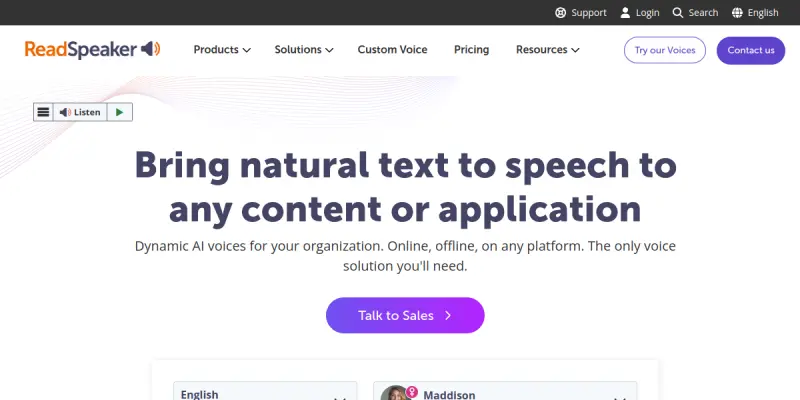
Screenshots & Interface
Pros
- ✓ Provides 280+ AI voices in 80+ languages for global reach.
- ✓ Offers a Document Reader for uploading and listening to local files.
- ✓ Seamlessly integrates with popular CMS platforms like WordPress and Drupal.
Cons
- × Enterprise licensing is required for high-volume usage and custom voice tuning.
- × Relies on a live internet connection, preventing offline playback.
- × The free tier offers limited voices and features compared to paid enterprise plans.
How to Use ReadSpeaker in Your Workflow
Integrating ReadSpeaker into your professional toolkit enhances efficiency by automating manual steps. By configuring it to suit your specific project requirements, you can optimize output quality and reduce project cycle times. Standard workflows involve testing the tool on simple tasks before scaling its use to complex operations.
Frequently Asked Questions
What is ReadSpeaker used for?
ReadSpeaker converts text into natural speech using AI, offering 280+ voices in 80+ languages for businesses and educational institutions.
What is the pricing model for ReadSpeaker?
ReadSpeaker uses a Freemium pricing model.
What are the main advantages of ReadSpeaker?
The key benefits of ReadSpeaker include: Provides 280+ AI voices in 80+ languages for global reach., Offers a Document Reader for uploading and listening to local files., Seamlessly integrates with popular CMS platforms like WordPress and Drupal..
What are the main limitations of ReadSpeaker?
Some limitations or cons of ReadSpeaker are: Enterprise licensing is required for high-volume usage and custom voice tuning., Relies on a live internet connection, preventing offline playback., The free tier offers limited voices and features compared to paid enterprise plans..
Alternative AI Tools

WellSaid Labs
Generate realistic AI voiceovers in various dialects and styles. WellSaid Labs offers secure text-to-speech technology for content creators.

Artlist AI
Generate royalty-free music and sound effects using AI for your projects. This SaaS platform offers a free tier for experimentation alongside paid plans for commercial use.

Coqui AI
Coqui AI is an open-source text-to-speech (TTS) platform that allows developers and content creators to generate high-quality, natural-sounding speech from text. It offers customizable voice cloning and supports multiple languages. Coqui AI stands out for its community-driven model and self-hosted deployment options.
Rating Details
Based on 0 ratings
Quick Comparisons
Related Tools
More AI tools from the same workflow, industry, or category.
ClipTrend.ai
ClipTrend.ai is an AI image-to-video workspace for creators, marketers, and short-form video teams.
SongR
SongR is a text-to-song app that generates custom music tracks from a few keywords. It is designed for content creators and social media users who need quick, royalty-free songs in genres like pop, rock, hip-hop, and chant. Its key differentiator is instant generation without requiring musical expertise.
Quantum Capture
Quantum Capture generates AI-powered talking head videos from text input. It is designed for content creators and marketers who need quick, studio-quality video clips without expensive equipment. The platform specializes in creating realistic avatars with consistent lip-sync and facial expressions.
Kaltura AI
Kaltura is an enterprise video platform that combines cloud hosting with AI tools for content creation, marketing, and learning management. It helps businesses create branded video experiences for webinars, social media, and internal training.
Reviews
No reviews submitted yet. Be the first to share your experience.
Write a Review
Share Your Experience
Join the community to write reviews, submit ratings, and bookmark your favorite AI tools.