

Voice Enhancer AI
Use Voice Enhancer AI as the anchor for a real shortlist.
Instead of returning to a broad directory, jump straight into the strongest adjacent matchups for pricing, workflow fit, and differentiation.
Overview
Overview
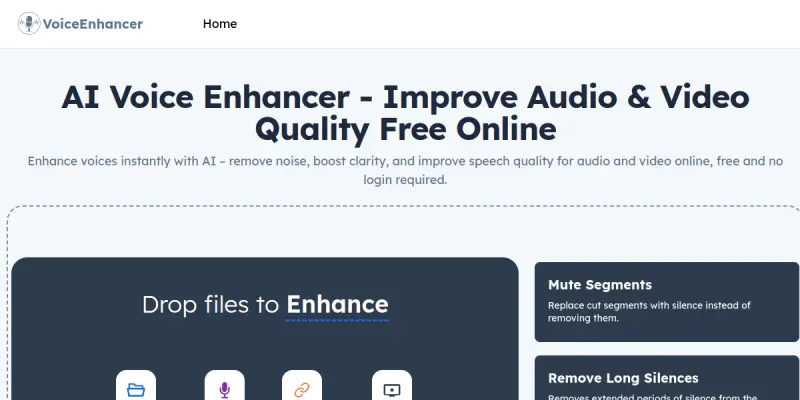
Voice Enhancer AI is a web-based application designed to improve the quality of audio and video files. By utilizing artificial intelligence, it processes input files to reduce noise and enhance clarity. The platform is accessible directly through a browser, eliminating the need for complex software installations. Users can upload various file types to receive an upgraded audio track suitable for professional or personal use.
Key Features
- No Login Required: Users can access basic enhancement tools immediately without creating an account or registering.
- Multi-Format Support: The tool supports standard audio formats including MP3, WAV, and others, making it versatile for different media types.
- Noise Reduction: AI algorithms identify and reduce background noise, such as static or hum, to produce cleaner audio.
- Clarity Enhancement: The system boosts voice clarity and volume levels to ensure content is easily understandable.
- Instant Processing: Files are processed quickly in the browser, providing immediate results without long waiting times.
- Free Access: The core features are available for free, allowing users to improve content without financial commitment.
Use Cases
Podcast Production
Podcasters often record in environments with ambient noise. Voice Enhancer AI can be used to clean up recordings during the post-production phase, ensuring the host's voice is the focal point of the episode.
Video Content Creation
Content creators on platforms like YouTube often record video with low-quality microphones. This tool helps enhance spoken dialogue in videos, improving viewer retention and experience.
Educational Material
Students or educators recording lectures can use the tool to make audio notes clearer, facilitating better study habits and information retention.
Pricing & Plans
The tool operates on a freemium model where the core audio enhancement features are completely free. While the basic version is sufficient for casual use, specific high-end processing features might require a paid subscription in the future. Currently, the focus is on providing accessible audio tools to everyone without upfront costs.
Integrations & Compatibility
Voice Enhancer AI is designed as a standalone web application. While specific API integrations are not explicitly detailed, the browser-based nature allows it to function alongside most standard media players and content management systems. It does not require specific software dependencies, ensuring compatibility across different operating systems.
Who Is It For?
This tool is ideal for content creators, podcasters, and video editors who need a quick solution to fix poor audio recordings. It is also suitable for casual users looking to improve voice messages or personal media files. It serves as an entry-level tool for those not ready to invest in professional audio editing software.
Limitations
- The free tier may limit the length or size of files that can be processed.
- Advanced audio editing capabilities found in professional software are absent.
- The tool relies on cloud processing, which may introduce latency for large files.
Final Verdict
Voice Enhancer AI serves as a practical, accessible tool for improving basic audio quality. While it lacks the depth of professional editing suites, it excels in providing instant, free solutions for common audio issues. For users needing a quick fix for noisy recordings, it offers significant value.
Tool Facts
Screenshots & Interface
Pros
- ✓ No account registration is needed to utilize the core enhancement features.
- ✓ The web-based interface allows for immediate use on any device with a browser.
- ✓ Support for common audio formats like MP3 simplifies the upload and processing workflow.
Cons
- × Advanced noise reduction settings and granular controls are restricted to paid users.
- × Processing power is limited by browser capabilities, which can affect performance on older devices.
- × The tool does not offer the professional-level audio engineering controls found in dedicated DAWs.
How to Use Voice Enhancer AI in Your Workflow
Integrating Voice Enhancer AI into your professional toolkit enhances efficiency by automating manual steps. By configuring it to suit your specific project requirements, you can optimize output quality and reduce project cycle times. Standard workflows involve testing the tool on simple tasks before scaling its use to complex operations.
Frequently Asked Questions
What is Voice Enhancer AI used for?
Voice Enhancer AI improves audio and video clarity using AI models. This free tool processes MP3s and podcasts without requiring user login. It offers basic noise reduction and enhancement features.
What is the pricing model for Voice Enhancer AI?
Voice Enhancer AI uses a Free pricing model.
What are the main advantages of Voice Enhancer AI?
The key benefits of Voice Enhancer AI include: No account registration is needed to utilize the core enhancement features., The web-based interface allows for immediate use on any device with a browser., Support for common audio formats like MP3 simplifies the upload and processing workflow..
What are the main limitations of Voice Enhancer AI?
Some limitations or cons of Voice Enhancer AI are: Advanced noise reduction settings and granular controls are restricted to paid users., Processing power is limited by browser capabilities, which can affect performance on older devices., The tool does not offer the professional-level audio engineering controls found in dedicated DAWs..
Alternative AI Tools

Sounddogs AI
Sounddogs AI combines a massive library of royalty-free audio with generative AI tools for creating custom music and voiceovers. It offers over one million sound effects and music tracks for professional media production. Ideal for video editors, podcasters, and game developers.

Podsqueeze
Podsqueeze is an AI-powered podcast platform that generates transcripts, summaries, clips, and enhances audio. It helps podcasters save time on post-production and content repurposing. The tool offers a free tier to get started.

Speechify
Speechify AI is a text-to-speech platform that converts written content into natural-sounding audio. It uses advanced voice synthesis to help users listen to documents, articles, and web pages. The tool is designed for productivity and accessibility, offering customizable voices and playback speeds.
Rating Details
Based on 0 ratings
Related Tools
More AI tools from the same workflow, industry, or category.
ClipTrend.ai
ClipTrend.ai is an AI image-to-video workspace for creators, marketers, and short-form video teams.
SongR
SongR is a text-to-song app that generates custom music tracks from a few keywords. It is designed for content creators and social media users who need quick, royalty-free songs in genres like pop, rock, hip-hop, and chant. Its key differentiator is instant generation without requiring musical expertise.
Quantum Capture
Quantum Capture generates AI-powered talking head videos from text input. It is designed for content creators and marketers who need quick, studio-quality video clips without expensive equipment. The platform specializes in creating realistic avatars with consistent lip-sync and facial expressions.
Kaltura AI
Kaltura is an enterprise video platform that combines cloud hosting with AI tools for content creation, marketing, and learning management. It helps businesses create branded video experiences for webinars, social media, and internal training.
Reviews
No reviews submitted yet. Be the first to share your experience.
Write a Review
Share Your Experience
Join the community to write reviews, submit ratings, and bookmark your favorite AI tools.