
RecordCast AI
Use RecordCast AI as the anchor for a real shortlist.
Instead of returning to a broad directory, jump straight into the strongest adjacent matchups for pricing, workflow fit, and differentiation.
Overview
Overview
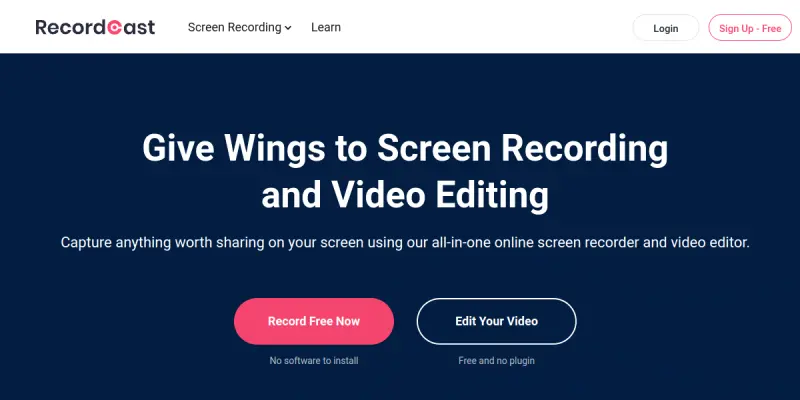
RecordCast is a cloud-based screen recording and video editing platform designed to simplify content creation. It allows users to capture their screen, specific application windows, or browser tabs directly from a web browser without the need for software installation. The tool provides a suite of integrated editing features, enabling users to trim, zoom, add transitions, and remove backgrounds instantly after recording.
Key Features
- No Installation Required: Runs entirely in the browser with no downloads or extensions needed.
- Multiple Recording Modes: Supports capturing full screens, specific application windows, or individual browser tabs.
- Integrated Editing Suite: Offers tools for trimming clips, applying zoom effects, adding transitions, and removing backgrounds.
- Cloud-Based Storage: Saves all recordings and projects securely in the cloud for easy access from any device.
- Browser Extension: Provides a quick-launch button for seamless recording from your browser toolbar.
- Audio Recording: Supports capturing system audio and microphone input simultaneously.
Use Cases
Social Media Content Creation
RecordCast is ideal for marketers and creators who need to produce short-form content for platforms like TikTok, Instagram Reels, and YouTube Shorts. The integrated trimming and captioning tools streamline the process of turning long videos into engaging clips.
Tutorials and Walkthroughs
Educators and technical writers can use the tool to record clear, step-by-step guides for software tutorials or product demos. The ability to highlight specific windows or tabs ensures the focus remains on the relevant information.
Webinars and Presentations
Professionals can record online meetings or presentation slides directly from the browser. The recording features allow for capturing detailed slides and speaker audio without needing specialized presentation software.
Pricing & Plans
RecordCast operates on a Freemium model. The free plan allows users to record videos with limitations on video quality (usually up to 720p) and recording duration. Paid plans offer higher resolutions (1080p), longer recording times, and access to premium editing features like background blur and advanced transitions.
Integrations & Compatibility
RecordCast is a web-first application that requires a modern web browser such as Chrome, Firefox, or Safari. It is compatible with both Windows and macOS operating systems. A Chrome extension is available to facilitate quick screen recording directly from the browser interface.
Who Is It For?
This tool is designed for content creators, marketers, educators, and small business owners who need to produce video content quickly without the technical overhead of traditional video editing software like Adobe Premiere or Final Cut Pro.
Limitations
- Browser Performance: Being a web-based tool, it may experience performance lag or buffering issues on slower internet connections compared to native desktop software.
- Limited Advanced Features: While it handles basic editing well, it lacks the professional-grade tools found in dedicated desktop editors for complex color grading or multi-track audio mixing.
- Rendering Times: Exporting high-resolution videos can sometimes be slower than expected depending on the server load.
Final Verdict
RecordCast is a highly accessible tool for anyone needing to create screen recordings and basic video edits without the hassle of installation. While it may not replace professional video editors for complex projects, it excels as a quick, browser-based solution for social media clips, tutorials, and simple presentations.
Tool Facts
Screenshots & Interface
Pros
- ✓ No software installation required; works directly in the web browser.
- ✓ Includes integrated editing tools like trimming, zooming, and transitions.
- ✓ Supports recording full screens, specific windows, or browser tabs.
Cons
- × Browser-based performance can be sluggish on lower-end devices.
- × Advanced editing features are more basic compared to dedicated desktop software.
- × Rendering times for high-quality exports can be lengthy.
How to Use RecordCast AI in Your Workflow
Integrating RecordCast AI into your professional toolkit enhances efficiency by automating manual steps. By configuring it to suit your specific project requirements, you can optimize output quality and reduce project cycle times. Standard workflows involve testing the tool on simple tasks before scaling its use to complex operations.
Frequently Asked Questions
What is RecordCast AI used for?
RecordCast is a cloud-based screen recorder and video editor that captures your screen, windows, or browser tabs without any software installation. It allows users to record, trim, and edit videos directly in the browser for social media and tutorials.
What is the pricing model for RecordCast AI?
RecordCast AI uses a Freemium pricing model.
What are the main advantages of RecordCast AI?
The key benefits of RecordCast AI include: No software installation required; works directly in the web browser., Includes integrated editing tools like trimming, zooming, and transitions., Supports recording full screens, specific windows, or browser tabs..
What are the main limitations of RecordCast AI?
Some limitations or cons of RecordCast AI are: Browser-based performance can be sluggish on lower-end devices., Advanced editing features are more basic compared to dedicated desktop software., Rendering times for high-quality exports can be lengthy..
Alternative AI Tools
Movio
Movio is an AI-powered video animation tool for creating AI avatars and talking heads, ideal for streamlining workflow productivity in the video and animation industry.

Bannerbear
Bannerbear is an API for generating social media visuals, ecommerce banners, and podcast videos from text templates. It automates content creation workflows for teams requiring high-quality assets.
Live2D AI
Live2D AI provides a 2D animation and real-time expression tool used by professional creators worldwide. It enables artists to rig and animate static illustrations for use in apps, games, VTuber avatars, and videos. Its key differentiator is the Cubism editor that allows natural, fluid motion without frame-by-frame animation.
Rating Details
Based on 0 ratings
Quick Comparisons
Related Tools
More AI tools from the same workflow, industry, or category.
ClipTrend.ai
ClipTrend.ai is an AI image-to-video workspace for creators, marketers, and short-form video teams.
SongR
SongR is a text-to-song app that generates custom music tracks from a few keywords. It is designed for content creators and social media users who need quick, royalty-free songs in genres like pop, rock, hip-hop, and chant. Its key differentiator is instant generation without requiring musical expertise.
Quantum Capture
Quantum Capture generates AI-powered talking head videos from text input. It is designed for content creators and marketers who need quick, studio-quality video clips without expensive equipment. The platform specializes in creating realistic avatars with consistent lip-sync and facial expressions.
Kaltura AI
Kaltura is an enterprise video platform that combines cloud hosting with AI tools for content creation, marketing, and learning management. It helps businesses create branded video experiences for webinars, social media, and internal training.
Reviews
No reviews submitted yet. Be the first to share your experience.
Write a Review
Share Your Experience
Join the community to write reviews, submit ratings, and bookmark your favorite AI tools.