

Scribens
Use Scribens as the anchor for a real shortlist.
Instead of returning to a broad directory, jump straight into the strongest adjacent matchups for pricing, workflow fit, and differentiation.
Overview
Overview
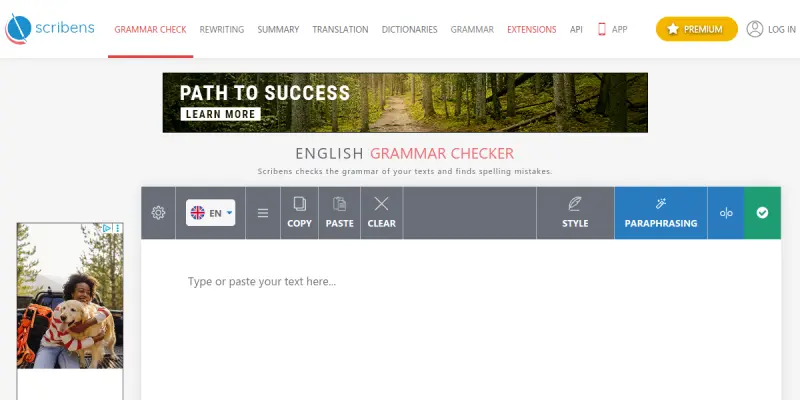
Scribens is a free, web-based grammar checker that helps users identify and correct a wide range of writing errors. It specializes in English language corrections, covering conjugation, subject-verb agreement, commonly confused words, punctuation, typography, and stylistic issues. The tool is accessible directly through a browser and also offers browser extensions for seamless integration.
Key Features
- Multi-category Error Detection: Scribens detects mistakes in conjugation, agreement, word confusion, punctuation, and typography, providing thorough coverage.
- Stylistic Suggestions: The tool suggests improvements for sentence structure and word choice to enhance readability.
- Plagiarism Checker (Premium): Scribens includes a built-in plagiarism detection feature that compares text against billions of web pages.
- Browser Extensions: Available for Chrome, Firefox, and Opera, allowing users to check grammar directly in their browser.
- Personal Dictionary: Users can add custom words to the dictionary to avoid false positives.
- Detailed Explanations: Each correction comes with a brief explanation to help users learn from their mistakes.
- Multi-format Support: Scribens works with text input and can also check uploaded documents (.doc, .docx, .txt).
- Real-time Correction: As users type or paste text, Scribens highlights errors instantly.
Use Cases
Academic Writing
Students can use Scribens to proofread essays, research papers, and assignments, ensuring grammatical accuracy and proper style before submission.
Professional Communication
Professionals can polish emails, reports, and presentations in the browser, reducing embarrassing errors and improving clarity.
Non-Native English Speakers
Scribens helps ESL learners understand complex grammar rules through detailed explanations and repeated exposure to corrections.
Content Creation
Bloggers and content writers can quickly check articles for typos and stylistic issues, speeding up the editing workflow.
Pricing & Plans
Scribens offers a free plan with core grammar checking features. A premium plan is also available with additional features such as an advanced plagiarism checker, higher character limits, and additional export formats. Detailed pricing information can be found on the Scribens website.
Integrations & Compatibility
Scribens integrates with major web browsers through dedicated extensions. It also supports document uploads in common text formats. The tool works on any device with a modern web browser.
Who Is It For?
Scribens is ideal for students, professionals, writers, and non-native English speakers who need a free, reliable grammar checker to improve their written English.
Limitations
- Scribens is primarily designed for English; support for other languages is limited.
- The free version has a character cap, requiring premium access for long texts.
- Some advanced stylistic suggestions may be less nuanced compared to premium competitors.
- The tool does not provide tone adjustment or paraphrasing suggestions natively.
Final Verdict
Scribens is a solid free grammar checker for English that covers a broad range of error types. Its browser extensions and plagiarism checker (premium) add value. While it may not replace premium tools for professional editors, it is an excellent choice for students and casual users. The tool's free tier makes it accessible to anyone looking to improve their writing without financial commitment.
Tool Facts
Screenshots & Interface
Pros
- ✓ Detects a broad range of grammar, punctuation, and stylistic errors.
- ✓ Offers a free tier with robust core features.
- ✓ Provides browser extensions for convenient desktop use.
- ✓ Includes a built-in plagiarism checker in the premium plan.
Cons
- × Free version imposes a character limit, restricting long text checks.
- × Grammar suggestions sometimes lack context, leading to false positives.
- × No native support for paraphrasing or tone adjustment.
- × Limited language support beyond English.
How to Use Scribens in Your Workflow
Integrating Scribens into your professional toolkit enhances efficiency by automating manual steps. By configuring it to suit your specific project requirements, you can optimize output quality and reduce project cycle times. Standard workflows involve testing the tool on simple tasks before scaling its use to complex operations.
Frequently Asked Questions
What is Scribens used for?
Scribens is a free grammar checker that corrects a wide variety of mistakes in English, including conjugation, agreement, word confusion, punctuation, and typography. It is designed for students, professionals, and non-native speakers who want to improve their writing accuracy.
What is the pricing model for Scribens?
Scribens uses a Free pricing model.
What are the main advantages of Scribens?
The key benefits of Scribens include: Detects a broad range of grammar, punctuation, and stylistic errors., Offers a free tier with robust core features., Provides browser extensions for convenient desktop use., Includes a built-in plagiarism checker in the premium plan..
What are the main limitations of Scribens?
Some limitations or cons of Scribens are: Free version imposes a character limit, restricting long text checks., Grammar suggestions sometimes lack context, leading to false positives., No native support for paraphrasing or tone adjustment., Limited language support beyond English..
Alternative AI Tools

InstaText
InstaText is an AI-powered writing and editing tool that helps users improve clarity, tone, and readability. It is suitable for professionals, students, and non-native speakers who want to polish their written content. A key differentiator is its ability to rewrite sentences while preserving the original meaning and context.

Craftly.AI
Craftly.AI is an AI writing assistant designed to generate blog posts, social media copy, and marketing copy. It focuses on SEO optimization and content rewriting to speed up workflows for marketers and writers.
Kafkai
Kafkai is an AI writing assistant that helps content creators generate articles, blog posts, and marketing copy from scratch. It supports multiple languages and offers features for editing, tone adjustment, and paraphrasing. The tool is designed for website owners, marketers, and agencies who need to scale content production efficiently.
Rating Details
Based on 0 ratings
Quick Comparisons
Related Tools
More AI tools from the same workflow, industry, or category.
fablepilot
FablePilot is a free AI story generator that turns a single prompt into a complete story — no sign-up required. Add illustrations or generate a plot outline.
Ghosts.app
Ghosts is an AI ghostwriter for agencies, creators, and law firms. It produces researched, cited drafts in a specific voice without requiring prompts. Users brief a specialist agent and approve a finished draft.
GrowthBar
GrowthBar is an AI tool for content generation, designed to boost productivity and streamline workflows for writers and content creators, with features like editing and tone adjustment.
GetGenie AI
GetGenie AI is an AI-powered writing and SEO assistant that helps content creators and marketers generate optimized content quickly. It includes built-in keyword research and SERP analysis to improve organic search performance.
Reviews
No reviews submitted yet. Be the first to share your experience.
Write a Review
Share Your Experience
Join the community to write reviews, submit ratings, and bookmark your favorite AI tools.