
InstaText
Use InstaText as the anchor for a real shortlist.
Instead of returning to a broad directory, jump straight into the strongest adjacent matchups for pricing, workflow fit, and differentiation.
Overview
Overview
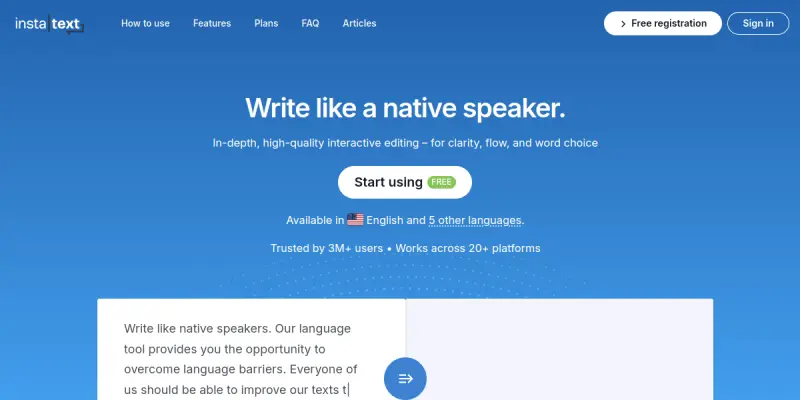
InstaText is an AI-powered writing assistant designed to help users refine their texts for clarity, coherence, and readability. Whether you are a student writing an essay, a professional drafting an email, or a non-native speaker polishing a report, InstaText rewrites your sentences while preserving the original meaning. The tool leverages advanced natural language processing to suggest improvements in grammar, style, and tone, making your writing more effective and engaging.
Key Features
- Smart Rewriting: InstaText rewrites sentences to improve clarity and flow without changing the intended message.
- Grammar and Spelling Correction: Automatically detects and fixes grammatical errors and typos.
- Tone Adjustment: Allows users to adjust the tone of their text to be more formal, casual, or professional.
- Paraphrasing Tool: Offers alternative phrasings for sentences to avoid repetition and enhance variety.
- Multi-Language Support: Supports multiple languages, making it accessible to a global audience.
- Real-Time Editing: Provides instant suggestions as you type, enabling a smooth editing workflow.
- Contextual Suggestions: Understands the context of your text to offer relevant improvements.
- User-Friendly Interface: Simple and intuitive design that requires no technical expertise.
Use Cases
Academic Writing
Students and researchers can use InstaText to improve the clarity and readability of their essays, research papers, and theses. The tool helps ensure that arguments are presented logically and that the language is precise and academic.
Professional Communication
Professionals can enhance emails, reports, proposals, and presentations with InstaText. It helps maintain a consistent tone and eliminates errors, making communication more effective and credible.
Content Creation
Bloggers, marketers, and content creators can use InstaText to polish articles, social media posts, and website copy. The paraphrasing feature is particularly useful for creating varied and engaging content.
Non-Native Speakers
Individuals for whom English is not a first language can benefit from InstaText's ability to correct grammar and suggest more natural phrasing. This helps them communicate more confidently and accurately.
Pricing & Plans
InstaText is currently offered as a free tool with no paid tiers disclosed. Users can access all core features without any subscription or payment. Future pricing plans or premium features have not been announced.
Integrations & Compatibility
InstaText is a web-based application accessible via any modern web browser. It does not currently offer native integrations with other platforms such as Microsoft Word, Google Docs, or email clients. Users must copy and paste text into the InstaText editor for processing.
Who Is It For?
InstaText is ideal for students, professionals, writers, and non-native speakers who want to improve the quality of their written English. It is also suitable for anyone who needs to produce clear and error-free texts quickly.
Limitations
- No Offline Mode: InstaText requires an internet connection to function, limiting its use in offline scenarios.
- Limited Integrations: The lack of integrations with popular writing platforms may disrupt established workflows.
- Repetitive Suggestions: For longer texts, the tool may sometimes offer repetitive or generic phrasing suggestions.
- No Image or File Upload: Users cannot upload images or documents directly; text must be entered manually.
Final Verdict
InstaText is a straightforward and effective tool for improving written English. Its free pricing and strong rewriting capabilities make it an attractive option for students and professionals alike. However, the absence of integrations and offline functionality may be drawbacks for power users. Overall, it is a solid choice for quick editing and proofreading tasks.
Tool Facts
Screenshots & Interface
Pros
- ✓ InstaText accelerates content creation by offering real-time rewriting and grammar corrections.
- ✓ The tool supports multiple languages, making it useful for non-native speakers and international teams.
- ✓ Tone adjustment and paraphrasing features help users tailor their writing to different audiences and purposes.
- ✓ Its free pricing removes financial barriers, allowing unlimited use without a subscription.
- ✓ The intuitive interface requires minimal learning curve, enabling quick adoption by any user.
Cons
- × InstaText does not integrate with popular writing platforms like Google Docs or Microsoft Word, requiring manual copy-pasting.
- × The tool occasionally offers repetitive or generic phrasing suggestions, especially on longer texts.
- × Users must manually fact-check any factual claims in the output, as the tool does not verify information.
- × An internet connection is required at all times, as there is no offline mode.
- × The tool does not support file uploads; text must be entered directly into the editor.
How to Use InstaText in Your Workflow
Integrating InstaText into your professional toolkit enhances efficiency by automating manual steps. By configuring it to suit your specific project requirements, you can optimize output quality and reduce project cycle times. Standard workflows involve testing the tool on simple tasks before scaling its use to complex operations.
Frequently Asked Questions
What is InstaText used for?
InstaText is an AI-powered writing and editing tool that helps users improve clarity, tone, and readability. It is suitable for professionals, students, and non-native speakers who want to polish their written content. A key differentiator is its ability to rewrite sentences while preserving the original meaning and context.
What is the pricing model for InstaText?
InstaText uses a Free pricing model.
What are the main advantages of InstaText?
The key benefits of InstaText include: InstaText accelerates content creation by offering real-time rewriting and grammar corrections., The tool supports multiple languages, making it useful for non-native speakers and international teams., Tone adjustment and paraphrasing features help users tailor their writing to different audiences and purposes., Its free pricing removes financial barriers, allowing unlimited use without a subscription., The intuitive interface requires minimal learning curve, enabling quick adoption by any user..
What are the main limitations of InstaText?
Some limitations or cons of InstaText are: InstaText does not integrate with popular writing platforms like Google Docs or Microsoft Word, requiring manual copy-pasting., The tool occasionally offers repetitive or generic phrasing suggestions, especially on longer texts., Users must manually fact-check any factual claims in the output, as the tool does not verify information., An internet connection is required at all times, as there is no offline mode., The tool does not support file uploads; text must be entered directly into the editor..
Alternative AI Tools

Veed.io
Browser-based AI video editor that streamlines editing, auto-captioning, and voiceovers. Designed for marketers to create professional video content quickly.

WhiteSmoke
WhiteSmoke is an all-in-one writing software suite that combines grammar checking, spell checking, and style editing. It offers translation capabilities and English learning resources to help users improve their written communication across various languages. The tool functions as a comprehensive writing assistant for professional and academic contexts.

Biograph AI
Biograph AI records voice conversations to preserve life stories, automatically transforming them into books, comics, or articles. It is designed for family historians and biographers seeking to digitize oral histories.
Rating Details
Based on 0 ratings
Quick Comparisons
Related Tools
More AI tools from the same workflow, industry, or category.
VidBreak
Turn a reference video into timed AI video prompts covering subjects, action, camera and sound, ready to check and adapt. Also writes story scripts and episodic screenplays. Paste a public link to try 15 seconds free, no sign-up. Packs from $19.
fablepilot
FablePilot is a free AI story generator that turns a single prompt into a complete story — no sign-up required. Add illustrations or generate a plot outline.
Ghosts.app
Ghosts is an AI ghostwriter for agencies, creators, and law firms. It produces researched, cited drafts in a specific voice without requiring prompts. Users brief a specialist agent and approve a finished draft.
GrowthBar
GrowthBar is an AI tool for content generation, designed to boost productivity and streamline workflows for writers and content creators, with features like editing and tone adjustment.
Reviews
No reviews submitted yet. Be the first to share your experience.
Write a Review
Share Your Experience
Join the community to write reviews, submit ratings, and bookmark your favorite AI tools.