

SeaArt AI
Use SeaArt AI as the anchor for a real shortlist.
Instead of returning to a broad directory, jump straight into the strongest adjacent matchups for pricing, workflow fit, and differentiation.
Overview
Overview
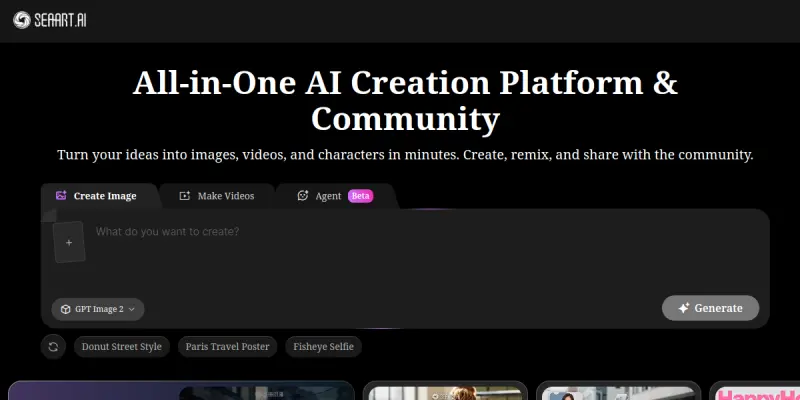
SeaArt AI is a comprehensive creative platform that combines AI-powered image, video, and audio generation with a vibrant community space. It allows creators to produce and share digital art, animate images, compose music, and interact with AI chatbots. The platform is designed for both beginners and experienced digital artists seeking an all-in-one creative toolkit.
Key Features
- AI Image Generation: Create high-quality images from text prompts using advanced diffusion models. Supports various styles including anime, realistic, fantasy, and more.
- AI Video Generation: Generate short video clips from text or image inputs. Includes motion effects and style transfer capabilities.
- AI Audio Generation: Produce music, sound effects, and voiceovers using AI. Offers multiple genres and customization options.
- AI Chat: Engage with AI-powered chatbots for creative brainstorming, writing assistance, or general conversation.
- Community Feed: Browse and discover artwork, videos, and audio created by other users. Like, comment, and follow favorite creators.
- Model Library: Access a curated collection of pre-trained AI models for different creative tasks. Users can also upload and share custom models.
- Prompt Library: Browse thousands of user-submitted prompts to inspire your own creations. Save and reuse favorite prompts.
- Batch Processing: Generate multiple outputs in one go to speed up experimentation and iteration.
Use Cases
Digital Art Creation
Artists can quickly generate concept art, character designs, and background scenes. The platform's diverse style models help in exploring different visual aesthetics without manual rendering.
Social Media Content
Content creators can produce eye-catching visuals, short video clips, and background music for social media posts. The batch generation feature enables rapid content production for platforms like Instagram, TikTok, and YouTube.
Music & Audio Production
Musicians and podcasters can create original soundtracks, jingles, and sound effects. The AI audio tools assist in composing melodies and generating voiceovers for various projects.
Creative Brainstorming
Writers and designers can use the AI chat feature to brainstorm ideas, refine concepts, and overcome creative blocks. The community aspect provides additional inspiration through shared work.
Education & Learning
Students and educators can use the platform to create visual aids, explain complex concepts through video, and explore AI technology in a hands-on manner.
Pricing & Plans
SeaArt AI operates on a freemium model. Free users get limited daily generations and access to basic features. Paid subscription plans offer higher generation limits, priority processing, advanced models, and removal of watermarks. Specific pricing tiers are not publicly disclosed and may vary by region.
Integrations & Compatibility
SeaArt AI is a web-based platform accessible through modern browsers. It does not offer native mobile apps but is responsive on mobile devices. There is no public API or direct integration with third-party creative software at this time.
Who Is It For?
SeaArt AI is ideal for digital artists, content creators, musicians, educators, and hobbyists who want an easy-to-use, multi-modal AI creative suite. It suits both individual creators and small teams looking for a centralized creative hub.
Limitations
- No offline mode; requires stable internet connection.
- Free tier has strict daily usage limits.
- Output quality varies depending on the clarity and specificity of user prompts.
- No direct integration with professional design software like Photoshop or Blender.
- Current video generation length is limited to short clips, not full-length videos.
Final Verdict
SeaArt AI offers a broad set of AI creative tools wrapped in a community-driven platform. Its strength lies in accessibility and variety, making it a good starting point for creators exploring AI-assisted production. However, power users may find limitations in output length, integration options, and advanced controls. For a free-to-try multi-modal creative suite, it provides solid value.
Tool Facts
Screenshots & Interface
Pros
- ✓ Supports image, video, and audio generation in a single platform, reducing the need for multiple tools.
- ✓ Community feed and prompt library provide a rich source of inspiration and ready-to-use ideas.
- ✓ Free tier allows users to test the platform without financial commitment.
Cons
- × No offline mode or native desktop application available.
- × Free tier has strict daily generation limits, which can slow down projects.
- × Video generation is currently limited to short clips, not suitable for long-form content.
- × No public API or direct integrations with professional creative software.
How to Use SeaArt AI in Your Workflow
Integrating SeaArt AI into your professional toolkit enhances efficiency by automating manual steps. By configuring it to suit your specific project requirements, you can optimize output quality and reduce project cycle times. Standard workflows involve testing the tool on simple tasks before scaling its use to complex operations.
Frequently Asked Questions
What is SeaArt AI used for?
SeaArt AI is a platform for generating images, videos, and audio using AI models. It also offers AI chat features and a community space for creators to share and discover content. The tool aims to simplify creative workflows for digital artists and content creators.
What is the pricing model for SeaArt AI?
SeaArt AI uses a Freemium pricing model.
What are the main advantages of SeaArt AI?
The key benefits of SeaArt AI include: Supports image, video, and audio generation in a single platform, reducing the need for multiple tools., Community feed and prompt library provide a rich source of inspiration and ready-to-use ideas., Free tier allows users to test the platform without financial commitment..
What are the main limitations of SeaArt AI?
Some limitations or cons of SeaArt AI are: No offline mode or native desktop application available., Free tier has strict daily generation limits, which can slow down projects., Video generation is currently limited to short clips, not suitable for long-form content., No public API or direct integrations with professional creative software..
Alternative AI Tools

Piktochart AI
Piktochart AI helps users create infographics, reports, and presentations quickly using natural language prompts. It is designed for professionals and teams who need branded visual content without design skills. A standout feature is its one-click brand kit application.
NightCafe
NightCafe generates images via text prompts and style transfer using Stable Diffusion. It features a community gallery and a free daily credit system.

Shutterstock AI
Shutterstock AI generates high-quality, commercial-ready images using proprietary models, integrated with a vast stock library.
Rating Details
Based on 0 ratings
Quick Comparisons
Related Tools
More AI tools from the same workflow, industry, or category.
Createimg.ai
Createimg.ai provides text-to-image generation and photo editing tools including background removal. It is designed for e-commerce sellers and creators needing free visual assets.
JetBrains AI
JetBrains AI is an AI-powered toolset integrated into JetBrains IDEs, offering code completion, debugging assistance, and intelligent suggestions for developers. It leverages large language models to help teams write, understand, and refactor code more efficiently. A key differentiator is its seamless integration with JetBrains' existing development environment.
Stable Diffusion Inpaint
Stable Diffusion Inpaint is an AI-powered tool that uses diffusion models to intelligently fill in or replace parts of an image. It is designed for photographers, designers, and content creators who need precise and context-aware image editing. Its key differentiator is the ability to generate new content that seamlessly blends with the existing image.
Crello AI
VistaCreate (formerly Crello) is a cloud-based design tool using AI to generate graphics from text prompts. It features 100K+ templates for social media and marketing.
Reviews
No reviews submitted yet. Be the first to share your experience.
Write a Review
Share Your Experience
Join the community to write reviews, submit ratings, and bookmark your favorite AI tools.