

Sudowrite
Use Sudowrite as the anchor for a real shortlist.
Instead of returning to a broad directory, jump straight into the strongest adjacent matchups for pricing, workflow fit, and differentiation.
Overview
Overview
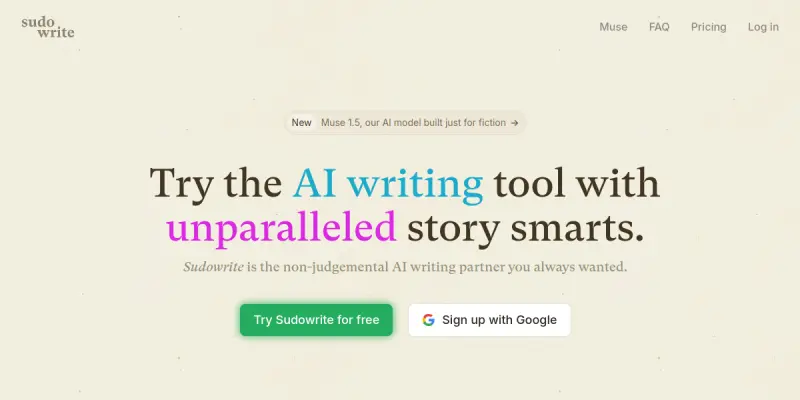
Sudowrite is a specialized AI writing tool built for fiction authors and creative writers. It assists with brainstorming plots, developing characters, expanding scenes, and rewriting prose to match a desired tone. Unlike general-purpose AI text generators, Sudowrite focuses on narrative structure and stylistic consistency, making it a practical companion for drafting novels, short stories, and screenplays.
Key Features
- Story Engine: Generates plot outlines and chapter-by-chapter suggestions based on user-defined genres and character arcs.
- Rewrite & Expand: Rewrites passages in different voices or expands brief notes into full paragraphs while preserving narrative flow.
- Tone Adjuster: Shifts the mood and formality of selected text to match specific scenes or character perspectives.
- Describe: Transforms simple physical descriptions into vivid, sensory-rich prose suitable for setting or character introductions.
- Brainstorming Tools: Offers prompts and guided exercises to overcome writer's block and develop story concepts.
- Feedback & Critique: Analyzes pacing, dialogue, and description density to provide structural notes on chapters.
- Multilingual Support: Works with text in multiple languages, though core features are optimized for English.
Use Cases
Novel Drafting
Authors can start from a rough outline and use Sudowrite to generate chapter drafts, expand dialogue, or refine descriptions. The tool helps maintain momentum during long-form writing projects.
Short Story Development
Writers working on shorter pieces can quickly experiment with different tones, openings, or endings. Sudowrite’s rewrite feature allows for rapid iteration on a single scene.
Revision & Editing
During the revision stage, authors can paste existing manuscript chapters and ask Sudowrite to tighten prose, adjust pacing, or vary sentence structure. The feedback tool highlights areas that may need more description or dialogue.
Character & World Building
Sudowrite provides prompts to flesh out character backstories, motivations, and relationships. It can also generate descriptions of fictional settings, cultures, and histories.
Pricing & Plans
Sudowrite operates on a subscription model. Specific pricing tiers are not disclosed in official materials, but reports indicate a monthly plan with a free trial option. For current pricing, visit the Sudowrite website.
Integrations & Compatibility
Sudowrite is a web-based application accessible through modern browsers. It does not offer native integrations with other writing platforms, but text can be copied and pasted between Sudowrite and any word processor or manuscript editor.
Who Is It For?
Sudowrite is best suited for fiction authors at any stage of their writing journey—from aspiring novelists seeking structure to experienced writers looking for efficient editing assistance. It is less useful for non-fiction, academic, or business writing.
Limitations
- Lacks direct integration with popular writing software (Scrivener, Word, Google Docs).
- Can produce repetitive phrasing or shallow suggestions if the input context is vague or incomplete.
- Output often requires significant manual editing to match a writer’s unique voice and narrative tone.
- Not designed for non-fiction, technical, or fact-based writing; factual accuracy of generated content is not guaranteed.
Final Verdict
Sudowrite is a focused and capable AI assistant for creative writing. Its strengths lie in brainstorming, rewriting, and narrative feedback, making it a valuable tool for fiction authors. However, its limited integrations and lack of support for non-fiction genres mean it is not a universal writing solution.
Tool Facts
Screenshots & Interface
Pros
- ✓ Generates plot outlines and chapter suggestions to help authors structure long-form fiction.
- ✓ Rewrite and expand features allow writers to quickly alter tone or add detail to existing prose.
- ✓ Multilingual support enables authors to work on stories in languages beyond English.
- ✓ Feedback tool provides structural analysis of pacing, dialogue, and description density.
Cons
- × Lacks direct integration with common writing software such as Scrivener and Google Docs.
- × May generate repetitive phrasing if the input context is too vague or short.
- × Not designed for non-fiction or fact-based writing, limiting its use for academic or business content.
How to Use Sudowrite in Your Workflow
Integrating Sudowrite into your professional toolkit enhances efficiency by automating manual steps. By configuring it to suit your specific project requirements, you can optimize output quality and reduce project cycle times. Standard workflows involve testing the tool on simple tasks before scaling its use to complex operations.
Frequently Asked Questions
What is Sudowrite used for?
Sudowrite is an AI writing assistant designed to help fiction authors plan, draft, and revise novels and short stories. It provides generative suggestions, tone adjustments, and structural feedback for creative writers.
What is the pricing model for Sudowrite?
Sudowrite uses a Paid pricing model.
What are the main advantages of Sudowrite?
The key benefits of Sudowrite include: Generates plot outlines and chapter suggestions to help authors structure long-form fiction., Rewrite and expand features allow writers to quickly alter tone or add detail to existing prose., Multilingual support enables authors to work on stories in languages beyond English., Feedback tool provides structural analysis of pacing, dialogue, and description density..
What are the main limitations of Sudowrite?
Some limitations or cons of Sudowrite are: Lacks direct integration with common writing software such as Scrivener and Google Docs., May generate repetitive phrasing if the input context is too vague or short., Not designed for non-fiction or fact-based writing, limiting its use for academic or business content..
Alternative AI Tools

Kafkai
Kafkai is an AI writing assistant that helps content creators generate articles, blog posts, and marketing copy from scratch. It supports multiple languages and offers features for editing, tone adjustment, and paraphrasing. The tool is designed for website owners, marketers, and agencies who need to scale content production efficiently.

NovelAI
NovelAI is a creative writing platform that uses AI to help authors generate and expand stories. It offers tools for world-building, character development, and branching narratives. The platform is designed for both hobbyist writers and professional authors looking to overcome writer's block.

InstaText
InstaText is an AI-powered writing and editing tool that helps users improve clarity, tone, and readability. It is suitable for professionals, students, and non-native speakers who want to polish their written content. A key differentiator is its ability to rewrite sentences while preserving the original meaning and context.
Rating Details
Based on 0 ratings
Quick Comparisons
Related Tools
More AI tools from the same workflow, industry, or category.
VidBreak
Turn a reference video into timed AI video prompts covering subjects, action, camera and sound, ready to check and adapt. Also writes story scripts and episodic screenplays. Paste a public link to try 15 seconds free, no sign-up. Packs from $19.
fablepilot
FablePilot is a free AI story generator that turns a single prompt into a complete story — no sign-up required. Add illustrations or generate a plot outline.
Ghosts.app
Ghosts is an AI ghostwriter for agencies, creators, and law firms. It produces researched, cited drafts in a specific voice without requiring prompts. Users brief a specialist agent and approve a finished draft.
GrowthBar
GrowthBar is an AI tool for content generation, designed to boost productivity and streamline workflows for writers and content creators, with features like editing and tone adjustment.
Reviews
No reviews submitted yet. Be the first to share your experience.
Write a Review
Share Your Experience
Join the community to write reviews, submit ratings, and bookmark your favorite AI tools.