

Timely AI
Use Timely AI as the anchor for a real shortlist.
Instead of returning to a broad directory, jump straight into the strongest adjacent matchups for pricing, workflow fit, and differentiation.
Overview
Overview
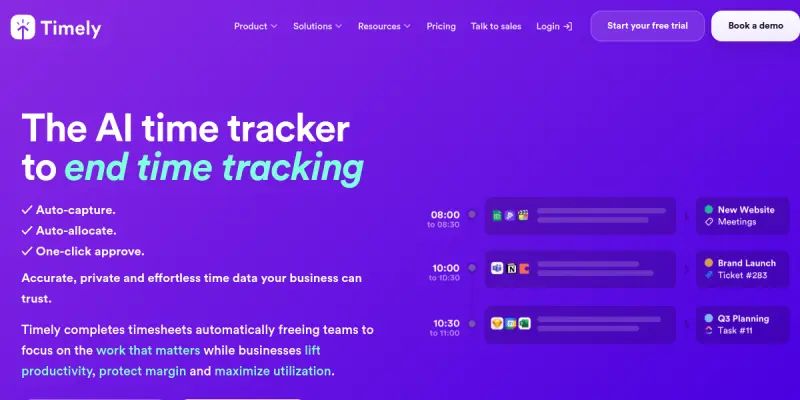
Timely is an AI-powered time tracking platform designed for professional service teams, including consultancies, agencies, and SaaS businesses. Unlike traditional time tracking tools that require manual start and stop timers, Timely automatically captures work activity in the background, using artificial intelligence to organize time entries. This allows teams to accurately bill clients, monitor project budgets, and understand where their time goes without the friction of manual logging.
Key Features
- Automatic Time Capture: Timely’s Memory feature runs silently in the background, recording work activity across apps and websites. It then organizes this data into a timeline that users can review and refine.
- AI-Powered Time Editing: The AI suggests titles, tags, and project assignments for each time entry, reducing the effort needed to maintain accurate timesheets.
- Project Budget Tracking: Set hourly or fixed budgets for projects and receive real-time alerts when budgets are approaching their limits.
- Client Dashboard: View all client work and profitability at a glance, including billable vs. non-billable hours and revenue.
- Integrated Calendar Sync: Sync with Google Calendar or Outlook to pull in scheduled events as time entries.
- Powerful Reporting: Generate reports by project, client, team member, or date range, and export them as PDF or CSV.
- Team Management: Admin controls for managing user permissions, creating teams, and assigning roles.
- Offline Mode: Work without internet connectivity and sync entries when connected again.
Use Cases
Agency Billing
Consultancies and agencies can rely on Timely to automatically capture time spent on each client project. The AI organizes entries by project and task, making it easy to produce accurate invoices at the end of each month.
Remote Team Productivity
Remote and distributed teams benefit from the passive time tracking feature, which does not require employees to remember to start or stop timers. Managers can review the timeline to understand bottlenecks and redistribute workloads.
Freelance Hourly Billing
Freelancers can use Timely to track time across multiple clients without manual logging. The auto-tracking ensures every billable minute is captured, and the reporting tool simplifies invoice creation.
Pricing & Plans
Timely offers a Freemium model. The Free plan includes limited automatic time capture (7-day history) and basic reports. Paid plans start at around $10/month per user for the Starter plan, which includes unlimited history, project budgets, and integrations. The Professional plan adds advanced features like expense tracking and custom reporting. Enterprise plans with dedicated support are available upon request.
Integrations & Compatibility
Timely integrates with popular productivity tools such as Google Calendar, Outlook, Asana, Trello, Jira, and Slack. It also supports browser extensions for Chrome and Firefox, and offers a desktop application for Windows and macOS. The API allows custom integrations.
Who Is It For?
Timely is best suited for professional service teams—consultancies, agencies, SaaS businesses, and freelancers—that need accurate, hassle-free time tracking for client billing and project management.
Limitations
- The automatic time capture may miss highly specific or offline work without manual correction.
- Privacy concerns: some users may feel uncomfortable with background activity monitoring.
- Advanced features like expense tracking require the Professional plan.
- The AI suggestions occasionally misclassify time entries, requiring manual review.
Final Verdict
Timely AI stands out among time tracking tools for its automatic, memory-based capture that removes the burden of manual logging. It is ideal for teams that bill by the hour and want accurate reports. While the free tier has limitations, the paid plans offer robust features that can improve billing accuracy and team productivity. For organizations that value automation and reporting, Timely is a strong choice.
Tool Facts
Screenshots & Interface
Pros
- ✓ Memory feature automatically captures time from apps and websites without manual logging.
- ✓ AI suggests project and task labels for time entries, reducing editing effort.
- ✓ Integrates with popular project management tools like Asana, Trello, and Jira.
- ✓ Real-time project budget alerts help prevent overspending.
- ✓ Offers a free tier with basic automatic time capture for small teams.
Cons
- × Automatic time capture may miss offline or highly specialized work without manual correction.
- × Active passive monitoring can raise privacy concerns among team members.
- × Advanced features like expense tracking are locked behind the Professional plan.
- × AI classification of time entries occasionally requires manual adjustments.
How to Use Timely AI in Your Workflow
Integrating Timely AI into your professional toolkit enhances efficiency by automating manual steps. By configuring it to suit your specific project requirements, you can optimize output quality and reduce project cycle times. Standard workflows involve testing the tool on simple tasks before scaling its use to complex operations.
Frequently Asked Questions
What is Timely AI used for?
Timely is an AI-powered time tracking platform for teams. It automatically logs work hours and generates reports for client billing and project monitoring. Its key differentiator is the memory function that captures time without manual entry.
What is the pricing model for Timely AI?
Timely AI uses a Freemium pricing model.
What are the main advantages of Timely AI?
The key benefits of Timely AI include: Memory feature automatically captures time from apps and websites without manual logging., AI suggests project and task labels for time entries, reducing editing effort., Integrates with popular project management tools like Asana, Trello, and Jira., Real-time project budget alerts help prevent overspending., Offers a free tier with basic automatic time capture for small teams..
What are the main limitations of Timely AI?
Some limitations or cons of Timely AI are: Automatic time capture may miss offline or highly specialized work without manual correction., Active passive monitoring can raise privacy concerns among team members., Advanced features like expense tracking are locked behind the Professional plan., AI classification of time entries occasionally requires manual adjustments..
Alternative AI Tools

Nifty AI
Nifty AI is a project management tool utilizing AI for automation and workflow optimization, designed for cross-industry professionals.

MeisterTask AI
MeisterTask AI automates task creation and project planning within the MeisterTask workflow. It uses AI to generate tasks from text inputs.

10,000ft AI
10,000ft AI is a resource management platform that uses artificial intelligence to help project managers plan, allocate, and track team resources. It offers real-time visibility into capacity and utilization for service-based organizations. The tool integrates with popular project management software to streamline workforce planning.
Rating Details
Based on 0 ratings
Quick Comparisons
Related Tools
More AI tools from the same workflow, industry, or category.
10,000ft AI
10,000ft AI is a resource management platform that uses artificial intelligence to help project managers plan, allocate, and track team resources. It offers real-time visibility into capacity and utilization for service-based organizations. The tool integrates with popular project management software to streamline workforce planning.
Kantree AI
Kantree AI is a flexible project management platform that enables teams to collaborate in real-time and visually manage workflows. It offers both self-hosted and cloud versions to suit different organizational needs. The platform leverages AI to automate tasks and improve planning efficiency.
Portfolio Management AI
Portfolio Management AI helps project managers allocate resources, track tasks, and optimize workflows using artificial intelligence. It is designed for teams managing multiple projects who need real-time portfolio visibility. The tool stands out with its AI-driven resource forecasting.
Wrike AI
Wrike AI is an enterprise project management platform that uses artificial intelligence to automate workflows, improve collaboration, and provide real-time project visibility. It is designed for teams and organizations looking to streamline task management and increase operational efficiency.
Reviews
No reviews submitted yet. Be the first to share your experience.
Write a Review
Share Your Experience
Join the community to write reviews, submit ratings, and bookmark your favorite AI tools.