

Time Doctor AI
Use Time Doctor AI as the anchor for a real shortlist.
Instead of returning to a broad directory, jump straight into the strongest adjacent matchups for pricing, workflow fit, and differentiation.
Overview
Overview
Time Doctor AI is a comprehensive workforce analytics platform designed to help businesses track time, monitor productivity, and gain actionable insights across distributed, remote, and in-office teams. Originally launched as a time tracking tool, Time Doctor has evolved by integrating artificial intelligence to automatically classify work activities, detect productivity patterns, and provide managers with real-time dashboards. The platform serves companies of all sizes, from small startups to large enterprises, aiming to improve accountability and operational efficiency.
Key Features
- AI-Powered Activity Classification: Automatically categorizes time entries into productive, neutral, and unproductive activities using machine learning models.
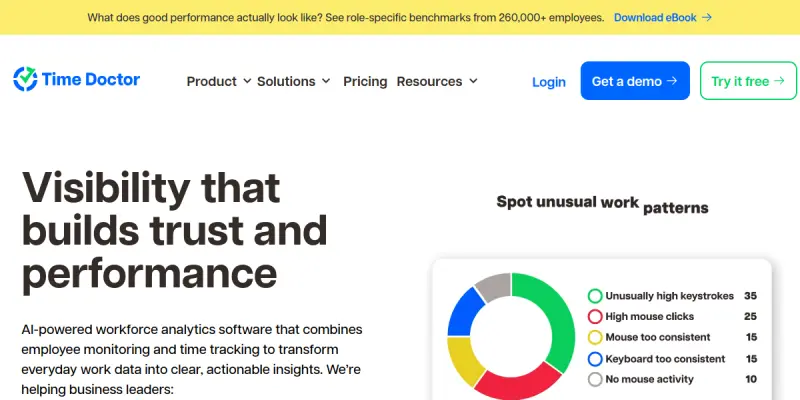
- Real-Time Dashboards: Provides managers with live views of team activity, including active hours, project time, and idle periods.
- Automatic Time Tracking: Tracks time spent on applications and websites without manual input, reducing administrative overhead.
- Screenshot Capture: Periodically captures screenshots to verify work activity (with user privacy controls).
- Project and Task Management: Integrates with project management tools to assign time to specific tasks and projects.
- Payroll and Billing Integration: Exports tracked time directly to payroll systems, simplifying invoicing and salary calculations.
- Productivity Scoring: Generates productivity scores for individuals and teams based on time allocation and activity patterns.
- Customizable Reports: Allows users to generate detailed reports on time usage, attendance, and productivity trends.
Use Cases
Remote Team Management
Managers of fully remote teams can use Time Doctor AI to ensure team members are working during agreed hours and to identify bottlenecks in workflows. The AI-driven insights help detect patterns such as frequent context switching or excessive time on non-work sites.
Freelancer and Contractor Oversight
Businesses that hire freelancers or contractors can track billable hours accurately and verify that work is being completed. The platform provides transparency for both parties, reducing disputes over time logs.
In-Office Productivity Analysis
Even in traditional office settings, Time Doctor AI can analyze how employees spend their time across different software tools, helping leadership make informed decisions about resource allocation and training needs.
Pricing & Plans
Time Doctor AI operates on a freemium model. A free plan is available for up to one user with limited features. Paid plans start at around $7/user/month (billed annually) for the Basic plan, which includes unlimited time tracking and basic reports. The Standard plan adds payroll integration and priority support. An Enterprise plan offers custom features, API access, and dedicated account management. Pricing is not publicly disclosed for the Enterprise tier.
Integrations & Compatibility
Time Doctor AI integrates with numerous third-party tools, including project management platforms like Asana, Trello, Monday.com, and Jira; payroll systems such as Gusto and ADP; and communication tools like Slack and Microsoft Teams. The platform is compatible with Windows, macOS, Linux, iOS, and Android devices. A browser extension is also available for Chrome and Firefox.
Who Is It For?
Time Doctor AI is designed for business owners, team leads, HR managers, and operations directors who need to monitor workforce productivity across distributed teams. It is suitable for industries such as IT, marketing, customer support, and consulting, where remote or hybrid work models are common. Freelancers and independent contractors can also use it to track their own time and generate reports for clients.
Limitations
- Privacy Concerns: Continuous monitoring via screenshots and activity tracking may raise privacy issues among employees, requiring clear communication and consent.
- Internet Dependency: The tool requires a stable internet connection to sync data, which can be problematic in areas with poor connectivity.
- Learning Curve for Reports: While the interface is intuitive, generating custom reports can be complex for new users due to the variety of filtering options.
- Limited AI Depth: The AI classification may not always accurately distinguish between productive and unproductive activities in niche or creative workflows.
Final Verdict
Time Doctor AI is a robust workforce analytics solution that brings valuable transparency to remote and hybrid teams. Its AI-powered features help automate time tracking and deliver actionable insights, making it a strong choice for managers seeking to improve accountability. However, organizations should weigh the privacy implications and ensure the tool aligns with their company culture. Overall, it is a reliable option for businesses that prioritize productivity monitoring.
Tool Facts
Screenshots & Interface
Pros
- ✓ Real-time dashboards give managers immediate visibility into team productivity.
- ✓ Automatic time tracking reduces manual entry and administrative overhead.
- ✓ Integration with payroll systems streamlines billing and salary calculations.
- ✓ Customizable reports allow in-depth analysis of time allocation across projects.
- ✓ The free tier is available for single users to test core features.
Cons
- × Screenshot capture and continuous monitoring may cause employee privacy concerns.
- × The AI activity classification can mislabel tasks in creative or non-standard workflows.
- × Generating custom reports can be complex for new users due to many filtering options.
- × Dependence on a stable internet connection limits usability in low-connectivity environments.
How to Use Time Doctor AI in Your Workflow
Integrating Time Doctor AI into your professional toolkit enhances efficiency by automating manual steps. By configuring it to suit your specific project requirements, you can optimize output quality and reduce project cycle times. Standard workflows involve testing the tool on simple tasks before scaling its use to complex operations.
Frequently Asked Questions
What is Time Doctor AI used for?
Time Doctor AI is a workforce analytics tool that tracks time and productivity for remote, hybrid, and in-office teams. It provides managers with dashboards and reports to monitor work hours, project progress, and employee engagement. Its key differentiator is the integration of AI to automatically classify activities and generate insights.
What is the pricing model for Time Doctor AI?
Time Doctor AI uses a Freemium pricing model.
What are the main advantages of Time Doctor AI?
The key benefits of Time Doctor AI include: Real-time dashboards give managers immediate visibility into team productivity., Automatic time tracking reduces manual entry and administrative overhead., Integration with payroll systems streamlines billing and salary calculations., Customizable reports allow in-depth analysis of time allocation across projects., The free tier is available for single users to test core features..
What are the main limitations of Time Doctor AI?
Some limitations or cons of Time Doctor AI are: Screenshot capture and continuous monitoring may cause employee privacy concerns., The AI activity classification can mislabel tasks in creative or non-standard workflows., Generating custom reports can be complex for new users due to many filtering options., Dependence on a stable internet connection limits usability in low-connectivity environments..
Alternative AI Tools

Everhour AI
Time tracking and billing software integrated directly into project management tools. Designed for teams and agencies needing precise budget control and invoicing. Tracks billable hours across Asana, ClickUp, and Jira.

Timely AI
Timely is an AI-powered time tracking platform for teams. It automatically logs work hours and generates reports for client billing and project monitoring. Its key differentiator is the memory function that captures time without manual entry.
Teamdeck AI
Deck is developer infrastructure for computer use agents. Design and deploy AI agents that authenticate, navigate, and return deterministic, structured data from any software. No API required.
Rating Details
Based on 0 ratings
Related Tools
More AI tools from the same workflow, industry, or category.
10,000ft AI
10,000ft AI is a resource management platform that uses artificial intelligence to help project managers plan, allocate, and track team resources. It offers real-time visibility into capacity and utilization for service-based organizations. The tool integrates with popular project management software to streamline workforce planning.
Kantree AI
Kantree AI is a flexible project management platform that enables teams to collaborate in real-time and visually manage workflows. It offers both self-hosted and cloud versions to suit different organizational needs. The platform leverages AI to automate tasks and improve planning efficiency.
Portfolio Management AI
Portfolio Management AI helps project managers allocate resources, track tasks, and optimize workflows using artificial intelligence. It is designed for teams managing multiple projects who need real-time portfolio visibility. The tool stands out with its AI-driven resource forecasting.
Wrike AI
Wrike AI is an enterprise project management platform that uses artificial intelligence to automate workflows, improve collaboration, and provide real-time project visibility. It is designed for teams and organizations looking to streamline task management and increase operational efficiency.
Reviews
No reviews submitted yet. Be the first to share your experience.
Write a Review
Share Your Experience
Join the community to write reviews, submit ratings, and bookmark your favorite AI tools.