

Veed.io
Use Veed.io as the anchor for a real shortlist.
Instead of returning to a broad directory, jump straight into the strongest adjacent matchups for pricing, workflow fit, and differentiation.
Overview
Overview
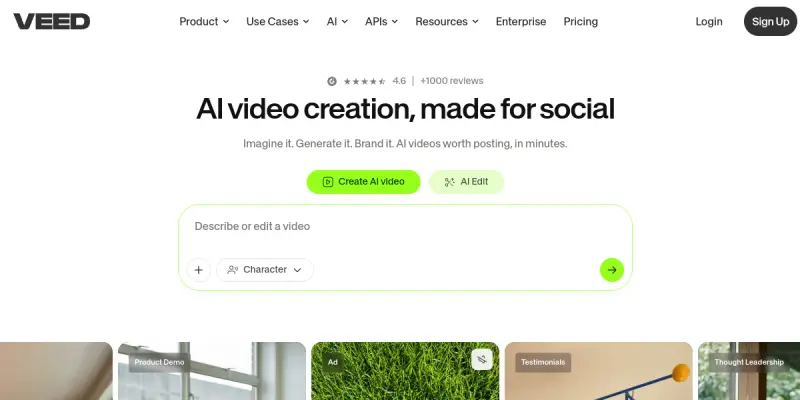
Veed.io is a cloud-based video editing platform designed to simplify the creation of professional video content. It combines standard editing tools with advanced AI features, allowing users to edit, caption, and voiceover videos directly in a web browser without requiring powerful hardware. It serves as a bridge between beginners and professionals, offering a streamlined workflow that removes technical barriers.
Key Features
- Auto-Captions: Automatically generates accurate subtitles in seconds.
- AI Avatars: Generates realistic digital human videos for presentations.
- Background Removal: Uses AI to remove backgrounds from video or images.
- AI Voiceovers: Creates studio-quality voiceovers in multiple languages.
- Stock Media Library: Provides access to millions of free stock videos and music.
- Collaborative Editing: Allows teams to edit together via a shared link.
Use Cases
Social Media Content
Create engaging short-form videos for platforms like TikTok and Instagram Reels with auto-captions to increase engagement.
Corporate Communications
Record webinars or meetings and instantly add captions for accessibility and easy sharing with remote teams.
Marketing & Sales
Produce product demos or explainer videos quickly using pre-made templates to boost conversion rates.
Pricing & Plans
Veed.io operates on a Freemium model. The free plan allows basic editing but limits export resolution to 720p. Paid tiers include the Plus plan ($12/month), Pro plan ($25/month), and Business plan ($45/month), offering higher resolutions (1080p/4K), longer export times, and team collaboration features.
Integrations & Compatibility
Veed.io integrates seamlessly with popular platforms including YouTube, Vimeo, Google Drive, Dropbox, and Zoom. It also supports direct uploads to social media channels.
Who Is It For?
This tool is ideal for social media managers, content creators, small business owners, and educators who need to produce video content quickly without learning complex video editing software.
Limitations
- Being a browser-based tool, it can struggle with very large or high-resolution files, sometimes resulting in lag.
- It lacks the advanced color grading and complex timeline control found in desktop software like Adobe Premiere Pro.
Final Verdict
Veed.io is an excellent solution for users who prioritize speed and ease of use over deep technical editing capabilities. It is particularly strong for social media and marketing use cases, providing a streamlined workflow that removes technical barriers.
Tool Facts
Screenshots & Interface
Pros
- ✓ Browser-based platform requiring no software installation
- ✓ Fast and accurate auto-captioning with sync capabilities
- ✓ Extensive library of stock footage, music, and sound effects
- ✓ User-friendly interface suitable for beginners and non-editors
- ✓ Direct sharing links for real-time team collaboration
Cons
- × Performance can be sluggish with very large video files
- × Export resolution is capped on the free tier
- × Lacks advanced color grading and motion graphics tools
- × Limited timeline control compared to desktop editors
How to Use Veed.io in Your Workflow
Integrating Veed.io into your professional toolkit enhances efficiency by automating manual steps. By configuring it to suit your specific project requirements, you can optimize output quality and reduce project cycle times. Standard workflows involve testing the tool on simple tasks before scaling its use to complex operations.
Frequently Asked Questions
What is Veed.io used for?
Browser-based AI video editor that streamlines editing, auto-captioning, and voiceovers. Designed for marketers to create professional video content quickly.
What is the pricing model for Veed.io?
Veed.io uses a Freemium pricing model.
What are the main advantages of Veed.io?
The key benefits of Veed.io include: Browser-based platform requiring no software installation, Fast and accurate auto-captioning with sync capabilities, Extensive library of stock footage, music, and sound effects, User-friendly interface suitable for beginners and non-editors, Direct sharing links for real-time team collaboration.
What are the main limitations of Veed.io?
Some limitations or cons of Veed.io are: Performance can be sluggish with very large video files, Export resolution is capped on the free tier, Lacks advanced color grading and motion graphics tools, Limited timeline control compared to desktop editors.
Alternative AI Tools

Jasper AI
Jasper AI is a generative writing assistant for marketing teams. It helps produce blog posts, ad copy, and marketing materials quickly. A key differentiator is its brand voice customization and SEO features.

Wave.video
Wave.video is an online video platform that lets users edit, record, multi-stream, and host videos. It is designed for content creators, marketers, and businesses seeking a unified video solution. A key differentiator is its built-in live streaming and hosting capabilities alongside a full editing suite.

Content at Scale
Content at Scale, now part of BrandWell, is a content creation and GTM platform that helps teams find buyers showing intent, identify website visitors via TrafficID, enrich records, and route them into CRM or outreach. It combines AI writing with sales intelligence for go-to-market teams.
Rating Details
Based on 0 ratings
Quick Comparisons
Related Tools
More AI tools from the same workflow, industry, or category.
fablepilot
FablePilot is a free AI story generator that turns a single prompt into a complete story — no sign-up required. Add illustrations or generate a plot outline.
Ghosts.app
Ghosts is an AI ghostwriter for agencies, creators, and law firms. It produces researched, cited drafts in a specific voice without requiring prompts. Users brief a specialist agent and approve a finished draft.
GrowthBar
GrowthBar is an AI tool for content generation, designed to boost productivity and streamline workflows for writers and content creators, with features like editing and tone adjustment.
GetGenie AI
GetGenie AI is an AI-powered writing and SEO assistant that helps content creators and marketers generate optimized content quickly. It includes built-in keyword research and SERP analysis to improve organic search performance.
Reviews
No reviews submitted yet. Be the first to share your experience.
Write a Review
Share Your Experience
Join the community to write reviews, submit ratings, and bookmark your favorite AI tools.