

Virtual Writing Tutor
Use Virtual Writing Tutor as the anchor for a real shortlist.
Instead of returning to a broad directory, jump straight into the strongest adjacent matchups for pricing, workflow fit, and differentiation.
Overview
Overview
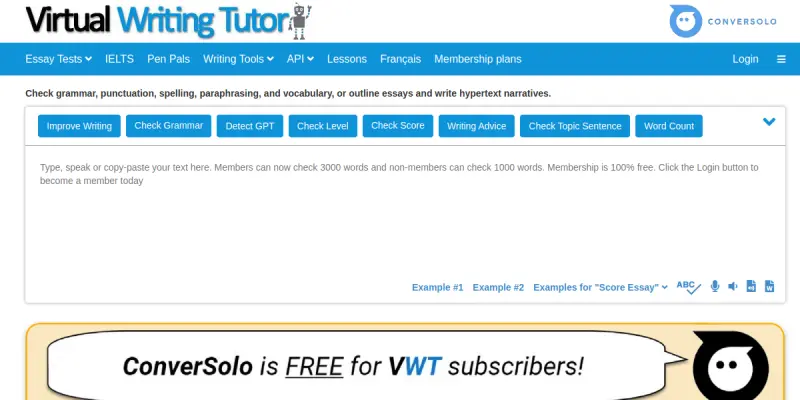
Virtual Writing Tutor is an online grammar checker designed specifically for second language learners. It focuses on correcting common ESL errors without requiring user registration, making it an accessible resource for students and professionals alike. The tool operates directly in the browser, providing immediate feedback on text input to help users improve their English proficiency.
Key Features
- Real-time Analysis: Instant feedback on grammar, spelling, and punctuation errors as you type.
- Paraphrasing Tool: Suggests alternative sentence structures to enhance readability and variety.
- Plagiarism Checker: Includes a tool to check for originality in written work to ensure academic integrity.
- Vocabulary Suggestions: Offers word choice improvements based on context and frequency.
- Conciseness Checker: Helps writers remove unnecessary words and improve brevity.
- Essay Scoring: Provides an overall score based on writing criteria such as coherence and cohesion.
Use Cases
Academic Writing
Helps students correct essays and research papers before submission to ensure grammatical accuracy and adherence to academic standards.
Business Communication
Assists professionals in drafting clear, error-free emails and reports, reducing the risk of misunderstandings in international business settings.
Language Learning
Provides ESL learners with detailed explanations of their mistakes, allowing them to understand and learn grammar rules for future improvement.
Pricing & Plans
The tool operates on a freemium model. The core grammar checker is completely free to use without requiring a credit card. While specific paid tiers are not prominently advertised, the free access offers robust functionality that meets the needs of most casual and student users.
Integrations & Compatibility
Currently functions as a standalone web application. While it does not offer native integrations with Microsoft Word or Google Docs, it supports copy-pasting text from any document editor, making it versatile across different platforms.
Who Is It For?
This tool is ideal for non-native English speakers, ESL students, and anyone looking to improve their English writing skills. It is particularly useful for those who want a simple, no-frills tool to proofread basic texts without the complexity of full-suite writing assistants.
Limitations
- Context Awareness: May miss subtle nuances in creative or highly technical writing where standard grammar rules don't apply.
- Creative Generation: Lacks the ability to generate new content or brainstorm ideas from scratch.
- Tone Analysis: Does not offer advanced emotional tone detection or stylistic recommendations found in premium AI tools.
Final Verdict
Virtual Writing Tutor is a solid, accessible resource for ESL learners. While it lacks the advanced features and modern design of paid competitors, its free availability and focus on education make it a valuable utility for anyone looking to polish their basic English writing.
Tool Facts
Screenshots & Interface
Pros
- ✓ Provides instant feedback on grammar and punctuation errors.
- ✓ Offers specific suggestions for paraphrasing sentences to improve clarity.
- ✓ Includes a plagiarism checker for academic integrity.
Cons
- × Limited functionality for generating creative content or brainstorming ideas.
- × The interface is basic and lacks the modern design of newer AI writing platforms.
- × Feedback can sometimes be ambiguous without detailed explanations.
How to Use Virtual Writing Tutor in Your Workflow
Integrating Virtual Writing Tutor into your professional toolkit enhances efficiency by automating manual steps. By configuring it to suit your specific project requirements, you can optimize output quality and reduce project cycle times. Standard workflows involve testing the tool on simple tasks before scaling its use to complex operations.
Frequently Asked Questions
What is Virtual Writing Tutor used for?
This tool provides real-time grammar and punctuation checks for non-native English speakers. It includes a paraphrasing feature to improve writing clarity and flow.
What is the pricing model for Virtual Writing Tutor?
Virtual Writing Tutor uses a Freemium pricing model.
What are the main advantages of Virtual Writing Tutor?
The key benefits of Virtual Writing Tutor include: Provides instant feedback on grammar and punctuation errors., Offers specific suggestions for paraphrasing sentences to improve clarity., Includes a plagiarism checker for academic integrity..
What are the main limitations of Virtual Writing Tutor?
Some limitations or cons of Virtual Writing Tutor are: Limited functionality for generating creative content or brainstorming ideas., The interface is basic and lacks the modern design of newer AI writing platforms., Feedback can sometimes be ambiguous without detailed explanations..
Alternative AI Tools

Plottr AI
Plottr is a story outlining software for authors that uses visual timelines to plot books. It includes character sheets and templates to organize fiction projects.

AdCreative AI
AdCreative AI helps marketers create ad creatives, images, videos, and ad copy using artificial intelligence. The tool is designed to streamline campaign scaling and improve return on ad spend (ROAS).
Trinka AI
Trinka AI is an automated proofreading and editing tool for academic and professional writing. It corrects grammar, style, and tone while suggesting improvements for clarity. Its key differentiator is deep grammar checking tuned for technical and scholarly language.
Rating Details
Based on 0 ratings
Related Tools
More AI tools from the same workflow, industry, or category.
fablepilot
FablePilot is a free AI story generator that turns a single prompt into a complete story — no sign-up required. Add illustrations or generate a plot outline.
Ghosts.app
Ghosts is an AI ghostwriter for agencies, creators, and law firms. It produces researched, cited drafts in a specific voice without requiring prompts. Users brief a specialist agent and approve a finished draft.
GrowthBar
GrowthBar is an AI tool for content generation, designed to boost productivity and streamline workflows for writers and content creators, with features like editing and tone adjustment.
GetGenie AI
GetGenie AI is an AI-powered writing and SEO assistant that helps content creators and marketers generate optimized content quickly. It includes built-in keyword research and SERP analysis to improve organic search performance.
Reviews
No reviews submitted yet. Be the first to share your experience.
Write a Review
Share Your Experience
Join the community to write reviews, submit ratings, and bookmark your favorite AI tools.