

Vizard AI
Use Vizard AI as the anchor for a real shortlist.
Instead of returning to a broad directory, jump straight into the strongest adjacent matchups for pricing, workflow fit, and differentiation.
Overview
Overview
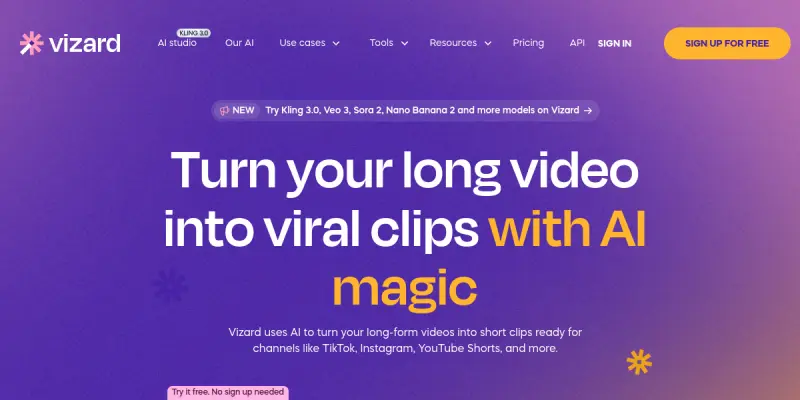
Vizard AI is a SaaS platform that transforms long-form video content into short, social-media-ready clips using artificial intelligence. It is designed for content creators, marketers, social media managers, and businesses looking to maximize the reach of their video assets without manual editing. By analyzing video for key moments, speech, and visual highlights, Vizard automatically generates multiple short clips optimized for different social platforms such as TikTok, Instagram Reels, and YouTube Shorts.
Key Features
- AI Clip Generation: Automatically identify and extract the most engaging moments from hours of video content.
- Smart Trimming: Remove silences, filler words, and low-energy segments to keep clips concise.
- Platform Presets: Pre-configured export settings for TikTok, Instagram, YouTube Shorts, and other social platforms.
- Auto-Captioning: Generate and style captions directly onto clips for accessibility and viewer retention.
- Multi-Clip Export: Batch process a single long video into multiple ready-to-publish clips in one go.
- A/B Testing Support: Create multiple versions of the same segment to test performance.
- Brand Customization: Add logos, intros, outros, and color palettes consistent with your brand.
- Direct Publishing Integration: Export clips directly to connected social media accounts from the dashboard.
Use Cases
Social Media Content Repurposing
A creator records a 30-minute podcast episode. Vizard AI analyzes the audio and visual highlights to produce 10 short clips, each focusing on a different topic or humorous moment, ready for Instagram and TikTok.
Marketing Campaign Expansion
A marketing team produces a single product launch video. Vizard helps them generate 15 short teaser clips for pre-launch social media teasers, plus 5 testimonial-style clips from customer interviews.
Internal Training Snippets
A company records a 1-hour training webinar. Vizard breaks it into digestible 2-to-5-minute modules that can be shared on internal communication channels for on-demand learning.
Event Recap Highlights
A conference organizer records keynote speeches. Vizard quickly pulls the most impactful statements and audience reactions into shareable highlight reels for LinkedIn and Twitter.
Pricing & Plans
Vizard AI operates on a paid subscription model. As of the latest review, specific pricing tiers (e.g., monthly or annual plans, number of export credits, storage limits) are not publicly disclosed in detail. Users are directed to contact sales or sign up for a demo for custom pricing. Some users report a free trial is available.
Integrations & Compatibility
Vizard AI integrates with popular social media platforms for direct publishing, including TikTok, Instagram (Reels and Stories), YouTube (Shorts and main platform), LinkedIn, and Twitter. The tool is web-based (SaaS) and works on any modern browser. No desktop application is required. Video input supports common formats like MP4, MOV, and AVI.
Who Is It For?
- Content creators (YouTubers, podcasters, streamers) who want to maximize output from a single recording session.
- Social media managers needing a steady pipeline of platform-optimized short clips.
- Marketing teams repurposing advertising and promotional videos.
- Educators and trainers breaking down long lectures into micro-lessons.
- Event organizers creating highlight reels from recorded sessions.
Limitations
- Processing time: Longer videos or high-resolution files can take significant time to analyze and export. Users on lower-tier plans may experience queue delays.
- Clip quality variance: While AI selection is generally good, some clips may miss the intended context or require manual re-editing.
- Limited fine control: Advanced editors may miss features like frame-by-frame trimming or multi-track audio mixing.
- Credit consumption: Each export consumes a credit (or similar unit); heavy users may need to upgrade plans frequently.
Final Verdict
Vizard AI is a powerful tool for anyone who needs to repurpose long-form video into short social clips at scale. Its AI-driven clip identification saves considerable manual editing time, and the platform presets ensure output compatibility. The main drawbacks are the lack of transparent pricing and limited control for power users. For most creators and marketers, the efficiency gains outweigh these cons.
Tool Facts
Screenshots & Interface
Pros
- ✓ Automatically identifies and extracts the most engaging moments from long videos, saving hours of manual editing.
- ✓ Multi-clip export from a single source video enables rapid content creation for multiple social platforms.
- ✓ Platform-specific export presets ensure clips are optimized for TikTok, Instagram, YouTube Shorts, and more.
- ✓ Auto-captioning feature improves accessibility and viewer retention without extra effort.
Cons
- × Pricing details are not publicly transparent, making it difficult to compare plans upfront.
- × Processing time for long videos can be significant, especially on lower-tier plans.
- × AI-selected clips sometimes miss context and require manual adjustments.
- × Lacks advanced editing controls such as frame-by-frame trimming or multi-track audio editing.
How to Use Vizard AI in Your Workflow
Integrating Vizard AI into your professional toolkit enhances efficiency by automating manual steps. By configuring it to suit your specific project requirements, you can optimize output quality and reduce project cycle times. Standard workflows involve testing the tool on simple tasks before scaling its use to complex operations.
Frequently Asked Questions
What is Vizard AI used for?
Vizard AI helps content creators, marketers, and social media managers repurpose long-form videos into short, shareable clips. It uses AI to identify key moments and automatically generate optimized cuts for platforms like TikTok, Instagram, and YouTube Shorts.
What is the pricing model for Vizard AI?
Vizard AI uses a Paid pricing model.
What are the main advantages of Vizard AI?
The key benefits of Vizard AI include: Automatically identifies and extracts the most engaging moments from long videos, saving hours of manual editing., Multi-clip export from a single source video enables rapid content creation for multiple social platforms., Platform-specific export presets ensure clips are optimized for TikTok, Instagram, YouTube Shorts, and more., Auto-captioning feature improves accessibility and viewer retention without extra effort..
What are the main limitations of Vizard AI?
Some limitations or cons of Vizard AI are: Pricing details are not publicly transparent, making it difficult to compare plans upfront., Processing time for long videos can be significant, especially on lower-tier plans., AI-selected clips sometimes miss context and require manual adjustments., Lacks advanced editing controls such as frame-by-frame trimming or multi-track audio editing..
Alternative AI Tools

Brightcove AI
Brightcove AI is a cloud-based video platform that helps businesses host, manage, and monetize video content at scale. It provides video streaming, analytics, and AI-powered features for marketers, publishers, and media companies seeking secure video delivery.

Kroto AI
Kroto AI is a freemium SaaS platform that transforms text into high-quality video clips and animations. It is designed for content creators, marketers, and businesses seeking quick social media clips or explainer videos without extensive editing overhead. A key differentiator is its ability to reduce studio rendering costs while maintaining AI-generated visual consistency.

Cascadeur
Cascadeur is a standalone software for 3D keyframe animation of humanoids. It uses AI to automate physics and secondary motion, allowing animators to focus on posing. The tool supports keyframe-based workflows for character animation.
Rating Details
Based on 0 ratings
Quick Comparisons
Related Tools
More AI tools from the same workflow, industry, or category.
ClipTrend.ai
ClipTrend.ai is an AI image-to-video workspace for creators, marketers, and short-form video teams.
SongR
SongR is a text-to-song app that generates custom music tracks from a few keywords. It is designed for content creators and social media users who need quick, royalty-free songs in genres like pop, rock, hip-hop, and chant. Its key differentiator is instant generation without requiring musical expertise.
Quantum Capture
Quantum Capture generates AI-powered talking head videos from text input. It is designed for content creators and marketers who need quick, studio-quality video clips without expensive equipment. The platform specializes in creating realistic avatars with consistent lip-sync and facial expressions.
Kaltura AI
Kaltura is an enterprise video platform that combines cloud hosting with AI tools for content creation, marketing, and learning management. It helps businesses create branded video experiences for webinars, social media, and internal training.
Reviews
No reviews submitted yet. Be the first to share your experience.
Write a Review
Share Your Experience
Join the community to write reviews, submit ratings, and bookmark your favorite AI tools.