

Wappalyzer AI
Use Wappalyzer AI as the anchor for a real shortlist.
Instead of returning to a broad directory, jump straight into the strongest adjacent matchups for pricing, workflow fit, and differentiation.
Overview
Overview
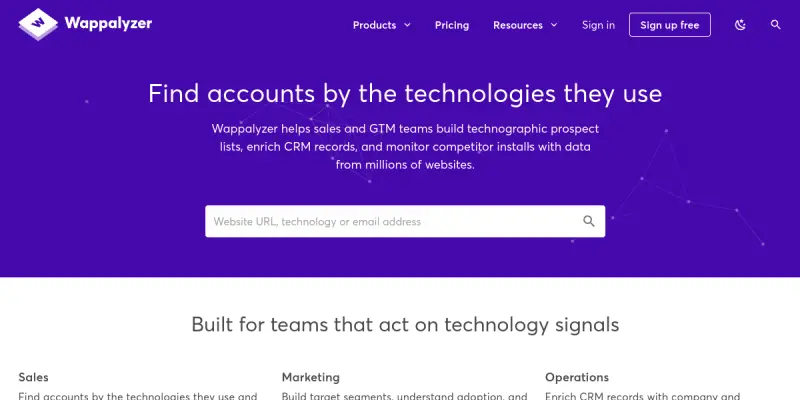
Wappalyzer is a web technology detection tool that identifies the software stacks powering millions of websites. It allows users to view and analyze the technologies used on any domain, ranging from web servers and CMS platforms to analytics tools and marketing scripts. Built by Favicon.co, this tool provides essential transparency into the digital landscape, helping professionals understand the technical infrastructure behind their competitors and prospects. It serves as a bridge between technical web data and business intelligence, making it indispensable for modern growth teams.
Key Features
- Comprehensive Technology Database: Detects over 3,000 technologies including CMS (WordPress, Drupal), e-commerce platforms (Shopify, Magento), and marketing tools (Google Analytics, Hotjar).
- Browser Extension: Lightweight Chrome and Microsoft Edge extensions for real-time website analysis directly within the browser.
- REST API: Robust API access allows developers to integrate technology detection into their own applications, scrapers, and internal tools.
- CRM Integration: Native integrations with Salesforce, HubSpot, and Pipedrive to automatically enrich prospect data with technology stack information.
- Competitor Monitoring: Analyze competitor websites to identify their tech stack, which helps in refining your own digital strategy.
- Custom Rules: Users can create custom rules to detect specific technologies not included in the standard database.
Use Cases
Sales Prospecting
Sales teams can use Wappalyzer to identify the technology stack of potential leads. By knowing which CRM, email marketing tool, or support platform a prospect uses, sales representatives can tailor their outreach messages to be more relevant, increasing the likelihood of engagement and conversion.
Competitor Research
Marketing professionals can scan competitor websites to see which CMS, payment gateways, or analytics solutions they utilize. This data is crucial for benchmarking and finding opportunities to differentiate your own digital presence.
SEO and Development Audits
Developers and SEO specialists can scan their own sites to ensure they are using the latest, secure, and performant technologies, or to identify deprecated scripts that might be affecting site performance.
Pricing & Plans
Wappalyzer operates on a Freemium model. The free plan allows users to scan a limited number of websites and view basic technology details. The paid plans (Pro and Enterprise) offer unlimited scanning, advanced filtering options, API access, and CRM integrations. Specific pricing is available on the official website.
Integrations & Compatibility
Wappalyzer is available as a browser extension for Chrome and Microsoft Edge. It features a REST API for programmatic data retrieval and offers direct integrations with popular Customer Relationship Management (CRM) platforms like Salesforce and HubSpot. It also works with automation tools like Zapier.
Who Is It For?
This tool is designed for three primary groups: Sales and Business Development professionals seeking technographic data, Developers and Tech Leads looking to audit website stacks, and Marketers performing competitive analysis and SEO research.
Limitations
- The browser extension provides a limited view of the technology stack compared to server-side scans.
- Advanced features, such as the API and unlimited scanning, require a paid subscription.
- It relies on JavaScript being enabled on the target website for accurate detection.
- Privacy concerns may arise when scanning third-party websites without explicit permission.
Final Verdict
Wappalyzer is a robust and essential tool for identifying website technologies. While the free version is useful for casual checks, the paid API and CRM integrations make it a powerful asset for sales teams and developers who need to automate and scale their technology research. It effectively bridges the gap between raw technical data and actionable business insights.
Tool Facts
Screenshots & Interface
Pros
- ✓ Detects over 3,000 technologies across 200 million websites.
- ✓ User-friendly browser extension for quick and real-time scanning.
- ✓ REST API enables seamless automation and CRM integration.
- ✓ Direct integrations with Salesforce and HubSpot for data enrichment.
Cons
- × Browser extension functionality is limited compared to on-premise scanners.
- × Advanced insights and unlimited scanning require a paid subscription.
- × It requires JavaScript to be enabled on the target website for detection.
How to Use Wappalyzer AI in Your Workflow
Integrating Wappalyzer AI into your professional toolkit enhances efficiency by automating manual steps. By configuring it to suit your specific project requirements, you can optimize output quality and reduce project cycle times. Standard workflows involve testing the tool on simple tasks before scaling its use to complex operations.
Frequently Asked Questions
What is Wappalyzer AI used for?
Wappalyzer helps sales teams build technographic lists and monitor competitors by detecting technologies on millions of websites.
What is the pricing model for Wappalyzer AI?
Wappalyzer AI uses a Freemium pricing model.
What are the main advantages of Wappalyzer AI?
The key benefits of Wappalyzer AI include: Detects over 3,000 technologies across 200 million websites., User-friendly browser extension for quick and real-time scanning., REST API enables seamless automation and CRM integration., Direct integrations with Salesforce and HubSpot for data enrichment..
What are the main limitations of Wappalyzer AI?
Some limitations or cons of Wappalyzer AI are: Browser extension functionality is limited compared to on-premise scanners., Advanced insights and unlimited scanning require a paid subscription., It requires JavaScript to be enabled on the target website for detection..
Alternative AI Tools

Klenty AI
Klenty AI is a sales engagement platform that helps teams orchestrate outbound motions across multiple channels. It uses AI agents to automate outreach sequences and boost calling volume for sales development reps. The platform is designed for B2B sales teams looking to scale cold outreach efficiently.

Zoho CRM AI
Zoho CRM AI integrates artificial intelligence into Zoho's customer relationship management platform to automate sales tasks and predict customer behavior. It is designed for sales teams and businesses seeking to streamline workflows and improve lead conversion rates through data-driven insights.

Mediafly AI
Mediafly is an AI-driven revenue enablement platform that centralizes sales content and automates distribution. It helps GTM teams ensure their content reaches the right audience at the right time.
Rating Details
Based on 0 ratings
Related Tools
More AI tools from the same workflow, industry, or category.
KalTalk
KalTalk is an AI-powered sales and support tool for businesses that centralizes customer interactions into a shared inbox. It offers visitor intent tracking and a grounded knowledge base to help teams respond faster and more accurately across multiple channels.
SimilarTech AI
SimilarTech identifies the technologies websites use, including web servers and CMS platforms. It provides traffic data and competitor insights for B2B research.
Mailshake AI
Mailshake automates sales outreach via email, phone, and social campaigns. It helps users build automated cadences to improve response rates. The platform integrates with CRMs like Salesforce and HubSpot.
Agile CRM AI
Agile CRM AI is a freemium customer relationship management platform that uses artificial intelligence to help sales teams automate workflows, prioritize leads, and manage contacts. It is ideal for small to medium businesses seeking an affordable AI-powered CRM.
Reviews
No reviews submitted yet. Be the first to share your experience.
Write a Review
Share Your Experience
Join the community to write reviews, submit ratings, and bookmark your favorite AI tools.