

webhook.site AI
Use webhook.site AI as the anchor for a real shortlist.
Instead of returning to a broad directory, jump straight into the strongest adjacent matchups for pricing, workflow fit, and differentiation.
Overview
Overview
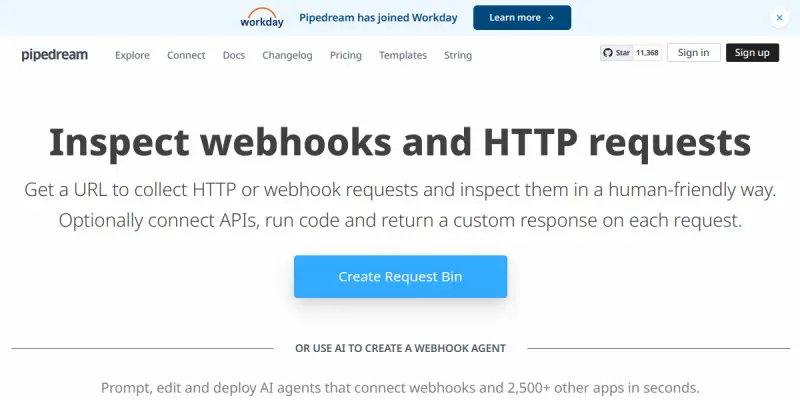
webhook.site AI is a webhook inspection and debugging tool provided by Pipedream, designed to help developers capture, inspect, and troubleshoot HTTP requests in real time. By offering a unique URL that collects webhook payloads, the tool simplifies the process of testing and verifying integrations between APIs, services, and automation workflows. It is particularly useful for DevOps engineers, backend developers, and anyone who needs to monitor webhook traffic during development or production.
Key Features
- Real-Time Request Capture: Instantly collects all HTTP requests (GET, POST, PUT, etc.) sent to your unique webhook URL, displaying them in a live dashboard.
- Inspect Headers and Body: View detailed information including request headers, query parameters, JSON body, and raw payload data for debugging.
- Shareable URLs: Generate unique webhook endpoints that can be easily shared with team members or third-party services for collaborative testing.
- Pipedream Integration: Directly connect captured requests to Pipedream's workflow automation platform, enabling further processing, transformation, or notification.
- No-Code Setup: Create a webhook endpoint in seconds without any coding or infrastructure setup, making it accessible for both technical and non-technical users.
- CORS Support: Handles Cross-Origin Resource Sharing (CORS) automatically, allowing webhooks from browser-based applications to be tested without extra configuration.
- Request History: Stores a history of all received requests, allowing you to revisit past payloads and compare changes over time.
- Export Capabilities: Download captured request data in JSON format for offline analysis or documentation.
Use Cases
Debugging API Integrations
When connecting a third-party service that sends webhooks (e.g., payment processors, CRM systems, or chatbots), developers can use webhook.site AI's URL to capture the exact payload structure and verify that the integration processes data correctly.
Testing Webhook Receivers
Before deploying a production webhook endpoint, teams can simulate incoming requests by sending test payloads to the tool's URL. This helps identify parsing errors or edge cases early in the development cycle.
Monitoring Automated Workflows
Users of Pipedream's automation platform can route webhook events through webhook.site AI to inspect them before they trigger downstream actions. This ensures that only well-formed requests are processed, reducing failures in automated pipelines.
Collaborative Troubleshooting
Share a webhook.site AI URL with remote team members or external partners during debugging sessions. Everyone can view the same incoming requests in real time, speeding up issue resolution.
Pricing & Plans
webhook.site AI is offered as a free tool by Pipedream. There is no paid tier for the webhook inspection functionality itself. However, users who wish to build automation workflows on top of captured requests will need a Pipedream subscription, which starts with a generous free tier (includes 10,000 workflow runs per month) and paid plans for higher usage.
Integrations & Compatibility
- Pipedream Workflows: Seamlessly forward captured requests to Pipedream for further automation.
- Any HTTP Client: Compatible with any service or application that can send HTTP requests (REST APIs, webhook senders, etc.).
- CORS Enabled: Works with browser-based JavaScript applications out of the box.
- No SDK Required: Simply use the provided URL as the webhook endpoint.
Who Is It For?
- Backend Developers: Who need to test and debug webhook integrations during development.
- DevOps Engineers: Who monitor API traffic and ensure reliable data flow between services.
- QA Engineers: Who validate that webhook payloads meet expected formats and contain correct data.
- Automation Enthusiasts: Who use Pipedream and want a lightweight inspection tool before processing events.
Limitations
- No Persistent Storage: Request data is retained only temporarily; users must export or forward it for long-term storage.
- Not Designed for Production Monitoring: The tool is intended for testing and debugging, not as a permanent webhook receiver for live services.
- No Advanced Filtering: The dashboard displays all incoming requests without the ability to filter by specific criteria (e.g., status code, header values).
- Dependent on Pipedream Ecosystem: The AI label and some features are tied to Pipedream; standalone users get basic request capture only.
Final Verdict
webhook.site AI is a straightforward, no-fuss tool for anyone who works with webhooks. Its real-time capture, shareable URLs, and deep integration with Pipedream make it a valuable addition to a developer's debugging toolkit. The free pricing and instant setup lower the barrier to entry, while the lack of advanced filtering and temporary storage remind users that this is a debugging aid, not a production solution. Overall, it's a solid choice for developers seeking a reliable webhook inspector.
Tool Facts
Screenshots & Interface
Pros
- ✓ Real-time capture of HTTP requests allows developers to debug integrations instantly.
- ✓ Generates unique, shareable webhook URLs that can be used across teams without additional setup.
- ✓ Seamless integration with Pipedream workflows enables automated processing of captured requests.
- ✓ No-code setup reduces onboarding time to seconds, making it accessible for all skill levels.
- ✓ Supports CORS, enabling testing of webhooks from browser-based applications.
- ✓ 100% free to use for webhook inspection, with no hidden costs.
Cons
- × Request data is stored only temporarily and cannot be retained for long-term analysis without manual export.
- × The dashboard does not support filtering or searching incoming requests by specific criteria.
- × The tool is intended for temporary debugging and is not suitable as a production webhook receiver.
- × Advanced automation features require a Pipedream paid plan, though basic inspection remains free.
How to Use webhook.site AI in Your Workflow
Integrating webhook.site AI into your professional toolkit enhances efficiency by automating manual steps. By configuring it to suit your specific project requirements, you can optimize output quality and reduce project cycle times. Standard workflows involve testing the tool on simple tasks before scaling its use to complex operations.
Frequently Asked Questions
What is webhook.site AI used for?
webhook.site AI is a webhook testing and inspection tool by Pipedream that lets developers capture, inspect, and debug HTTP requests in real time. It helps DevOps teams and API developers troubleshoot webhook integrations without writing code. Its key differentiator is its seamless integration with Pipedream's workflow automation platform.
What is the pricing model for webhook.site AI?
webhook.site AI uses a Paid pricing model.
What are the main advantages of webhook.site AI?
The key benefits of webhook.site AI include: Real-time capture of HTTP requests allows developers to debug integrations instantly., Generates unique, shareable webhook URLs that can be used across teams without additional setup., Seamless integration with Pipedream workflows enables automated processing of captured requests., No-code setup reduces onboarding time to seconds, making it accessible for all skill levels., Supports CORS, enabling testing of webhooks from browser-based applications., 100% free to use for webhook inspection, with no hidden costs..
What are the main limitations of webhook.site AI?
Some limitations or cons of webhook.site AI are: Request data is stored only temporarily and cannot be retained for long-term analysis without manual export., The dashboard does not support filtering or searching incoming requests by specific criteria., The tool is intended for temporary debugging and is not suitable as a production webhook receiver., Advanced automation features require a Pipedream paid plan, though basic inspection remains free..
Alternative AI Tools

Stitch AI
Stitch AI automates API and database data pipelines with AI to streamline ETL workflows for developers.

Pinecone
Pinecone is a fully managed vector database for AI applications, enabling fast similarity search and retrieval-augmented generation (RAG). It targets developers and data scientists who need scalable vector storage without managing infrastructure.

Hevo AI
Hevo AI is a data integration platform that helps businesses automate and manage their data pipelines. It enables users to connect, transform, and sync data from various sources into their preferred destinations without manual coding. A key differentiator is its AI-driven schema mapping and real-time data replication capabilities.
Rating Details
Based on 0 ratings
Related Tools
More AI tools from the same workflow, industry, or category.
Stoplight Mock AI
Stoplight Mock AI accelerates API design by generating OpenAPI specifications and mock servers instantly. It streamlines developer workflows by transforming raw data into interactive documentation.
RequestBin AI
RequestBin AI helps developers capture, inspect, and debug webhook requests in real time. It is designed for API integration testing and workflow monitoring without the need for a local server.
AWS Glue AI
AWS Glue is a fully managed serverless ETL service that automates data preparation and integration for building data lakes. It uses machine learning to dynamically optimize your data pipelines. Ideal for developers and data engineers seeking scalable, cost-effective data workflows.
Xplenty AI
Xplenty AI is a data integration platform that automates ETL, ELT, and reverse ETL processes. It helps data engineers and analysts build secure pipelines to unify data for better decision-making. The platform includes robust API management for connecting diverse data sources.
Reviews
No reviews submitted yet. Be the first to share your experience.
Write a Review
Share Your Experience
Join the community to write reviews, submit ratings, and bookmark your favorite AI tools.