

When2meet AI
Use When2meet AI as the anchor for a real shortlist.
Instead of returning to a broad directory, jump straight into the strongest adjacent matchups for pricing, workflow fit, and differentiation.
Overview
Overview
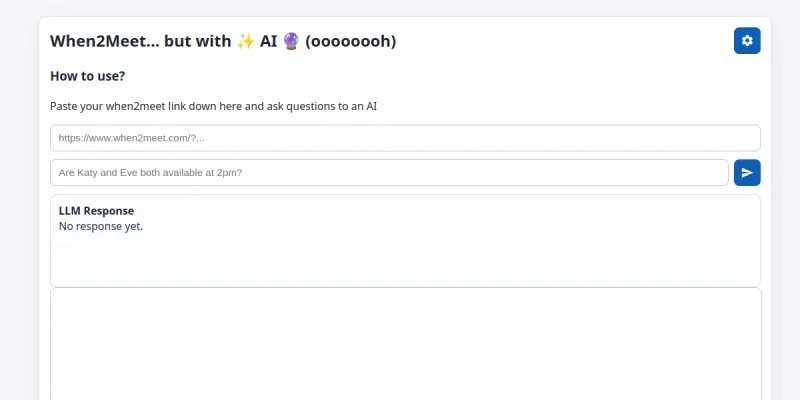
When2meet AI is an AI-powered scheduling tool designed to streamline the process of finding mutually available time slots for team meetings. It analyzes individual calendars and preferences to suggest optimal meeting times, reducing the back-and-forth typically associated with group scheduling. The tool is particularly useful for distributed teams, project managers, and anyone who regularly coordinates meetings across multiple participants.
Key Features
- AI-Driven Scheduling: Automatically analyzes availability patterns and suggests the best meeting times based on participant preferences.
- Calendar Integration: Syncs with popular calendar services to pull real-time availability without manual entry.
- Group Polls: Send out scheduling polls to collect availability from participants who may not use the same calendar platform.
- Smart Conflict Detection: Identifies and highlights scheduling conflicts before a meeting is finalized.
- Timezone Handling: Automatically adjusts for timezone differences so all participants see times in their local time.
- Meeting Reminders: Sends automated reminders to participants before scheduled meetings.
- Analytics Dashboard: Provides insights into team scheduling patterns, such as most common meeting times and average planning time saved.
- Mobile-Friendly Interface: Works on smartphones and tablets so availability can be checked on the go.
Use Cases
Team Meeting Coordination
Project managers and team leads can use When2meet AI to quickly find time slots that work for all members of a cross-functional team, reducing the email chain or chat thread that often precedes scheduling.
Client & External Stakeholder Meetings
Sales professionals and consultants can send a scheduling link to clients, who then select their available times. The AI then matches with the host’s calendar to propose the best slot.
Recurring Standups & Check-ins
For daily or weekly standups, When2meet AI learns the group’s preferred patterns and suggests consistent times, reducing repeated scheduling overhead.
Pricing & Plans
When2meet AI operates on a Freemium model. The free tier includes basic scheduling polls and limited calendar integrations. Paid plans unlock advanced features such as unlimited polls, team analytics, priority support, and API access. Specific pricing tiers and amounts are not publicly disclosed on the website.
Integrations & Compatibility
The tool integrates with Google Calendar, Microsoft Outlook, and Apple Calendar. It also supports sharing via a web link for participants without calendar sync. There is no native Slack or Microsoft Teams integration listed at this time.
Who Is It For?
When2meet AI is designed for busy professionals, team leads, project coordinators, and anyone who organizes meetings with two or more participants. It is especially valuable for remote and hybrid teams where coordinating across timezones is a common challenge.
Limitations
- The free tier has a cap on the number of scheduling polls per month.
- No native integration with popular messaging platforms like Slack or Teams.
- The tool requires all participants to either sync their calendar or respond to a poll, which may not work for all corporate security policies.
- User reviews indicate a low average rating (2.7/5), suggesting the experience may not meet expectations for reliability or accuracy.
Final Verdict
When2meet AI offers a focused solution for AI-assisted scheduling with solid core features. Its freemium model makes it accessible, but the low user satisfaction score and limited integrations are notable drawbacks. It is best suited for small to medium teams that need a simple, AI-driven scheduling assistant without the complexity of full-featured enterprise scheduling platforms.
Tool Facts
Screenshots & Interface
Pros
- ✓ AI-driven optimization reduces time spent on manual scheduling.
- ✓ Freemium model allows users to test core features without upfront payment.
- ✓ Timezone handling automatically adjusts for global teams, simplifying cross-timezone coordination.
- ✓ Calendar integration pulls real-time availability, eliminating duplicate data entry.
Cons
- × Free tier limits the number of scheduling polls per month.
- × No native integration with Slack or Microsoft Teams limits workflow automation.
- × Low user rating (2.7/5) suggests potential reliability or usability issues.
- × Requires calendar sync or manual poll responses, which may not comply with strict corporate security policies.
How to Use When2meet AI in Your Workflow
Integrating When2meet AI into your professional toolkit enhances efficiency by automating manual steps. By configuring it to suit your specific project requirements, you can optimize output quality and reduce project cycle times. Standard workflows involve testing the tool on simple tasks before scaling its use to complex operations.
Frequently Asked Questions
What is When2meet AI used for?
When2meet AI is a scheduling assistant that analyzes team availability and compares schedules to find optimal meeting times. It targets busy professionals and teams seeking to reduce scheduling friction. Its key differentiator is AI-driven optimization of group time slots.
What is the pricing model for When2meet AI?
When2meet AI uses a Freemium pricing model.
What are the main advantages of When2meet AI?
The key benefits of When2meet AI include: AI-driven optimization reduces time spent on manual scheduling., Freemium model allows users to test core features without upfront payment., Timezone handling automatically adjusts for global teams, simplifying cross-timezone coordination., Calendar integration pulls real-time availability, eliminating duplicate data entry..
What are the main limitations of When2meet AI?
Some limitations or cons of When2meet AI are: Free tier limits the number of scheduling polls per month., No native integration with Slack or Microsoft Teams limits workflow automation., Low user rating (2.7/5) suggests potential reliability or usability issues., Requires calendar sync or manual poll responses, which may not comply with strict corporate security policies..
Alternative AI Tools

Kronologic AI
Kronologic is an AI-powered business orchestration platform that automates complex scheduling and support workflows. It helps sales and customer success teams manage customer interactions through conversational AI. The tool differentiates itself by handling end-to-end process automation without manual coding.

Workflowy AI
Workflowy AI integrates generative AI into the Workflowy note-taking platform to help you organize thoughts, summarize text, and expand bullet points efficiently.

SavvyCal AI
SavvyCal is a smart calendar scheduling tool that uses AI to suggest optimal meeting times and reduce back-and-forth emails.
Rating Details
Based on 0 ratings
Related Tools
More AI tools from the same workflow, industry, or category.
Mailbutler AI
Mailbutler AI is an email extension that integrates AI-powered writing, scheduling, and tracking features directly into your existing inbox. It helps professionals and teams streamline email workflows and save time on routine communication tasks.
Lucidspark AI
Lucidspark AI is a virtual whiteboard tool that helps teams brainstorm, organize ideas, and move from concept to execution. It is designed for remote and hybrid teams seeking a structured yet flexible collaboration space. Its integration with Lucidchart sets it apart for end-to-end visual workflow planning.
SignNow AI
SignNow AI automates document signing and workflow management for businesses. It uses AI to extract fields, send documents for signature, and track completion. Ideal for HR, legal, and sales teams.
ProtonMail AI
ProtonMail AI is an integrated writing assistant for secure email, leveraging Swiss privacy standards to draft, summarize, and translate messages within the Proton Mail interface.
Reviews
No reviews submitted yet. Be the first to share your experience.
Write a Review
Share Your Experience
Join the community to write reviews, submit ratings, and bookmark your favorite AI tools.