

Wisegrid Verified
Use Wisegrid as the anchor for a real shortlist.
Instead of returning to a broad directory, jump straight into the strongest adjacent matchups for pricing, workflow fit, and differentiation.
Overview
Overview
Wisegrid is a work management platform designed to bridge the gap between traditional spreadsheets and dedicated project management software. It allows teams to manage data, projects, and workflows directly within a spreadsheet interface. The primary modality is text-based data entry and manipulation, utilizing rows, columns, and formulas. The target user includes teams currently relying on spreadsheets for project tracking who need more structure, visualization, and automation without abandoning the familiarity of grid-based editing.
Key Features
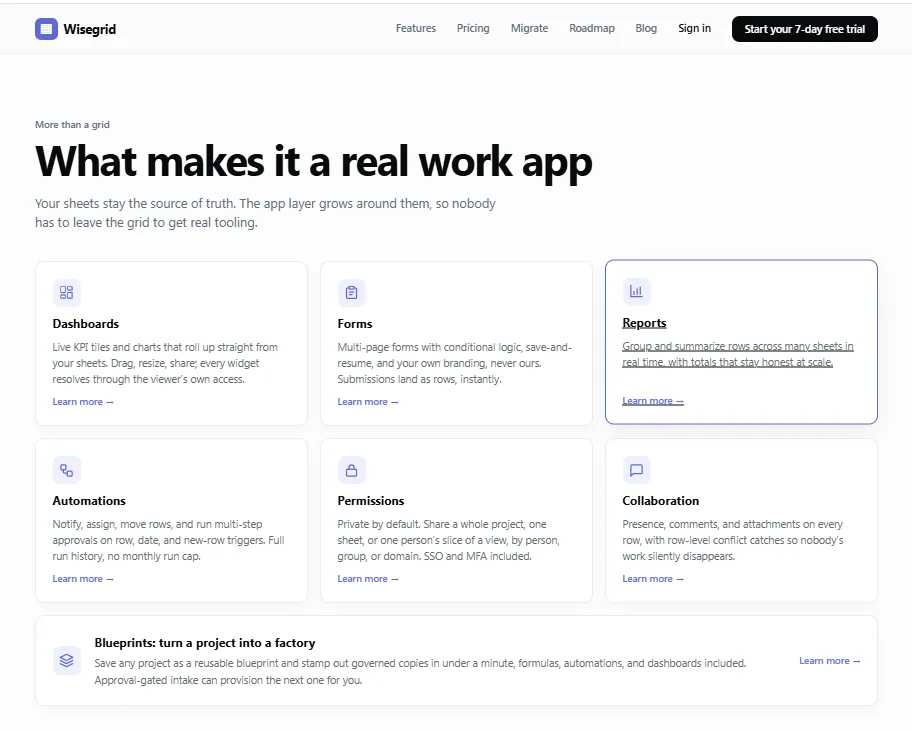
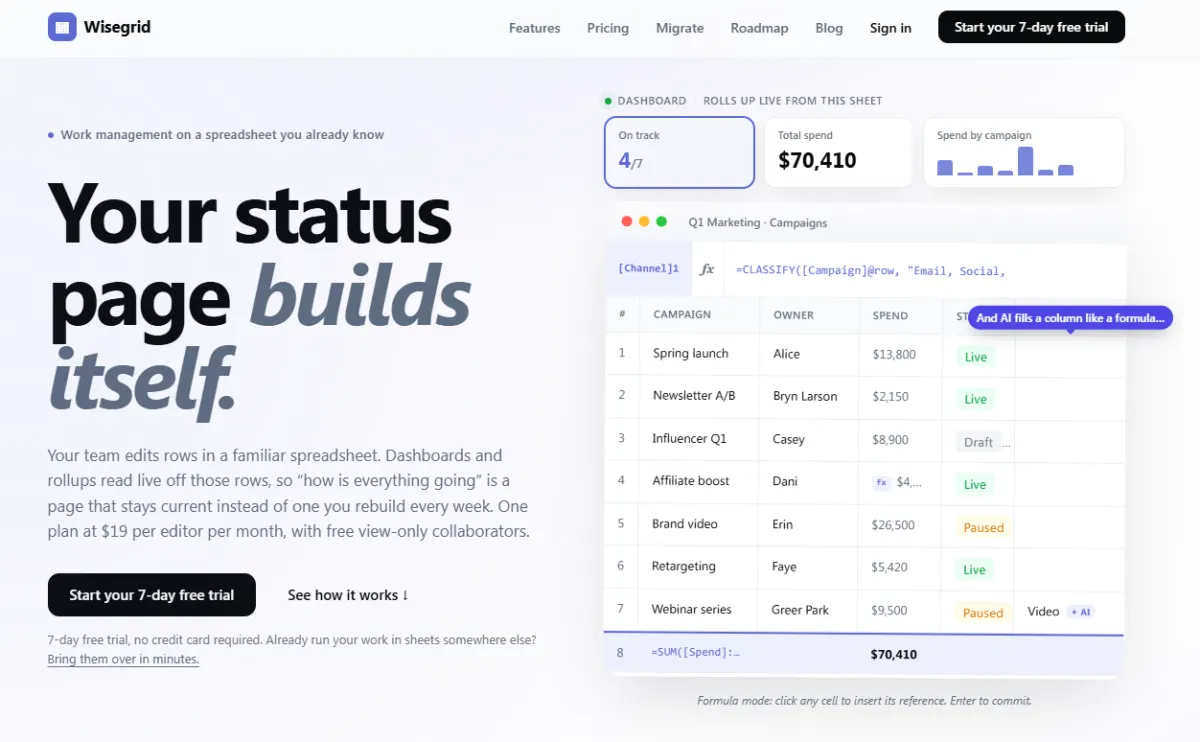
- Live Dashboards: Visual KPI tiles and charts that automatically aggregate data from spreadsheet rows without manual updates.
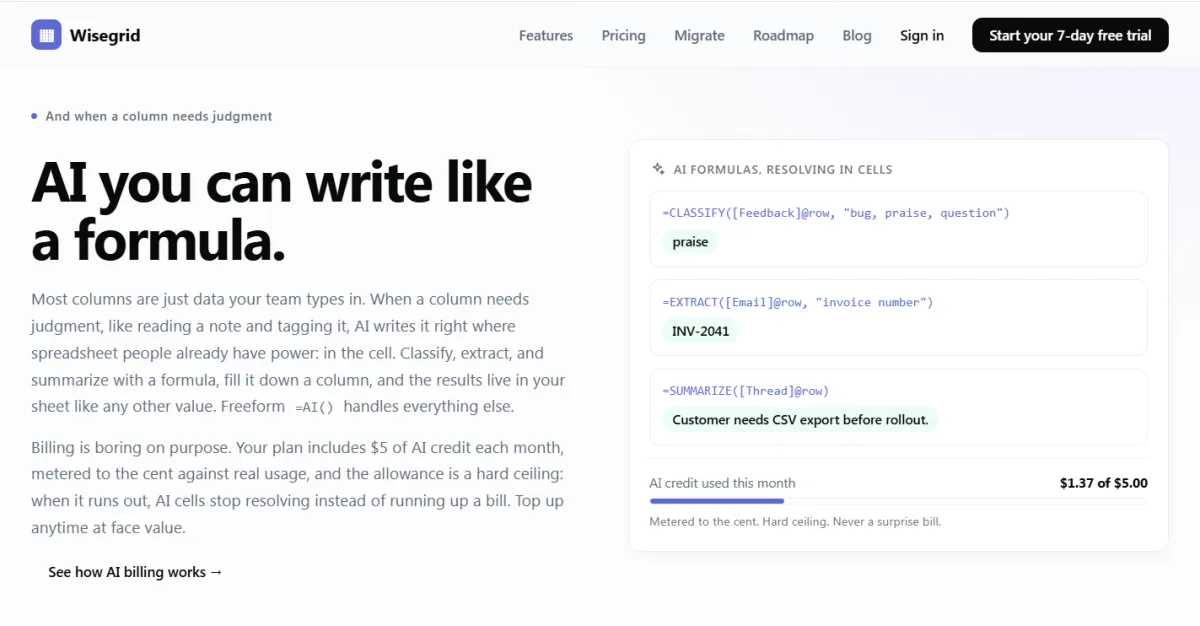
- AI-Powered Formulas: Integrated AI functions like
=CLASSIFY(),=EXTRACT(), and=SUMMARIZE()that operate directly within cells, allowing users to automate categorization and analysis. - Spreadsheet Compatibility: 119 Excel-compatible functions with row references (e.g.,
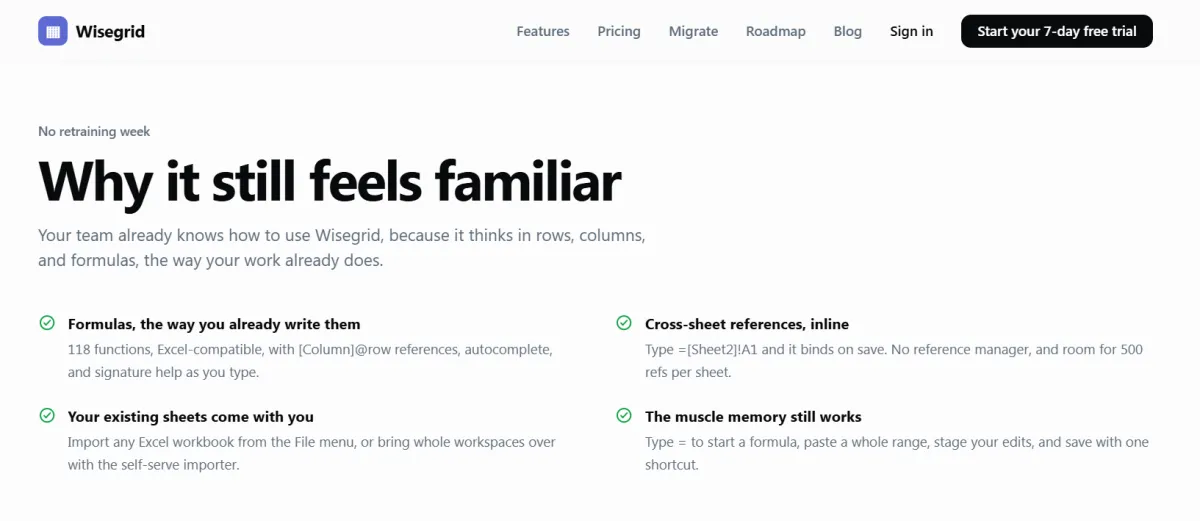
[Column]@row) and cross-sheet linking capabilities. - Automations: Triggers for notifications, row assignment, and multi-step approvals based on row or date events.
- Reusable Blueprints: The ability to save a project configuration as a template and stamp out governed copies instantly.
- Conflict Resolution: Row-level editing locks to prevent data loss when multiple users edit the same row simultaneously.
- Forms with Logic: Multi-page forms with conditional logic and custom branding that submit data directly as spreadsheet rows.
- Self-Serve Import: A tool to migrate existing workspaces, folders, and sheets from other tools into Wisegrid.
Use Cases
Marketing Campaign Management
Marketing teams can use Wisegrid to track budgets, status updates, and performance metrics across multiple campaigns. By using live dashboards and formulas to aggregate spend data, teams can monitor ROI in real-time without manually updating reports.
Project Tracking and Scheduling
Project managers can utilize the Gantt charts and automation features to track progress, assign tasks, and set reminders. The blueprint feature allows for standardizing project templates, ensuring consistency across different initiatives.
Data Entry and Verification
Teams needing to classify or extract data from unstructured text can use the AI formula features to automate tagging and summarization, saving hours of manual processing.
Pricing & Plans
Wisegrid operates on a single, flat pricing tier model. The plan costs $19 per editor per month. This includes access to all features such as Gantt charts, automations, dashboards, and AI in formulas. A unique aspect of the pricing is that view-only collaborators are always free, regardless of how many are invited. There are no hidden tiers or "contact sales" requirements. A 7-day free trial is available, with no credit card required.
Integrations & Compatibility
Wisegrid integrates primarily through import capabilities. Users can import Excel workbooks directly via the File menu. A self-serve importer allows users to bring over workspaces from other tools using an API token. The platform mentions Google Sheets as a future integration point. Native integrations with third-party tools are not explicitly detailed beyond the import/export functionality.
Who Is It For?
Wisegrid is designed for teams that are already proficient with spreadsheet logic but have outgrown basic spreadsheet usage. It is ideal for project managers, marketing coordinators, and operations teams who need a structured way to manage data without the steep learning curve of complex SaaS tools. It requires a moderate level of technical comfort regarding formulas.
Limitations
- AI Usage Limits: While AI is included, there is a monthly credit cap of $5, and the tool does not auto-charge; it simply stops resolving AI cells when the cap is reached.
- Cell Capacity: While offering 1 million cells per sheet, users are warned when approaching this limit, though it is a high ceiling compared to standard spreadsheets.
- Migration Nuances: The self-serve importer uses read-only endpoints, but complex data structures may not translate perfectly, requiring manual review.
Final Verdict
Wisegrid offers a compelling solution for organizations that want the power of spreadsheets combined with the utility of modern work management apps. Its flat pricing and focus on formula-based automation make it attractive for teams looking to modernize their workflow without changing how they think about data. While the AI credit cap is a minor limitation, the tool successfully democratizes automation for spreadsheet users.
Tool Facts
Screenshots & Interface
Pros
- ✓ Flat pricing model includes all features without hidden tiers
- ✓ Excel-compatible formula syntax reduces learning curve for existing users
- ✓ Live dashboards automatically aggregate data from spreadsheet rows
- ✓ AI formulas operate directly within cells to automate categorization
- ✓ Row-level conflict resolution prevents data loss during simultaneous edits
- ✓ Self-serve import tool supports migrating existing workspaces from other tools
Cons
- × AI features are metered with a monthly credit cap of $5
- × Cell capacity is limited to 1 million cells per sheet
- × Complex data structures may not translate perfectly during the import process
- × Users require existing familiarity with spreadsheet formulas
How to Use Wisegrid in Your Workflow
Integrating Wisegrid into your professional toolkit enhances efficiency by automating manual steps. By configuring it to suit your specific project requirements, you can optimize output quality and reduce project cycle times. Standard workflows involve testing the tool on simple tasks before scaling its use to complex operations.
Frequently Asked Questions
What is Wisegrid used for?
Wisegrid is a work management platform that combines spreadsheet functionality with application features like dashboards and automations. It allows teams to manage projects and data using rows and columns, including AI-driven formulas, with a flat pricing model.
What is the pricing model for Wisegrid?
Wisegrid uses a Freemium pricing model.
What are the main advantages of Wisegrid?
The key benefits of Wisegrid include: Flat pricing model includes all features without hidden tiers, Excel-compatible formula syntax reduces learning curve for existing users, Live dashboards automatically aggregate data from spreadsheet rows, AI formulas operate directly within cells to automate categorization, Row-level conflict resolution prevents data loss during simultaneous edits, Self-serve import tool supports migrating existing workspaces from other tools.
What are the main limitations of Wisegrid?
Some limitations or cons of Wisegrid are: AI features are metered with a monthly credit cap of $5, Cell capacity is limited to 1 million cells per sheet, Complex data structures may not translate perfectly during the import process, Users require existing familiarity with spreadsheet formulas.
Alternative AI Tools

AceProject AI
AceProject AI is a project management platform that helps teams collaborate, track time, and manage expenses. It offers a free tier for small teams. Its key differentiator is combining traditional PM features with AI assistance for task planning and prioritization.
Teamdeck AI
Deck is developer infrastructure for computer use agents. Design and deploy AI agents that authenticate, navigate, and return deterministic, structured data from any software. No API required.

Hubstaff AI
Hubstaff AI is a time tracking and productivity monitoring platform that uses artificial intelligence to automate timesheets and analyze work patterns. It is designed for remote teams and freelancers seeking to improve efficiency. The tool differentiates itself with AI-driven screenshot analysis and idle time detection.
Rating Details
Based on 0 ratings
Quick Comparisons
Related Tools
More AI tools from the same workflow, industry, or category.
NewsData.io
NewsData.io delivers structured global news data via a real-time API. It supports 100,000+ sources across 200+ countries with filtering by keyword and date. This tool helps developers integrate news intelligence into applications and dashboards.
TradeBB
TradeBB is a All-in-One Trading Journal and analysis tool that helps traders seamlessly record each transaction, deeply analyze trading data, and review trading processes.
Pinecone
Pinecone is a fully managed vector database for AI applications, enabling fast similarity search and retrieval-augmented generation (RAG). It targets developers and data scientists who need scalable vector storage without managing infrastructure.
Goalfinder
Goalfinder provides AI-driven audits for pre-launch, post-launch, and market analysis, helping early-stage startups identify growth blockers in under 60 seconds. It targets founders who need a quick, unbiased reality check on product-market fit and distribution challenges.
Reviews
No reviews submitted yet. Be the first to share your experience.
Write a Review
Share Your Experience
Join the community to write reviews, submit ratings, and bookmark your favorite AI tools.