

Wix ADI
Use Wix ADI as the anchor for a real shortlist.
Instead of returning to a broad directory, jump straight into the strongest adjacent matchups for pricing, workflow fit, and differentiation.
Overview
Overview
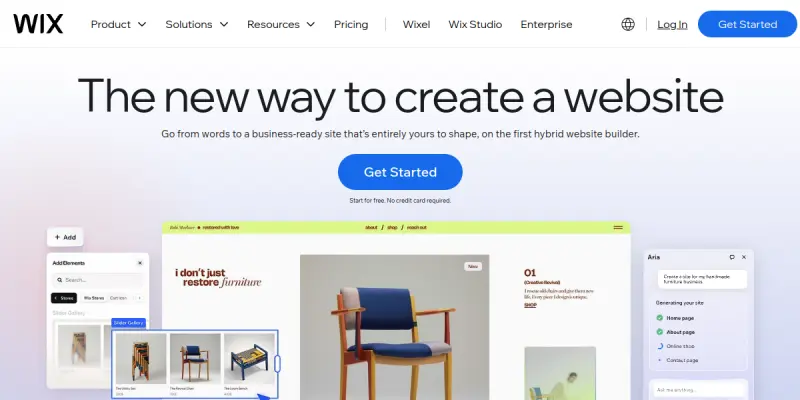
Wix ADI (Artificial Design Intelligence) is an AI-powered feature within the Wix website builder that automates the design process. Instead of manually selecting templates, users answer a few questions, and the AI generates a custom site layout, content, and images tailored to their needs. It serves as a rapid prototyping tool for creating functional websites without deep technical knowledge.
Key Features
- Automated Design Generation: Creates unique layouts based on user input and specific business requirements.
- Smart Content Filling: Automatically suggests and writes relevant site copy and headings.
- Visual Customization: Allows users to tweak the AI-generated design easily within the Wix editor.
- Template Integration: Seamlessly converts the AI output into standard Wix templates for further editing.
- Mobile Optimization: Generates responsive layouts automatically to ensure mobile compatibility.
- Image Suggestion: Proposes relevant stock photography based on the site's topic.
Use Cases
Quick Portfolio Creation
Photographers, graphic designers, and freelancers can use Wix ADI to generate a polished portfolio site in minutes. By answering questions about their work style and aesthetic, the tool builds a visual layout that highlights their best projects immediately.
Small Business Launches
Startups and local businesses can use Wix ADI to establish a digital presence quickly. The tool helps define the business structure, contact information, and service offerings, providing a complete starting point for an e-commerce or service-based site.
Event Pages
For one-time events or promotions, Wix ADI can rapidly generate a dedicated landing page. It simplifies the process of organizing event details, ticketing links, and schedules, allowing organizers to focus on promotion rather than design.
Pricing & Plans
Wix ADI is included as a feature within Wix's paid subscription plans, such as Vela, Core, and Business Basic. Users can test the tool using the Wix free plan, but they must upgrade to a premium plan to publish the generated site. Custom pricing is not available for the tool itself as it is part of the ecosystem.
Integrations & Compatibility
Wix ADI outputs a standard Wix website, allowing full compatibility with the Wix App Market. Users can integrate third-party tools for email marketing (e.g., Mailchimp), booking systems (e.g., Calendly), and SEO optimization directly into the generated site. However, Wix ADI does not offer a standalone public API for external developers.
Who Is It For?
This tool is best suited for non-technical users, small business owners, and individuals who need a professional-looking website quickly but lack design skills. It is ideal for those who prefer a guided, conversational approach to building a site over manually configuring complex templates.
Limitations
- Limited Customization: The initial design is automated, which can sometimes result in generic layouts that lack a unique brand identity.
- Content Accuracy: The AI-generated text and images may require manual editing to ensure accuracy and tone match.
- Ecosystem Lock-in: The tool is exclusive to the Wix platform, meaning users cannot export the design to other website builders.
Final Verdict
Wix ADI is a powerful solution for speed and ease of use. While it may not offer the granular control of manual site building, it excels at providing a solid foundation for users who need to get online quickly. It effectively lowers the barrier to entry for web development.
Tool Facts
Screenshots & Interface
Pros
- ✓ Saves significant time by generating initial site structures instantly from conversational inputs.
- ✓ Eliminates design paralysis by providing a professional layout immediately upon answering questions.
- ✓ Seamlessly integrates into the Wix editor, allowing for easy manual adjustments to the AI output.
- ✓ Provides a mobile-optimized result automatically, reducing the need for separate responsive design work.
Cons
- × Requires a paid Wix subscription to publish the site, limiting the use case for casual testing.
- × Generated designs can feel generic or templated compared to manually crafted sites.
- × The AI-generated content often requires manual editing to ensure specific brand voice and factual accuracy.
How to Use Wix ADI in Your Workflow
Integrating Wix ADI into your professional toolkit enhances efficiency by automating manual steps. By configuring it to suit your specific project requirements, you can optimize output quality and reduce project cycle times. Standard workflows involve testing the tool on simple tasks before scaling its use to complex operations.
Frequently Asked Questions
What is Wix ADI used for?
Wix ADI automates website creation by generating custom sites based on user inputs and preferences. It offers 500+ design styles and integrates directly with the Wix editor. This tool targets users seeking a quick, AI-driven solution for establishing a professional web presence.
What is the pricing model for Wix ADI?
Wix ADI uses a Paid pricing model.
What are the main advantages of Wix ADI?
The key benefits of Wix ADI include: Saves significant time by generating initial site structures instantly from conversational inputs., Eliminates design paralysis by providing a professional layout immediately upon answering questions., Seamlessly integrates into the Wix editor, allowing for easy manual adjustments to the AI output., Provides a mobile-optimized result automatically, reducing the need for separate responsive design work..
What are the main limitations of Wix ADI?
Some limitations or cons of Wix ADI are: Requires a paid Wix subscription to publish the site, limiting the use case for casual testing., Generated designs can feel generic or templated compared to manually crafted sites., The AI-generated content often requires manual editing to ensure specific brand voice and factual accuracy..
Alternative AI Tools

Ucraft AI
Ucraft AI is a drag-and-drop website builder that leverages artificial intelligence to help business owners, entrepreneurs, and creatives quickly build professional websites. Its AI-powered design assistant generates layouts and content, reducing setup time to minutes.
Uizard
Uizard is an AI-powered UI design tool that enables rapid prototyping for apps, websites, and desktop software. It is designed for non-designers and professionals alike, offering a drag-and-drop interface and AI features like generating designs from text prompts.

Framer AI
Framer AI helps designers and teams create fully custom websites using a no-code visual builder. It offers a powerful CMS, built-in SEO tools, and real-time collaboration features. The platform combines design freedom with AI-powered layout generation for faster workflows.
Rating Details
Based on 0 ratings
Quick Comparisons
Related Tools
More AI tools from the same workflow, industry, or category.
Createimg.ai
Createimg.ai provides text-to-image generation and photo editing tools including background removal. It is designed for e-commerce sellers and creators needing free visual assets.
JetBrains AI
JetBrains AI is an AI-powered toolset integrated into JetBrains IDEs, offering code completion, debugging assistance, and intelligent suggestions for developers. It leverages large language models to help teams write, understand, and refactor code more efficiently. A key differentiator is its seamless integration with JetBrains' existing development environment.
Stable Diffusion Inpaint
Stable Diffusion Inpaint is an AI-powered tool that uses diffusion models to intelligently fill in or replace parts of an image. It is designed for photographers, designers, and content creators who need precise and context-aware image editing. Its key differentiator is the ability to generate new content that seamlessly blends with the existing image.
Crello AI
VistaCreate (formerly Crello) is a cloud-based design tool using AI to generate graphics from text prompts. It features 100K+ templates for social media and marketing.
Reviews
No reviews submitted yet. Be the first to share your experience.
Write a Review
Share Your Experience
Join the community to write reviews, submit ratings, and bookmark your favorite AI tools.