

Yepic AI
Use Yepic AI as the anchor for a real shortlist.
Instead of returning to a broad directory, jump straight into the strongest adjacent matchups for pricing, workflow fit, and differentiation.
Overview
Overview
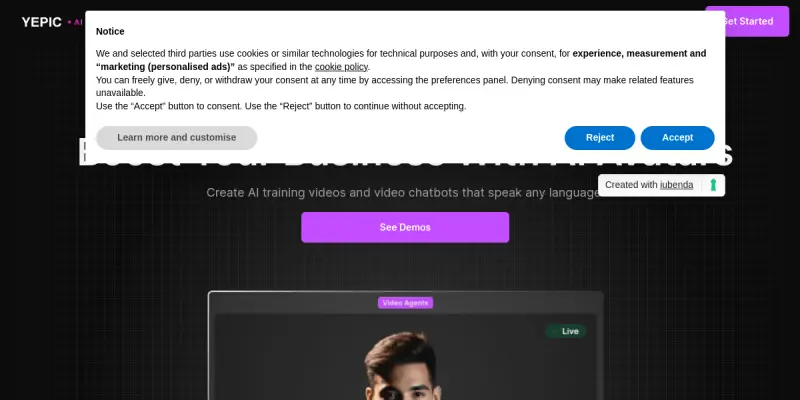
Yepic AI is a SaaS platform designed to democratize video production through artificial intelligence. It enables users to generate high-quality video clips, animations, and AI avatars directly from text prompts, eliminating the need for professional video editing software or physical filming studios. The tool focuses on streamlining the content creation workflow for businesses and individuals looking to produce video assets quickly.
Key Features
- Text-to-Video Generation: Converts written scripts into photorealistic video scenes automatically.
- AI Avatars: Provides lifelike virtual presenters with lip-sync capabilities for tutorials and presentations.
- Custom Backgrounds: Allows users to generate or upload custom backgrounds to match specific branding needs.
- Real-Time Rendering: Delivers video outputs rapidly, reducing the time spent on rendering and editing.
- Multi-Language Support: Offers tools to generate content in various languages to reach global audiences.
- Template Library: Includes pre-built templates for common video formats like social media ads and explainer videos.
Use Cases
Marketing and Advertising
Marketers can use Yepic AI to produce localized ad campaigns and product demos quickly. The ability to generate AI avatars speaking multiple languages allows for A/B testing different markets without hiring new talent.
Corporate Training and Education
Educators and HR departments can create engaging training videos using AI avatars to deliver consistent messages to employees or students, reducing the need for live filming sessions.
Social Media Content
Content creators can generate short-form video clips optimized for platforms like TikTok, Instagram Reels, and YouTube Shorts, maintaining a consistent posting schedule with minimal effort.
Internal Communications
Companies can use the tool to create internal announcements and company updates, ensuring information is delivered in a visually appealing format without disrupting daily operations.
Pricing & Plans
Yepic AI operates on a Freemium model. A free tier is typically available for users to test basic video generation capabilities and limited credits. Paid tiers are generally offered based on credit packages, where users purchase credits to generate longer videos or higher-resolution outputs. Enterprise solutions may be available for teams requiring higher volume or dedicated support.
Integrations & Compatibility
The platform offers a robust API that allows developers to integrate video generation capabilities directly into their own applications and workflows. It is compatible with various web-based interfaces and can be embedded into content management systems (CMS) for seamless publishing.
Who Is It For?
This tool is ideal for marketing agencies, content creators, small business owners, and instructional designers who need to produce video content but lack the budget or technical skills for traditional video production.
Limitations
- Rendering Time: Generating high-resolution videos can take time, and long-form content requires a significant number of credits.
- Temporal Consistency: There may be occasional inconsistencies in character movements or background details between frames.
- Creative Control: Users have limited control over specific facial expressions or complex scene compositions compared to traditional editing software.
Final Verdict
Yepic AI is a powerful tool for users who prioritize speed and cost-efficiency over total creative control. It is particularly well-suited for generating standard marketing videos, social media content, and educational material. However, users requiring highly nuanced cinematography or complex storytelling may need to supplement AI outputs with manual editing.
Tool Facts
Screenshots & Interface
Pros
- ✓ Generates photorealistic video clips from text prompts without requiring professional video editing software
- ✓ Reduces production costs and time by eliminating the need for physical studios or complex rendering pipelines
- ✓ Includes AI avatars with lip-sync capabilities for personalized communication
Cons
- × Generating long-form videos requires a significant number of credits and can be time-consuming
- × The temporal consistency of generated clips is not always perfect, which may require manual touch-ups
- × Users have limited control over specific character facial expressions during the generation process
How to Use Yepic AI in Your Workflow
Integrating Yepic AI into your professional toolkit enhances efficiency by automating manual steps. By configuring it to suit your specific project requirements, you can optimize output quality and reduce project cycle times. Standard workflows involve testing the tool on simple tasks before scaling its use to complex operations.
Frequently Asked Questions
What is Yepic AI used for?
Yepic AI is a SaaS platform that generates video clips and animations from text prompts. It offers a freemium model suitable for creating social media content and marketing assets without traditional rendering costs.
What is the pricing model for Yepic AI?
Yepic AI uses a Freemium pricing model.
What are the main advantages of Yepic AI?
The key benefits of Yepic AI include: Generates photorealistic video clips from text prompts without requiring professional video editing software, Reduces production costs and time by eliminating the need for physical studios or complex rendering pipelines, Includes AI avatars with lip-sync capabilities for personalized communication.
What are the main limitations of Yepic AI?
Some limitations or cons of Yepic AI are: Generating long-form videos requires a significant number of credits and can be time-consuming, The temporal consistency of generated clips is not always perfect, which may require manual touch-ups, Users have limited control over specific character facial expressions during the generation process.
Alternative AI Tools

Loom AI
Loom AI is a video enhancement tool for Loom recordings that automatically removes silence, generates titles and summaries, and creates shareable highlights. It helps professionals and teams save time editing async video messages.

DeepMotion
DeepMotion converts 2D video into 3D animations using AI motion capture. Ideal for game developers and motion designers needing browser-based rigging.

ScreenPal AI
ScreenPal’s intuitive tools help you capture, create, and share videos and images for authentic and effective visual communication.
Rating Details
Based on 0 ratings
Quick Comparisons
Related Tools
More AI tools from the same workflow, industry, or category.
ClipTrend.ai
ClipTrend.ai is an AI image-to-video workspace for creators, marketers, and short-form video teams.
SongR
SongR is a text-to-song app that generates custom music tracks from a few keywords. It is designed for content creators and social media users who need quick, royalty-free songs in genres like pop, rock, hip-hop, and chant. Its key differentiator is instant generation without requiring musical expertise.
Quantum Capture
Quantum Capture generates AI-powered talking head videos from text input. It is designed for content creators and marketers who need quick, studio-quality video clips without expensive equipment. The platform specializes in creating realistic avatars with consistent lip-sync and facial expressions.
Kaltura AI
Kaltura is an enterprise video platform that combines cloud hosting with AI tools for content creation, marketing, and learning management. It helps businesses create branded video experiences for webinars, social media, and internal training.
Reviews
No reviews submitted yet. Be the first to share your experience.
Write a Review
Share Your Experience
Join the community to write reviews, submit ratings, and bookmark your favorite AI tools.