

Yodayo
Use Yodayo as the anchor for a real shortlist.
Instead of returning to a broad directory, jump straight into the strongest adjacent matchups for pricing, workflow fit, and differentiation.
Overview
Overview
Yodayo is an AI-powered platform that enables artists and creators to generate, share, and refine visual art using a variety of generative models. Launched in 2023, it serves as a centralized hub where users can explore styles ranging from realistic portraits to anime-inspired illustrations. The platform emphasizes community interaction, allowing users to post their creations, follow other artists, and remix existing images.
Key Features
- Multi-Model Support: Access to multiple popular AI image generation models (e.g., Stable Diffusion variants) within a single interface.
- Community Feed: A built-in social feed where users can share artwork, like, comment, and remix images.
- Advanced Prompting Tools: Features like prompt weighting, negative prompts, and seed control for fine-tuned output.
- Image-to-Image Generation: Upload an existing image and use it as a starting point for new generations.
- Inpainting & Outpainting: Modify specific parts of an image or extend the canvas beyond its original borders.
- Privacy Controls: Options to keep generated images private or share them publicly on the platform.
- Mobile-Friendly Interface: Responsive design that works well on both desktop and mobile browsers.
Use Cases
Digital Art Creation
Artists can quickly generate concept art, character designs, and background scenery using text prompts, then refine them with inpainting and image-to-image tools.
Social Sharing & Community Engagement
Yodayo functions as a social platform for AI artists. Users can build a following, participate in challenges, and discover new techniques by browsing the community feed.
Content for Games & Media
Game developers and content creators can use Yodayo to produce assets, mood boards, and promotional art without commissioning expensive custom artwork.
Experimentation with AI Models
Hobbyists and researchers can compare outputs from different models side by side, adjust parameters, and learn how prompt engineering affects results.
Pricing & Plans
Yodayo operates on a freemium model. The free tier grants a limited number of daily generations and access to basic features. Paid subscriptions (typically monthly or yearly) increase generation quotas, unlock premium models, and provide priority processing. Specific pricing details are available on the Yodayo website.
Integrations & Compatibility
Yodayo is a web-based SaaS tool and works on any modern browser. There are no native desktop or mobile apps, but the mobile browser experience is optimized. The platform does not offer direct API access or third-party integrations.
Who Is It For?
Yodayo is ideal for digital artists, illustrators, game developers, and AI art enthusiasts who want a single platform to generate, share, and discover AI-assisted artwork. It is particularly suited to those interested in anime and manga styles, though its multi-model support allows for diverse artistic outputs.
Limitations
- Generation Limits on Free Tier: The free plan restricts the number of images you can create per day.
- No API Access: Yodayo does not currently offer an API, limiting its use for automated or programmatic workflows.
- Moderation Policies: Some content may be filtered by the platform's content moderation system, which can occasionally block unintended prompts.
Final Verdict
Yodayo is a solid choice for AI artists who value community and ease of use. Its multi-model support and social features set it apart from simpler generation tools. While the free tier is restrictive, paid plans are reasonably priced for the functionality offered. It is best suited for individual creators rather than enterprise or automated use cases.
Tool Facts
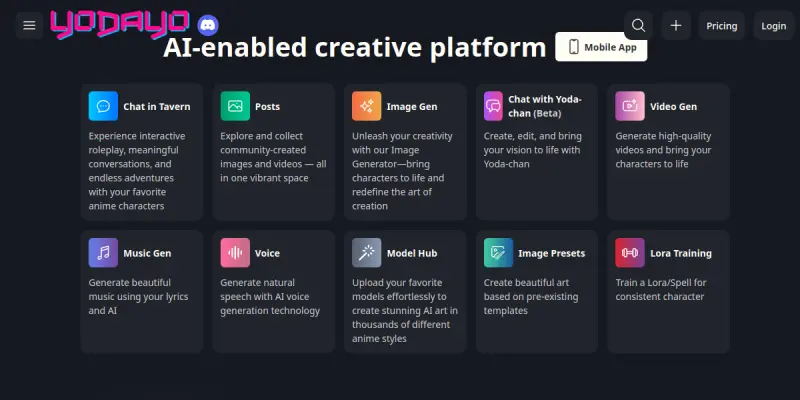
Screenshots & Interface
Pros
- ✓ Multi-model support allows users to switch between different AI generators without leaving the platform.
- ✓ Built-in community feed enables easy sharing and discovery of AI-generated art.
- ✓ Advanced prompting features (negative prompts, seed control) give experienced users fine-grained control.
- ✓ Mobile-friendly interface works well on phones and tablets for on-the-go creation.
Cons
- × Free tier restricts daily generations, which may frustrate heavy users.
- × No API access limits integration with external workflows or automation.
- × Content moderation can occasionally block prompts unintentionally.
- × The tool is web-only, with no offline desktop or mobile app available.
How to Use Yodayo in Your Workflow
Integrating Yodayo into your professional toolkit enhances efficiency by automating manual steps. By configuring it to suit your specific project requirements, you can optimize output quality and reduce project cycle times. Standard workflows involve testing the tool on simple tasks before scaling its use to complex operations.
Frequently Asked Questions
What is Yodayo used for?
Yodayo is an AI-powered image generation platform designed for artists and creative professionals. It provides a suite of generative tools for producing high-quality illustrations and anime-style artwork. Its key differentiator is a strong community focus and integration of multiple popular AI models.
What is the pricing model for Yodayo?
Yodayo uses a Freemium pricing model.
What are the main advantages of Yodayo?
The key benefits of Yodayo include: Multi-model support allows users to switch between different AI generators without leaving the platform., Built-in community feed enables easy sharing and discovery of AI-generated art., Advanced prompting features (negative prompts, seed control) give experienced users fine-grained control., Mobile-friendly interface works well on phones and tablets for on-the-go creation..
What are the main limitations of Yodayo?
Some limitations or cons of Yodayo are: Free tier restricts daily generations, which may frustrate heavy users., No API access limits integration with external workflows or automation., Content moderation can occasionally block prompts unintentionally., The tool is web-only, with no offline desktop or mobile app available..
Alternative AI Tools

MarkMaker
MarkMaker is an AI-powered logo design tool for creators, streamlining workflow productivity with automated design capabilities and intuitive interface.
Erase.bg
Erase.bg uses AI to automatically remove image backgrounds for humans, animals, and products. It delivers high-resolution PNGs for free, suitable for e-commerce and design projects.

Wix ADI
Wix ADI automates website creation by generating custom sites based on user inputs and preferences. It offers 500+ design styles and integrates directly with the Wix editor. This tool targets users seeking a quick, AI-driven solution for establishing a professional web presence.
Rating Details
Based on 0 ratings
Quick Comparisons
Related Tools
More AI tools from the same workflow, industry, or category.
Createimg.ai
Createimg.ai provides text-to-image generation and photo editing tools including background removal. It is designed for e-commerce sellers and creators needing free visual assets.
JetBrains AI
JetBrains AI is an AI-powered toolset integrated into JetBrains IDEs, offering code completion, debugging assistance, and intelligent suggestions for developers. It leverages large language models to help teams write, understand, and refactor code more efficiently. A key differentiator is its seamless integration with JetBrains' existing development environment.
Stable Diffusion Inpaint
Stable Diffusion Inpaint is an AI-powered tool that uses diffusion models to intelligently fill in or replace parts of an image. It is designed for photographers, designers, and content creators who need precise and context-aware image editing. Its key differentiator is the ability to generate new content that seamlessly blends with the existing image.
Crello AI
VistaCreate (formerly Crello) is a cloud-based design tool using AI to generate graphics from text prompts. It features 100K+ templates for social media and marketing.
Reviews
No reviews submitted yet. Be the first to share your experience.
Write a Review
Share Your Experience
Join the community to write reviews, submit ratings, and bookmark your favorite AI tools.