

Infogram AI
Use Infogram AI as the anchor for a real shortlist.
Instead of returning to a broad directory, jump straight into the strongest adjacent matchups for pricing, workflow fit, and differentiation.
Overview
Overview
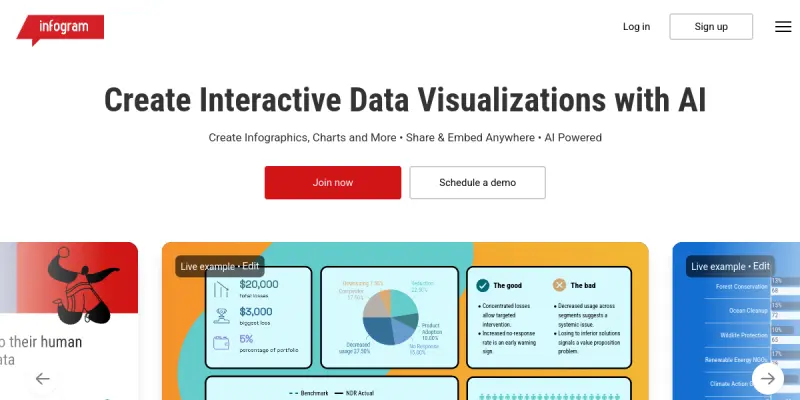
Infogram AI is a data visualization platform that leverages artificial intelligence to help users create interactive charts, maps, infographics, and reports. It is designed for professionals in marketing, journalism, education, and business who need to communicate data-driven insights clearly. The AI assists with chart selection, data formatting, and design suggestions, speeding up the creation process.
Key Features
- AI Chart Builder: Automatically suggests the best chart type based on your data.
- Interactive Infographics: Create scrollable, clickable infographics with embedded media.
- Map Visualization: Generate interactive maps with region data and custom styles.
- Report Generation: Combine multiple visualizations into branded reports.
- Templates Library: Access a wide range of pre-designed templates for quick starts.
- Collaboration Tools: Invite team members to co-edit projects in real time.
- Embed & Share: Publish visualizations on websites, blogs, or social media via embed codes or direct links.
- Data Import: Upload data from CSV, Excel, Google Sheets, or connect live data sources.
Use Cases
Marketing Reports
Marketers can create visually engaging reports that highlight campaign performance, audience demographics, and ROI metrics. AI-driven suggestions help choose the most effective chart types.
Educational Materials
Teachers and students can build interactive infographics and maps to explain complex topics, making learning more engaging and data-driven.
News and Journalism
Journalists can produce data-rich stories with interactive maps and charts that readers can explore, adding depth to articles.
Business Dashboards
Business analysts can design real-time dashboards that track KPIs, sales figures, and operational metrics, shareable across the organization.
Data Presentations
Professionals can turn raw data into polished presentation slides with animated charts and infographics for meetings and conferences.
Pricing & Plans
Infogram offers a free tier with basic features and watermarked exports. Paid plans start at $19/month (Pro) and include more templates, higher export quality, and team collaboration features. Enterprise pricing is available on request with custom branding and advanced integrations.
Integrations & Compatibility
Infogram integrates with Google Sheets, Microsoft Excel, CSV imports, and WordPress via plugins. It also offers embed codes for any website and supports live data connections for real-time updates. API access is available on higher-tier plans.
Who Is It For?
Infogram AI is for marketers, journalists, educators, business analysts, and any professional who needs to create data visualizations quickly without extensive design skills. It suits teams and individuals looking to enhance their data storytelling.
Limitations
- The free tier includes watermarks on all exports.
- Advanced features like live data and custom branding require paid plans.
- Offline use is not supported; an internet connection is required.
- Some complex dataset cleaning may still require manual adjustments before visualization.
Final Verdict
Infogram AI is a powerful tool for creating interactive data visualizations with minimal effort. Its AI assistance streamlines the design process, making it accessible to non-designers. While the free tier has limitations, the paid plans offer good value for professionals who regularly produce data-driven content.
Tool Facts
Screenshots & Interface
Pros
- ✓ AI-powered chart suggestions reduce time spent on selecting the right visualization type.
- ✓ Interactive features like clickable maps and scrollable infographics engage viewers.
- ✓ Templates library accelerates creation of branded content for non-designers.
- ✓ Real-time collaboration enables teams to work on projects simultaneously.
Cons
- × Free tier exports include watermarks, limiting use for professional distribution.
- × Offline access is not available; requires constant internet connection.
- × Advanced features like live data connections and custom branding are locked behind paid plans.
- × Data preparation may still require manual cleaning before AI chart generation.
How to Use Infogram AI in Your Workflow
Integrating Infogram AI into your professional toolkit enhances efficiency by automating manual steps. By configuring it to suit your specific project requirements, you can optimize output quality and reduce project cycle times. Standard workflows involve testing the tool on simple tasks before scaling its use to complex operations.
Frequently Asked Questions
What is Infogram AI used for?
Infogram AI helps users turn data into interactive charts, maps, infographics, and reports. It is designed for marketers, journalists, and educators who need visual storytelling tools with AI-powered chart creation and easy sharing options.
What is the pricing model for Infogram AI?
Infogram AI uses a Free pricing model.
What are the main advantages of Infogram AI?
The key benefits of Infogram AI include: AI-powered chart suggestions reduce time spent on selecting the right visualization type., Interactive features like clickable maps and scrollable infographics engage viewers., Templates library accelerates creation of branded content for non-designers., Real-time collaboration enables teams to work on projects simultaneously..
What are the main limitations of Infogram AI?
Some limitations or cons of Infogram AI are: Free tier exports include watermarks, limiting use for professional distribution., Offline access is not available; requires constant internet connection., Advanced features like live data connections and custom branding are locked behind paid plans., Data preparation may still require manual cleaning before AI chart generation..
Alternative AI Tools

Copilot Image
Copilot Image is an AI-powered assistant for generating and editing images from text prompts. It helps designers, content creators, and marketers produce visuals quickly. A key differentiator is its integration with Microsoft's ecosystem and real-time web search capabilities.

Placeit
Placeit offers a library of templates for product photography and branding. It simplifies the design process with drag-and-drop tools. Users can create visuals without specialized software.
Waifu2x
Waifu2x is an open-source AI image upscaler that enhances resolution and reduces noise for anime and photo images.
Rating Details
Based on 0 ratings
Quick Comparisons
Related Tools
More AI tools from the same workflow, industry, or category.
Createimg.ai
Createimg.ai provides text-to-image generation and photo editing tools including background removal. It is designed for e-commerce sellers and creators needing free visual assets.
JetBrains AI
JetBrains AI is an AI-powered toolset integrated into JetBrains IDEs, offering code completion, debugging assistance, and intelligent suggestions for developers. It leverages large language models to help teams write, understand, and refactor code more efficiently. A key differentiator is its seamless integration with JetBrains' existing development environment.
Stable Diffusion Inpaint
Stable Diffusion Inpaint is an AI-powered tool that uses diffusion models to intelligently fill in or replace parts of an image. It is designed for photographers, designers, and content creators who need precise and context-aware image editing. Its key differentiator is the ability to generate new content that seamlessly blends with the existing image.
Crello AI
VistaCreate (formerly Crello) is a cloud-based design tool using AI to generate graphics from text prompts. It features 100K+ templates for social media and marketing.
Reviews
No reviews submitted yet. Be the first to share your experience.
Write a Review
Share Your Experience
Join the community to write reviews, submit ratings, and bookmark your favorite AI tools.