

Zoho CRM AI
Use Zoho CRM AI as the anchor for a real shortlist.
Instead of returning to a broad directory, jump straight into the strongest adjacent matchups for pricing, workflow fit, and differentiation.
Overview
Overview
Zoho CRM AI, commonly referred to as Zia, serves as the intelligent backbone for the Zoho CRM platform. It empowers businesses to automate complex sales processes, analyze vast amounts of customer data, and utilize predictive analytics to make informed decisions. Unlike standalone AI tools, Zia is deeply integrated into the CRM, allowing it to understand context from across the entire customer lifecycle.
Key Features
- Predictive Lead Scoring: Automatically prioritizes leads by analyzing historical data and predicting their likelihood to convert into paying customers.
- Conversation Intelligence: Provides real-time transcription and analysis of sales calls to improve coaching and negotiation strategies.
- Sales Forecasting: Uses AI algorithms to project future sales revenue based on historical trends and current pipeline data.
- Automated Workflows: Enables users to create custom triggers and actions to automate repetitive tasks without coding.
- Email Sentiment Analysis: Scans incoming and outgoing emails to gauge customer mood, helping agents tailor their responses.
- Zia Chatbot: A virtual assistant that can handle customer queries and provide instant support via chat.
Use Cases
Sales Pipeline Management
Sales teams use Zoho CRM AI to visualize their pipeline and identify bottlenecks. The AI suggests the next best action for each lead, ensuring consistent follow-up and increased conversion rates.
Customer Support Optimization
Support departments utilize sentiment analysis tools to detect angry or urgent customers. This allows for immediate escalation and personalized support, reducing churn and improving Net Promoter Scores (NPS).
E-commerce Management
Online retailers leverage the platform to track customer interactions across multiple channels. The AI helps in segmenting customers based on purchasing behavior, enabling targeted marketing campaigns.
Project Management Integration
For project-based businesses, Zoho CRM AI connects seamlessly with project management tools to align sales activities with project timelines, ensuring resources are allocated efficiently.
Pricing & Plans
Zoho CRM offers a flexible Freemium pricing structure. The 'Essentials' plan is free or low-cost, while 'Standard', 'Professional', and 'Enterprise' tiers offer increasing levels of functionality. Advanced AI features such as predictive lead scoring are generally included in the Professional and Enterprise plans. Custom pricing is available for very large organizations requiring dedicated support.
Integrations & Compatibility
The platform supports deep integration with the Zoho One ecosystem, linking CRM with Books, People, Projects, and Inventory. It also connects with major third-party platforms including Gmail, Outlook, Slack, and Salesforce. Through its open API and Zoho Marketplace, users can connect with over 40 additional applications to extend functionality. This ensures that Zoho CRM AI can fit into existing tech stacks without creating data silos.
Who Is It For?
Zoho CRM AI is designed for businesses of all sizes, from startups to large enterprises. It is particularly well-suited for companies with complex sales cycles, high-volume customer interactions, or those looking to unify their sales and marketing data.
Limitations
- The extensive feature set results in a complex user interface that may require significant onboarding time.
- Customizing the AI to fit specific industry nuances often requires third-party consultants or advanced technical skills.
- While the mobile app is functional, it lacks some of the depth and speed of the desktop version.
- Pricing can become expensive as the number of users and required AI modules increases.
Final Verdict
Zoho CRM AI stands out as a comprehensive tool for businesses aiming to modernize their sales operations. By embedding AI directly into the CRM workflow, it removes the need for separate analytics tools. Despite the learning curve, the return on investment for sales teams is substantial, making it a top choice for organizations prioritizing data-driven decision-making.
Tool Facts
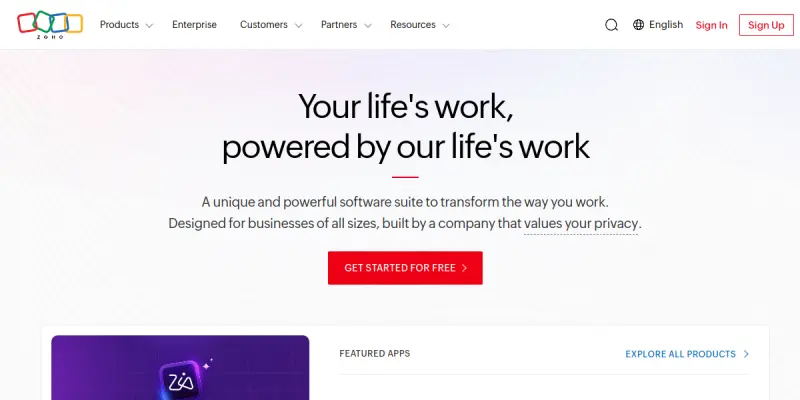
Screenshots & Interface
Pros
- ✓ Provides comprehensive lead scoring to prioritize high-value prospects automatically.
- ✓ Includes conversation intelligence tools that analyze customer calls for better coaching.
- ✓ Offers predictive analytics for accurate sales forecasting.
Cons
- × The interface is feature-rich, which can be overwhelming for new users who need time to learn the system.
- × Customizing the AI models and workflows often requires technical expertise or additional training.
- × Pricing can become expensive as the number of users and required AI modules increases.
How to Use Zoho CRM AI in Your Workflow
Integrating Zoho CRM AI into your professional toolkit enhances efficiency by automating manual steps. By configuring it to suit your specific project requirements, you can optimize output quality and reduce project cycle times. Standard workflows involve testing the tool on simple tasks before scaling its use to complex operations.
Frequently Asked Questions
What is Zoho CRM AI used for?
Zoho CRM AI integrates artificial intelligence into Zoho's customer relationship management platform to automate sales tasks and predict customer behavior. It is designed for sales teams and businesses seeking to streamline workflows and improve lead conversion rates through data-driven insights.
What is the pricing model for Zoho CRM AI?
Zoho CRM AI uses a Freemium pricing model.
What are the main advantages of Zoho CRM AI?
The key benefits of Zoho CRM AI include: Provides comprehensive lead scoring to prioritize high-value prospects automatically., Includes conversation intelligence tools that analyze customer calls for better coaching., Offers predictive analytics for accurate sales forecasting..
What are the main limitations of Zoho CRM AI?
Some limitations or cons of Zoho CRM AI are: The interface is feature-rich, which can be overwhelming for new users who need time to learn the system., Customizing the AI models and workflows often requires technical expertise or additional training., Pricing can become expensive as the number of users and required AI modules increases..
Alternative AI Tools

FindThatLead AI
FindThatLead AI is a B2B lead generation tool that automatically extracts contact email addresses from target websites. It helps sales teams build prospect lists quickly and efficiently without manual searching.

Outplay AI
Outplay is a sales engagement platform that unifies email, LinkedIn, and phone outreach into a single interface. It automates multichannel workflows for B2B sales teams, helping them manage pipelines and boost response rates with AI-powered personalization.

BoostUp AI
Terret Nexus is the answer-to-action engine for revenue teams. Get root-cause analysis from the Revenue Graph and execute with AI Agents. Book a demo.
Rating Details
Based on 0 ratings
Quick Comparisons
Related Tools
More AI tools from the same workflow, industry, or category.
KalTalk
KalTalk is an AI-powered sales and support tool for businesses that centralizes customer interactions into a shared inbox. It offers visitor intent tracking and a grounded knowledge base to help teams respond faster and more accurately across multiple channels.
SimilarTech AI
SimilarTech identifies the technologies websites use, including web servers and CMS platforms. It provides traffic data and competitor insights for B2B research.
Mailshake AI
Mailshake automates sales outreach via email, phone, and social campaigns. It helps users build automated cadences to improve response rates. The platform integrates with CRMs like Salesforce and HubSpot.
Agile CRM AI
Agile CRM AI is a freemium customer relationship management platform that uses artificial intelligence to help sales teams automate workflows, prioritize leads, and manage contacts. It is ideal for small to medium businesses seeking an affordable AI-powered CRM.
Reviews
No reviews submitted yet. Be the first to share your experience.
Write a Review
Share Your Experience
Join the community to write reviews, submit ratings, and bookmark your favorite AI tools.