
AICode
Use AICode as the anchor for a real shortlist.
Instead of returning to a broad directory, jump straight into the strongest adjacent matchups for pricing, workflow fit, and differentiation.
Key details Tap to expand
Overview
Overview
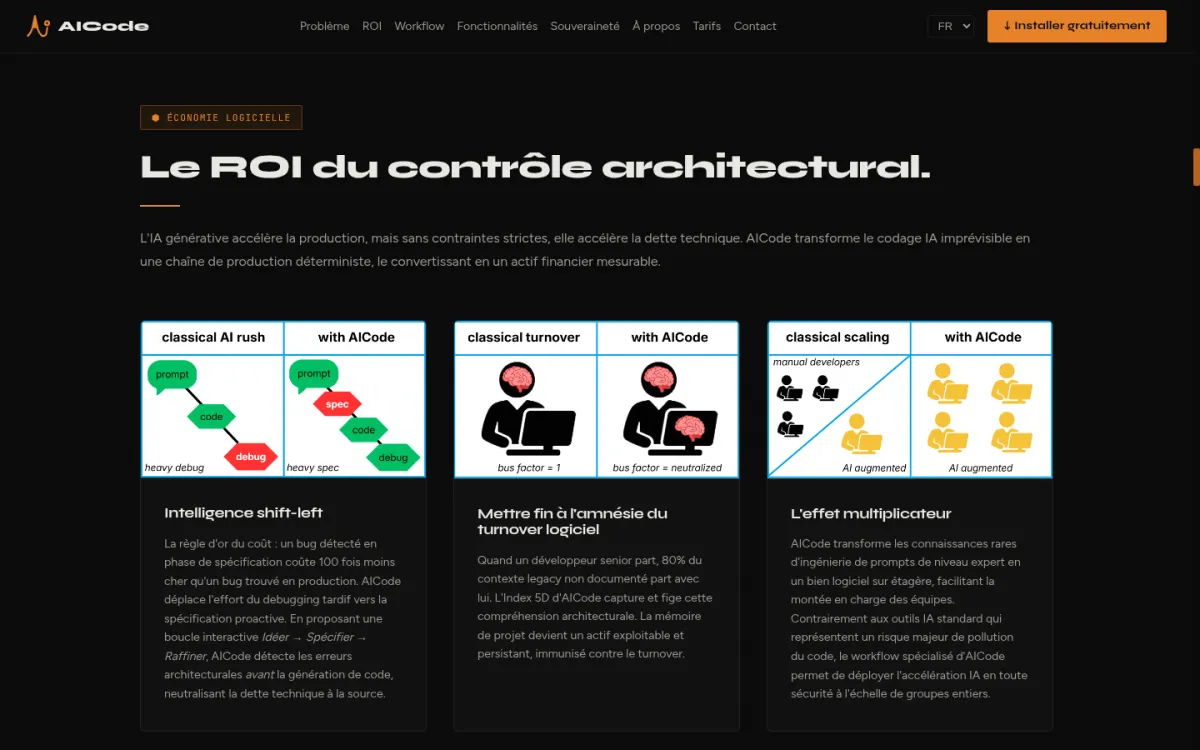
AICode is a spec-driven, intent-aware AI coding copilot built as a Visual Studio Code extension that rethinks how developers interact with generative AI. Its core philosophy is summed up in its tagline: "Most AI tools write code. AICode builds systems." Instead of generating code autonomously, AICode forces a workflow where developers write specifications first, review every change as a virtual patch, and then approve modifications. This approach is designed to prevent common problems with AI-generated code such as architectural drift, silent regressions, and accumulation of unmaintainable code.
Key Features
- Spec-Driven Workflow: Developers write a specification before any code is generated. This prevents AI from introducing unintended architectural changes or breaking existing functionality.
- 5D Code Index: A multi-dimensional index that gives the AI deep understanding of the entire project—including dependencies, data flow, test coverage, and deployment configuration.
- Offline-First / BYOK Architecture: Code never leaves the developer's machine and the developer can bring their own API keys and LLM provider, ensuring full data sovereignty.
- Virtual Workspace Patch System: AI-generated changes are presented as patches that developers must review and approve line by line before they are applied to the codebase.
- Refine and Verify Loops: After generating code, AICode runs tests and verification steps to catch errors that traditional static analysis tools might miss.
- AI Debugger with Instrumentation + Git Regression Tracking: Helps identify which AI-generated change introduced a bug, with precise instrumentation and integration with Git history.
- MCP Protocol Support: Supports the Model Context Protocol, enabling integration with a wide range of external tools and services.
- Dogfooded at Scale: The tool maintains a 500,000-line codebase managed by a single developer, proving its effectiveness in real-world large projects.
Use Cases
Small Prototypes and Microservices
Developers building small projects or microservices can use AICode to rapidly generate code while ensuring each change is reviewed. The spec-based approach helps keep early-stage code organized and reduces the need for later refactoring.
Large Enterprise Codebases
For teams working on large, complex codebases, AICode’s 5D index and line-by-line patch system help maintain code quality. It prevents AI-generated changes from creating regressions or violating existing architecture patterns.
Code Review and Refactoring
When updating or refactoring existing code, AICode forces a structured review process. Developers can see exactly what the AI proposes, verify it against the specification, and catch issues before they reach production.
Learning and Onboarding
New developers can use AICode to understand how code changes are made in a project. By writing specs and reviewing patches, they learn both the technical details and the team’s coding standards.
Pricing & Plans
AICode is available as a free extension on the Visual Studio Code Marketplace. There is no paid tier disclosed, and all features are included in the free version. Users must provide their own API keys for the underlying LLM, meaning ongoing costs depend on the chosen LLM provider.
Integrations & Compatibility
AICode is designed exclusively for Visual Studio Code. It supports the Model Context Protocol (MCP) for extensibility, allowing connection to custom tools, data sources, and services. No other IDEs are currently supported.
Who Is It For?
AICode is aimed at professional developers and development teams who want to generate code with AI but are concerned about quality and maintainability. It is especially relevant for teams working on large, long-lived projects where technical debt can accumulate quickly. Individual developers who prefer a review-first workflow will also benefit.
Limitations
- Five-Step Workflow Adds Overhead: For very small, trivial tasks the multi-step spec, patch, and verify loop can feel slower than direct code generation.
- BYOK Requires Managing Own API Keys: Users must obtain and manage their own LLM API keys and provider accounts, which adds setup time and ongoing cost tracking.
- Effectiveness Depends on Underlying LLM Quality: The generated output is only as good as the LLM used, so results vary across providers and models.
- Initial Indexing Takes Time: For very large codebases, the first run of the 5D index can be slow, though subsequent runs are incremental.
- Only Available for VS Code: Developers using other IDEs such as JetBrains or Vim cannot use AICode.
Final Verdict
AICode offers a disciplined, human-in-the-loop approach to AI-assisted coding. It is best suited for developers and teams who value code quality and maintainability over raw speed of generation. While the workflow introduces some overhead, it can prevent significant technical debt and regression issues in complex projects.
Tool Facts
Screenshots & Interface


Pros
- ✓ Spec-driven workflow prevents unmaintainable AI code
- ✓ 5D Code Index provides deep, multi-dimensional project understanding
- ✓ Offline-first / BYOK architecture ensures total data sovereignty
- ✓ Virtual workspace patch system forces line-by-line review
- ✓ Refine and Verify loops catch flaws traditional tools miss
- ✓ AI debugger with instrumentation + Git regression tracking
Cons
- × Five-step workflow adds overhead for small tasks
- × BYOK requires managing own API keys/providers
- × Effectiveness depends on underlying LLM quality
- × Initial indexing takes time for large codebases
- × Only available for Visual Studio Code
How to Use AICode in Your Workflow
Integrating AICode into your professional toolkit enhances efficiency by automating manual steps. By configuring it to suit your specific project requirements, you can optimize output quality and reduce project cycle times. Standard workflows involve testing the tool on simple tasks before scaling its use to complex operations.
Frequently Asked Questions
What is AICode used for?
AICode is a spec-driven AI coding copilot for developers using Visual Studio Code. It enforces a disciplined workflow to prevent AI-generated technical debt and ensures maintainable code. Its key differentiator is forcing line-by-line human review before changes are applied.
What is the pricing model for AICode?
AICode uses a Free pricing model.
What are the main advantages of AICode?
The key benefits of AICode include: Spec-driven workflow prevents unmaintainable AI code, 5D Code Index provides deep, multi-dimensional project understanding, Offline-first / BYOK architecture ensures total data sovereignty, Virtual workspace patch system forces line-by-line review, Refine and Verify loops catch flaws traditional tools miss, AI debugger with instrumentation + Git regression tracking.
What are the main limitations of AICode?
Some limitations or cons of AICode are: Five-step workflow adds overhead for small tasks, BYOK requires managing own API keys/providers, Effectiveness depends on underlying LLM quality, Initial indexing takes time for large codebases, Only available for Visual Studio Code.
Alternative AI Tools

Perfecto AI
Perfecto.io automates mobile and web app testing using AI-driven quality assurance on a cloud device fleet. It integrates with CI/CD pipelines for continuous testing.

Draftbit AI
Draftbit AI is a visual development platform for building native iOS and Android apps. It combines a drag-and-drop editor with full code access for developers. Its AI-powered features assist in generating components and automating repetitive tasks.

Carrd AI
Carrd is a free, no-code platform that lets users build simple, fully responsive one-page websites. It is designed for individuals and small businesses who need a quick online presence without technical skills. Its key differentiator is the ability to create polished, mobile-friendly pages with minimal effort.
Rating Details
Based on 1 ratings
Underlying AI Models
Quick Comparisons
Related Tools
More AI tools from the same workflow, industry, or category.
Opik
Opik is an open-source platform for LLM observability and evaluation. It helps developers trace, test, and monitor AI applications and autonomous agents throughout development and production.
PlanetScale AI
PlanetScale provides serverless cloud hosting for Vitess and PostgreSQL databases. It targets developers and engineering teams requiring high-performance, scalable database infrastructure. The platform enables instant scaling and branching workflows.
CodeReview AI
CodeReview AI is a tool that uses artificial intelligence to analyze code and suggest improvements. It helps developers identify bugs, security issues, and style inconsistencies automatically. The tool integrates with popular version control systems to fit into existing workflows.
Kubevious AI
Kubevious AI streamlines workflow productivity for DevOps teams with AI-powered container management. It simplifies complex tasks and enhances efficiency.
Reviews
No reviews submitted yet. Be the first to share your experience.
Write a Review
Share Your Experience
Join the community to write reviews, submit ratings, and bookmark your favorite AI tools.