

Applitools
Use Applitools as the anchor for a real shortlist.
Instead of returning to a broad directory, jump straight into the strongest adjacent matchups for pricing, workflow fit, and differentiation.
Overview
Overview
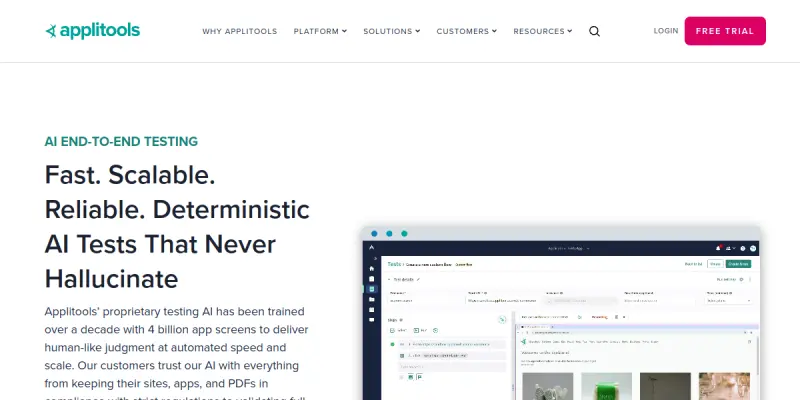
Applitools is an AI-powered end-to-end visual testing platform designed to help development and QA teams automate visual validation across web, mobile, and desktop applications. By combining traditional Visual AI with Generative AI and no-code approaches, Applitools reduces the manual effort required for UI testing, accelerates release cycles, and improves test reliability. The platform supports continuous testing workflows, integrates with popular test frameworks and CI/CD pipelines, and is accessible to both technical and non-technical users.
Key Features
- Visual AI: Automatically detects visual differences with pixel-level accuracy, reducing false positives and maintenance overhead.
- GenAI Integration: Leverages generative AI to auto-generate test conditions and validation rules.
- No-Code Test Builder: Enables non-technical team members to create and maintain visual tests without programming skills.
- Ultrafast Grid: Executes tests in parallel across hundreds of browser, device, and OS combinations to speed up feedback.
- Root Cause Analysis: Provides detailed visual diffs and logs to pinpoint the exact cause of failures.
- CI/CD Integration: Works with Jenkins, GitHub Actions, GitLab CI, CircleCI, and other pipeline tools.
- Cross-Browser & Cross-Device Testing: Validates rendering consistency across Chrome, Firefox, Safari, Edge, and mobile emulators.
- Smart Component Testing: Allows testing of individual UI components in isolation for earlier bug detection.
Use Cases
Continuous Visual Regression Testing
Teams running agile or DevOps workflows can integrate Applitools into their CI/CD pipeline to automatically compare screenshots after each commit. This catches visual regressions before they reach production, ensuring a consistent user experience across updates.
Cross-Browser and Cross-Device Validation
When launching a new feature or redesign, Applitools verifies that the UI renders correctly on all supported browsers, operating systems, and screen sizes. The Ultrafast Grid reduces a task that once took hours to just minutes.
No-Code Test Automation for QA Teams
Non-technical QA professionals can build visual tests using the no-code interface without needing programming knowledge. This allows organizations to scale their testing efforts without relying solely on automation engineers.
Accessibility Compliance Checks
With Visual AI, teams can detect issues like missing alt text or improper contrast ratios, helping meet WCAG and other accessibility standards.
Pricing & Plans
Applitools operates on a freemium pricing model. The free tier includes limited tests and screenshots per month. Paid plans start with a 'Pro' tier that increases limits and adds advanced features such as Ultrafast Grid and root cause analysis. Enterprise plans are available with custom pricing, dedicated support, and additional security controls. Exact pricing is not publicly disclosed and requires contacting sales.
Integrations & Compatibility
Applitools integrates with major test frameworks (Selenium, Cypress, Playwright, Puppeteer, Appium), CI/CD tools (Jenkins, GitHub Actions, GitLab CI, CircleCI, Bitbucket Pipelines), and issue trackers (Jira, GitHub Issues). It supports testing of web applications, mobile apps (iOS/Android), and desktop applications (Windows, macOS).
Who Is It For?
Applitools is designed for QA engineers, software developers, DevOps teams, and non-technical testers who need to automate visual validation. It is suitable for organizations of any size — from startups to large enterprises — that want to reduce manual testing effort and increase release confidence.
Limitations
- Dependence on stable internet: The platform is cloud-based, so testing can be disrupted during network outages.
- Learning curve for advanced features: While the no-code builder is simple, mastering Ultrafast Grid configuration and Custom Reporting requires training.
- Pricing transparency: Detailed pricing for higher tiers is not publicly available, making budget estimation difficult without a sales conversation.
- Limited native API testing: Applitools focuses on visual validation and does not offer extensive API testing capabilities.
Final Verdict
Applitools is a robust visual testing platform that excels at automating UI validation across browsers and devices. Its combination of Visual AI, GenAI, and no-code tools makes it accessible to a wide audience while still providing advanced capabilities for power users. The platform integrates smoothly into modern CI/CD pipelines and helps teams release with confidence. However, teams should consider internet dependency and the need for training on some advanced features. Overall, Applitools is a strong choice for any team looking to improve test coverage and reduce manual visual inspection.
Tool Facts
Screenshots & Interface
Pros
- ✓ User-friendly no-code interface enables non-technical team members to create visual tests without programming.
- ✓ Ultrafast Grid runs tests in parallel across hundreds of browser and device combinations, dramatically reducing feedback time.
- ✓ Root Cause Analysis provides clear visual diffs and logs, making it easier to pinpoint failures.
- ✓ Integrates with popular CI/CD tools like Jenkins, GitHub Actions, and GitLab CI for seamless automation.
- ✓ Cross-browser and cross-device testing helps ensure consistent UI rendering across platforms.
Cons
- × Cloud-based architecture means testing can be interrupted during network outages.
- × Detailed enterprise pricing is not publicly disclosed, requiring a sales conversation for budget estimation.
- × Advanced features such as Custom Reporting have a learning curve that may require formal training.
- × Limited native API testing capabilities — the platform focuses primarily on visual validation.
How to Use Applitools in Your Workflow
Integrating Applitools into your professional toolkit enhances efficiency by automating manual steps. By configuring it to suit your specific project requirements, you can optimize output quality and reduce project cycle times. Standard workflows involve testing the tool on simple tasks before scaling its use to complex operations.
Frequently Asked Questions
What is Applitools used for?
Applitools is an AI-powered end-to-end testing platform that uses Visual AI and GenAI to automate visual testing and maintenance. It helps QA teams, developers, and non-technical users increase test coverage while reducing false positives. The platform offers no-code capabilities for easier adoption.
What is the pricing model for Applitools?
Applitools uses a Paid pricing model.
What are the main advantages of Applitools?
The key benefits of Applitools include: User-friendly no-code interface enables non-technical team members to create visual tests without programming., Ultrafast Grid runs tests in parallel across hundreds of browser and device combinations, dramatically reducing feedback time., Root Cause Analysis provides clear visual diffs and logs, making it easier to pinpoint failures., Integrates with popular CI/CD tools like Jenkins, GitHub Actions, and GitLab CI for seamless automation., Cross-browser and cross-device testing helps ensure consistent UI rendering across platforms..
What are the main limitations of Applitools?
Some limitations or cons of Applitools are: Cloud-based architecture means testing can be interrupted during network outages., Detailed enterprise pricing is not publicly disclosed, requiring a sales conversation for budget estimation., Advanced features such as Custom Reporting have a learning curve that may require formal training., Limited native API testing capabilities — the platform focuses primarily on visual validation..
Alternative AI Tools

Prisma AI
Prisma AI provides a computer vision platform, Gryphos, for developers and businesses that need predictive visual analytics. It offers pre-trained and custom models to analyze images and video for use cases like object detection and facial recognition.

Squarespace AI
Squarespace AI is an AI-powered website builder that helps users create professional websites quickly. It offers customizable templates, AI-driven design suggestions, and built-in business tools for entrepreneurs and small businesses. Its key differentiator is the seamless integration of AI within a full-featured website-building and e-commerce platform.

Puppeteer AI
Puppeteer AI provides voice-enabled, HIPAA-compliant AI agents for healthcare practices. It automates patient intake, scheduling, and triage workflows to reduce administrative burden. Designed for clinics and hospitals, it helps streamline front-office operations.
Rating Details
Based on 0 ratings
Quick Comparisons
Related Tools
More AI tools from the same workflow, industry, or category.
AICode
AICode is a spec-driven AI coding copilot for developers using Visual Studio Code. It enforces a disciplined workflow to prevent AI-generated technical debt and ensures maintainable code. Its key differentiator is forcing line-by-line human review before changes are applied.
Opik
Opik is an open-source platform for LLM observability and evaluation. It helps developers trace, test, and monitor AI applications and autonomous agents throughout development and production.
PlanetScale AI
PlanetScale provides serverless cloud hosting for Vitess and PostgreSQL databases. It targets developers and engineering teams requiring high-performance, scalable database infrastructure. The platform enables instant scaling and branching workflows.
CodeReview AI
CodeReview AI is a tool that uses artificial intelligence to analyze code and suggest improvements. It helps developers identify bugs, security issues, and style inconsistencies automatically. The tool integrates with popular version control systems to fit into existing workflows.
Reviews
No reviews submitted yet. Be the first to share your experience.
Write a Review
Share Your Experience
Join the community to write reviews, submit ratings, and bookmark your favorite AI tools.