

Bannerbear
Use Bannerbear as the anchor for a real shortlist.
Instead of returning to a broad directory, jump straight into the strongest adjacent matchups for pricing, workflow fit, and differentiation.
Overview
Overview
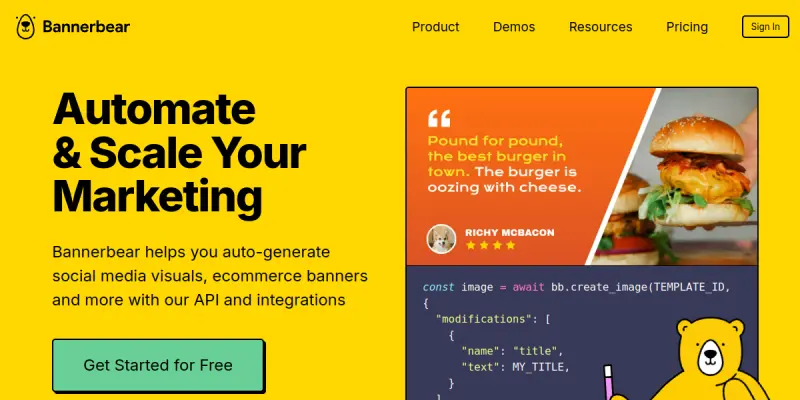
Bannerbear is a text-to-media API that enables developers and creators to automate the generation of images, videos, and PDFs. By using simple templates and JSON inputs, users can produce high-quality visual assets at scale without manual design work. Unlike traditional design software, Bannerbear focuses on programmatic generation, allowing users to programmatically manipulate text, images, and layout elements to create dynamic content. This makes it an essential tool for any workflow that requires high-volume visual output without sacrificing quality.
Key Features
- Text-to-Image/Video: Convert text into visual media using customizable templates.
- Dynamic Social Media: Auto-generate personalized posts for platforms like Instagram, Twitter, and LinkedIn.
- E-commerce Automation: Dynamically create product images and banners based on inventory data.
- API-First Design: Robust REST API allows for programmatic control and integration into existing workflows.
- PDF Generation: Create invoices, tickets, and reports programmatically.
- Video Rendering: Generate video clips with custom avatars and animations.
- Template Library: Access a wide range of pre-made templates for common use cases.
Use Cases
Social Media Management
Automate the creation of personalized social media posts at scale. Instead of manually designing graphics for every user or update, use Bannerbear to generate unique visuals based on user data, hashtags, or timestamps. This is particularly useful for marketing agencies managing multiple client accounts or influencers personalizing content for followers.
E-commerce Product Marketing
Dynamically update product banners and images based on inventory levels or pricing changes. This ensures your storefront always displays current offers without manual design intervention. For example, an e-commerce store can automatically update a "Sale" banner when inventory drops below a certain threshold, ensuring customers always see the latest deals.
Podcast & Video Graphics
Automatically generate episode thumbnails, intro sequences, and social clips for podcasters and video editors. By syncing the API with your publishing calendar, you can ensure that new episodes are immediately accompanied by professional-looking cover art and promotional videos, saving hours of editing time.
Custom Developer Integrations
Build custom applications that require visual output, such as generating personalized certificates, tickets, or marketing emails. Developers can integrate Bannerbear directly into their backend systems to provide users with branded visual assets instantly upon completion of a service.
Pricing & Plans
Bannerbear operates on a freemium model, allowing users to explore the platform before committing financially. The free tier usually provides a limited number of credits to test the API and templates, giving developers a chance to verify the integration works as expected. Paid plans are typically based on usage, where credits are deducted for each image, video, or PDF generated. Higher tiers often offer increased credit allowances, priority rendering, and access to more advanced features like custom avatars or high-resolution video exports.
Integrations & Compatibility
The primary integration is via the REST API, which is the core of the platform. This API is compatible with a wide variety of development environments and can be connected to popular automation platforms like Zapier, Make (formerly Integromat), and n8n. This allows non-developers to trigger Bannerbear generation from simple triggers like new form submissions or scheduled tasks. Additionally, the API supports various formats, including JSON, making it easy to send data to the service.
Who Is It For?
This tool is designed primarily for developers, software engineers, and product managers who need to integrate visual generation into their software products. However, it is equally suitable for digital marketing teams and content creators who need to speed up their design workflows. If your role involves managing large amounts of visual content or requires personalized graphics for thousands of users, Bannerbear offers the scalability that manual design tools cannot match.
Limitations
- Template Limitations: The visual output is constrained to the available templates, which may not cover every specific design requirement.
- Credit Costs: Generating high-resolution videos or complex assets consumes credits quickly, which can become expensive at scale.
- Temporal Consistency: As noted in the cons, maintaining consistent movement or style across long-form video generation can be challenging.
- Learning Curve: While the API is powerful, understanding how to structure JSON inputs for specific templates requires some technical knowledge.
Final Verdict
Bannerbear is a powerful solution for automating visual content creation, particularly for developers and marketing teams. Its API-first approach makes it a versatile tool for integration, though users should be mindful of credit costs and template constraints. For teams looking to scale their content production without increasing headcount, Bannerbear provides a scalable and efficient solution.
Tool Facts
Screenshots & Interface
Pros
- ✓ Robust developer API enables custom integrations for various platforms
- ✓ Generates high-quality video clips and animations directly from text inputs
- ✓ Reduces video editing overhead and studio rendering costs significantly
Cons
- × Generating long-form video consumes credits quickly and can be slow
- × Temporal consistency across frames can sometimes break unexpectedly
- × Limited fine control over complex character movements compared to dedicated animation software
How to Use Bannerbear in Your Workflow
Integrating Bannerbear into your professional toolkit enhances efficiency by automating manual steps. By configuring it to suit your specific project requirements, you can optimize output quality and reduce project cycle times. Standard workflows involve testing the tool on simple tasks before scaling its use to complex operations.
Frequently Asked Questions
What is Bannerbear used for?
Bannerbear is an API for generating social media visuals, ecommerce banners, and podcast videos from text templates. It automates content creation workflows for teams requiring high-quality assets.
What is the pricing model for Bannerbear?
Bannerbear uses a Freemium pricing model.
What are the main advantages of Bannerbear?
The key benefits of Bannerbear include: Robust developer API enables custom integrations for various platforms, Generates high-quality video clips and animations directly from text inputs, Reduces video editing overhead and studio rendering costs significantly.
What are the main limitations of Bannerbear?
Some limitations or cons of Bannerbear are: Generating long-form video consumes credits quickly and can be slow, Temporal consistency across frames can sometimes break unexpectedly, Limited fine control over complex character movements compared to dedicated animation software.
Alternative AI Tools

Wistia AI
Wistia is a video hosting platform with AI-powered editing tools. It helps businesses create, host, and market video content efficiently. Its key differentiator is the integrated AI for auto-clipping and engagement analytics.
Wonder Dynamics
Wonder Dynamics creates AI-powered animated videos from scripts, helping creators reduce production costs.
ClipTrend.ai
ClipTrend.ai is an AI image-to-video workspace for creators, marketers, and short-form video teams.
Rating Details
Based on 0 ratings
Quick Comparisons
Related Tools
More AI tools from the same workflow, industry, or category.
ClipTrend.ai
ClipTrend.ai is an AI image-to-video workspace for creators, marketers, and short-form video teams.
SongR
SongR is a text-to-song app that generates custom music tracks from a few keywords. It is designed for content creators and social media users who need quick, royalty-free songs in genres like pop, rock, hip-hop, and chant. Its key differentiator is instant generation without requiring musical expertise.
Quantum Capture
Quantum Capture generates AI-powered talking head videos from text input. It is designed for content creators and marketers who need quick, studio-quality video clips without expensive equipment. The platform specializes in creating realistic avatars with consistent lip-sync and facial expressions.
Kaltura AI
Kaltura is an enterprise video platform that combines cloud hosting with AI tools for content creation, marketing, and learning management. It helps businesses create branded video experiences for webinars, social media, and internal training.
Reviews
No reviews submitted yet. Be the first to share your experience.
Write a Review
Share Your Experience
Join the community to write reviews, submit ratings, and bookmark your favorite AI tools.