

Bito AI
Use Bito AI as the anchor for a real shortlist.
Instead of returning to a broad directory, jump straight into the strongest adjacent matchups for pricing, workflow fit, and differentiation.
Overview
Overview
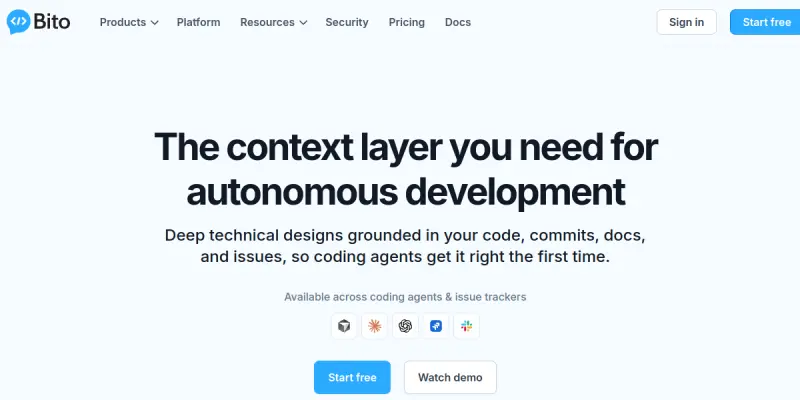
Bito AI is an AI-powered code assistant that helps developers automate code generation, code review, and technical design. Its core technology, AI Architect, leverages the full context of your existing codebase, business logic, and team knowledge to generate accurate, production-ready code. By integrating directly into the development workflow, Bito AI aims to reduce repetitive tasks and enable engineers to focus on higher-level problem-solving.
Key Features
- AI Code Generation: Automatically writes code based on natural language prompts and contextual understanding of your project.
- Code Review Automation: Analyzes pull requests for bugs, security issues, and best practices, providing inline suggestions.
- Technical Design Assistance: Helps create architectural plans and design documents by pulling from your codebase and business context.
- Contextual Understanding: Uses AI Architect to index your entire codebase, business rules, and team documentation for relevant, accurate outputs.
- IDE Integration: Works seamlessly within popular IDEs like VS Code, IntelliJ, and Eclipse as a plugin.
- Natural Language Queries: Ask questions about your codebase in plain English and get instant, contextual answers.
- Customizable Rules: Set project-specific coding standards and best practices that the AI follows.
Use Cases
Accelerating Code Creation
Developers can describe a new function or module in natural language and have Bito AI generate the code, saving hours of manual typing and debugging.
Streamlining Code Reviews
Engineering teams can reduce review time by having Bito AI automatically scan pull requests for common issues, allowing reviewers to focus on logic and architecture.
Onboarding New Team Members
New developers can use Bito AI to quickly understand the codebase, ask questions about specific modules, and generate code that follows existing patterns.
Refactoring Legacy Code
Teams maintaining older codebases can leverage Bito AI’s context to safely refactor and modernize code while preserving business logic.
Pricing & Plans
Bito AI offers a free tier with limited usage and several paid plans for individuals and teams. Paid subscriptions unlock higher usage limits, advanced AI models, and priority support. Enterprise plans are available with custom pricing for larger organizations. Specific pricing details are not disclosed on the website.
Integrations & Compatibility
Bito AI integrates with major IDEs including Visual Studio Code, JetBrains IntelliJ, and Eclipse. It works with any programming language and framework supported by the underlying AI model. A web-based interface is also available for quick interactions.
Who Is It For?
This tool is ideal for software developers, engineering teams, and technical leads who want to speed up development, improve code quality, and reduce manual overhead. It is especially useful for teams with large or complex codebases that require deep contextual understanding.
Limitations
- Requires Internet Connection: Bito AI relies on cloud-based AI models, so an active internet connection is necessary to function.
- Context Indexing Overhead: Initial setup requires indexing your codebase, which may take time for large projects.
- Dependency on Input Quality: The accuracy of generated code and suggestions is heavily dependent on clear and detailed user prompts.
- Limited Offline Capabilities: There is no offline mode for core features; all processing is done server-side.
Final Verdict
Bito AI is a powerful tool for developers seeking to automate repetitive tasks and leverage AI for code generation and review. Its ability to understand full project context sets it apart from simpler autocomplete tools. However, reliance on internet connectivity and cloud processing may be a drawback for some teams. Overall, it is a valuable addition to any modern development workflow.
Tool Facts
Screenshots & Interface
Pros
- ✓ Automates code generation based on full project context, reducing manual coding effort.
- ✓ Integrates directly into popular IDEs like VS Code and IntelliJ, minimizing workflow disruption.
- ✓ Provides automated code review that catches bugs and security issues early.
- ✓ Offers a free tier, making it accessible for individual developers to evaluate.
- ✓ Extracts context from codebase, business rules, and team documentation for more accurate outputs.
Cons
- × Requires a stable internet connection for all core features, limiting offline use.
- × Advanced features and higher usage limits are locked behind a paid subscription.
- × Accuracy of generated code depends on the clarity of user prompts and quality of the indexed codebase.
- × Initial codebase indexing can be time-consuming for large projects.
How to Use Bito AI in Your Workflow
Integrating Bito AI into your professional toolkit enhances efficiency by automating manual steps. By configuring it to suit your specific project requirements, you can optimize output quality and reduce project cycle times. Standard workflows involve testing the tool on simple tasks before scaling its use to complex operations.
Frequently Asked Questions
What is Bito AI used for?
Bito AI is an AI-powered tool that assists developers with code generation, code review, and technical design. It relies on a proprietary AI Architect that uses context from your codebase, business logic, and team knowledge to automate development tasks. This tool is designed for development teams looking to accelerate workflows and reduce manual effort.
What is the pricing model for Bito AI?
Bito AI uses a Paid pricing model.
What are the main advantages of Bito AI?
The key benefits of Bito AI include: Automates code generation based on full project context, reducing manual coding effort., Integrates directly into popular IDEs like VS Code and IntelliJ, minimizing workflow disruption., Provides automated code review that catches bugs and security issues early., Offers a free tier, making it accessible for individual developers to evaluate., Extracts context from codebase, business rules, and team documentation for more accurate outputs..
What are the main limitations of Bito AI?
Some limitations or cons of Bito AI are: Requires a stable internet connection for all core features, limiting offline use., Advanced features and higher usage limits are locked behind a paid subscription., Accuracy of generated code depends on the clarity of user prompts and quality of the indexed codebase., Initial codebase indexing can be time-consuming for large projects..
Alternative AI Tools

CodePal
CodePal is an AI-powered code assistant that helps developers write, review, and optimize code more efficiently. It offers a freemium model with a robust API for custom integrations. Suitable for both individual developers and teams.

Neon AI
Neon AI offers a serverless PostgreSQL database optimized for AI, enabling developers to build and scale applications without managing infrastructure.

Reviewable AI
Reviewable AI automates code review for development teams by integrating with GitHub. It analyzes pull requests for issues, style violations, and security risks. This tool helps teams maintain code quality without slowing down delivery.
Rating Details
Based on 0 ratings
Quick Comparisons
Related Tools
More AI tools from the same workflow, industry, or category.
AICode
AICode is a spec-driven AI coding copilot for developers using Visual Studio Code. It enforces a disciplined workflow to prevent AI-generated technical debt and ensures maintainable code. Its key differentiator is forcing line-by-line human review before changes are applied.
Opik
Opik is an open-source platform for LLM observability and evaluation. It helps developers trace, test, and monitor AI applications and autonomous agents throughout development and production.
PlanetScale AI
PlanetScale provides serverless cloud hosting for Vitess and PostgreSQL databases. It targets developers and engineering teams requiring high-performance, scalable database infrastructure. The platform enables instant scaling and branching workflows.
CodeReview AI
CodeReview AI is a tool that uses artificial intelligence to analyze code and suggest improvements. It helps developers identify bugs, security issues, and style inconsistencies automatically. The tool integrates with popular version control systems to fit into existing workflows.
Reviews
No reviews submitted yet. Be the first to share your experience.
Write a Review
Share Your Experience
Join the community to write reviews, submit ratings, and bookmark your favorite AI tools.