

BlueWillow
Use BlueWillow as the anchor for a real shortlist.
Instead of returning to a broad directory, jump straight into the strongest adjacent matchups for pricing, workflow fit, and differentiation.
Overview
Overview
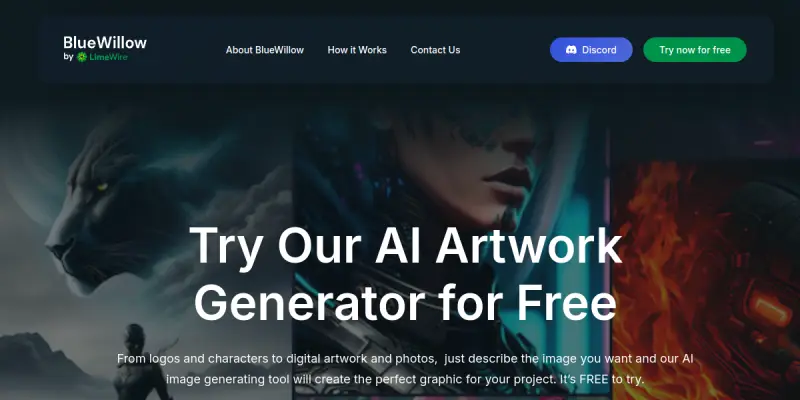
BlueWillow is a free AI image generation tool that operates primarily through Discord. It allows users to create artwork from simple text prompts, similar to Midjourney but without the cost. The platform is designed for creators, marketers, and hobbyists who want to explore AI-generated visuals without a financial commitment.
Key Features
- Discord-Based Interface: Generate images directly within Discord servers, making collaboration and sharing seamless.
- Text-to-Image Generation: Convert descriptive text prompts into high-quality images using advanced AI models.
- No Usage Limits (Free Tier): Unlike many freemium tools, BlueWillow offers unlimited image generation on its free plan.
- Prompt Customization: Users can adjust parameters such as aspect ratio, style, and detail level to refine outputs.
- Community Galleries: Browse and remix images created by other users for inspiration.
- Fast Rendering: Images are typically generated within seconds.
- Commercial Use Rights: Generated images can be used for commercial projects, subject to BlueWillow's terms.
Use Cases
Social Media Content Creation
Marketers and social media managers can quickly generate eye-catching visuals for posts, stories, and ads without needing design skills.
Concept Art and Ideation
Artists and designers use BlueWillow to rapidly prototype visual concepts, explore styles, and overcome creative blocks.
Personal Projects and Hobbies
Hobbyists and enthusiasts can create custom artwork for posters, wallpapers, or gifts using simple text descriptions.
Educational Materials
Teachers and educators can generate illustrative images for lessons, presentations, and handouts to make learning more engaging.
Pricing & Plans
BlueWillow operates on a freemium model. The free tier provides unlimited image generation with basic features. As of now, BlueWillow does not publicly list paid subscription plans, but its free offering is its primary draw.
Integrations & Compatibility
BlueWillow is accessed exclusively through Discord. It does not offer a standalone web or mobile app, nor does it provide native API integrations. Users must have a Discord account to use the service.
Who Is It For?
BlueWillow is ideal for individuals and small teams seeking a free, accessible AI image generator. It appeals to content creators, graphic designers, educators, and anyone curious about AI art who wants to avoid subscription costs.
Limitations
- Discord Dependency: Requires a Discord account and is not available as a standalone platform.
- Limited Control: Advanced fine-tuning options are fewer compared to paid tools like Midjourney or DALL-E.
- Quality Variability: Output quality can be inconsistent and highly dependent on prompt specificity.
- No API Access: Cannot be integrated into external applications or workflows.
Final Verdict
BlueWillow is an excellent entry point for AI image generation, especially for users on a tight budget. Its unlimited free tier and Discord-based community make it unique, but the lack of advanced features and standalone access may limit its appeal for professional users. It is best suited for casual experimentation and quick content needs.
Tool Facts
Screenshots & Interface
Pros
- ✓ Free for unlimited image generation with no hidden caps.
- ✓ Discord-based integration makes sharing and collaboration easy.
- ✓ Generates images in seconds from simple text prompts.
- ✓ Offers commercial use rights for generated images.
- ✓ Supports prompt customization including aspect ratio and style adjustments.
Cons
- × Requires a Discord account and is not available as a standalone platform.
- × Advanced customization and fine-tuning options are limited compared to paid alternatives.
- × Output quality can be inconsistent and depends heavily on prompt specificity.
- × No API access for integration into external tools or workflows.
How to Use BlueWillow in Your Workflow
Integrating BlueWillow into your professional toolkit enhances efficiency by automating manual steps. By configuring it to suit your specific project requirements, you can optimize output quality and reduce project cycle times. Standard workflows involve testing the tool on simple tasks before scaling its use to complex operations.
Frequently Asked Questions
What is BlueWillow used for?
BlueWillow is a free AI image generator that lets you create artwork from text prompts. It serves users who want a no-cost alternative to Midjourney, with a focus on Discord-based generation. Its key differentiator is providing high-quality outputs without a subscription.
What is the pricing model for BlueWillow?
BlueWillow uses a Freemium pricing model.
What are the main advantages of BlueWillow?
The key benefits of BlueWillow include: Free for unlimited image generation with no hidden caps., Discord-based integration makes sharing and collaboration easy., Generates images in seconds from simple text prompts., Offers commercial use rights for generated images., Supports prompt customization including aspect ratio and style adjustments..
What are the main limitations of BlueWillow?
Some limitations or cons of BlueWillow are: Requires a Discord account and is not available as a standalone platform., Advanced customization and fine-tuning options are limited compared to paid alternatives., Output quality can be inconsistent and depends heavily on prompt specificity., No API access for integration into external tools or workflows..
Alternative AI Tools
Playground AI
Playground AI is an online image generation tool that helps users create custom designs, logos, and social media graphics. It offers a text-to-image workflow suitable for designers and content creators seeking quick visual assets. Its key differentiator is a large library of community-created styles and models.
Stencil AI
Stencil AI is an AI-powered graphic design platform that helps marketers and small business owners quickly create social media images, banners, and other visual content. Its key differentiator is a library of over 5 million curated stock photos and a drag-and-drop editor that simplifies the design process.
DreamStudio
DreamStudio is a web interface for the Stability AI image generation model. It allows users to create images from text prompts with customizable settings.
Rating Details
Based on 0 ratings
Quick Comparisons
Related Tools
More AI tools from the same workflow, industry, or category.
Createimg.ai
Createimg.ai provides text-to-image generation and photo editing tools including background removal. It is designed for e-commerce sellers and creators needing free visual assets.
JetBrains AI
JetBrains AI is an AI-powered toolset integrated into JetBrains IDEs, offering code completion, debugging assistance, and intelligent suggestions for developers. It leverages large language models to help teams write, understand, and refactor code more efficiently. A key differentiator is its seamless integration with JetBrains' existing development environment.
Stable Diffusion Inpaint
Stable Diffusion Inpaint is an AI-powered tool that uses diffusion models to intelligently fill in or replace parts of an image. It is designed for photographers, designers, and content creators who need precise and context-aware image editing. Its key differentiator is the ability to generate new content that seamlessly blends with the existing image.
Crello AI
VistaCreate (formerly Crello) is a cloud-based design tool using AI to generate graphics from text prompts. It features 100K+ templates for social media and marketing.
Reviews
No reviews submitted yet. Be the first to share your experience.
Write a Review
Share Your Experience
Join the community to write reviews, submit ratings, and bookmark your favorite AI tools.