
Camtasia AI
Use Camtasia AI as the anchor for a real shortlist.
Instead of returning to a broad directory, jump straight into the strongest adjacent matchups for pricing, workflow fit, and differentiation.
Overview
Overview
Camtasia AI is an artificial intelligence tool designed to convert static images and screenshots into dynamic, professional video content. Unlike traditional video editors that require complex timelines and rendering, this tool automates the animation process, allowing users to generate video assets quickly from visual assets alone.
Key Features
- Image-to-Video Conversion: Automatically generates motion from static screenshots and images.
- Text-to-Video Generation: Creates video sequences based on textual descriptions.
- No Editing Required: Streamlines the production workflow by removing the need for manual timeline editing.
- Rapid Rendering: Reduces studio rendering times significantly compared to traditional methods.
- Multi-Format Output: Supports creation of various video types suitable for different platforms.
- User-Friendly Interface: Simplifies the video creation process for beginners and professionals alike.
Use Cases
Social Media Content
Camtasia AI is ideal for creating engaging short-form content for platforms like TikTok, Instagram Reels, and YouTube Shorts. Users can quickly transform product screenshots into dynamic ads or turn personal photos into shareable stories.
Educational Tutorials
Instructors and course creators can use the tool to animate slides and diagrams, making lessons more visually engaging without the time investment of traditional animation software.
Business Presentations
Professionals can convert static pitch decks and reports into animated presentations to highlight key data points and maintain audience attention during meetings or investor pitches.
Marketing Animations
Marketing teams can generate explainer videos and product demos from static assets, speeding up the content creation cycle for campaigns.
Pricing & Plans
The tool operates on a Freemium model. While specific pricing tiers are not publicly disclosed in detail, users can typically access basic features for free with limitations on video length or resolution. Upgrading to a paid plan generally unlocks higher resolution exports, longer video durations, and additional credit allowances for frequent use.
Integrations & Compatibility
Camtasia AI is accessible via a web-based interface, making it compatible with most modern web browsers. Native integrations with cloud storage services for asset management are commonly supported, allowing for seamless workflow between uploading images and exporting the final video.
Who Is It For?
This tool is best suited for content creators, marketers, educators, and small business owners who need to produce video content quickly but lack the time or technical expertise to use traditional video editing software like Premiere Pro or Final Cut.
Limitations
- Generating long-form video content can consume credits quickly, making it expensive for large projects.
- The temporal consistency of movements between frames can sometimes be inconsistent or glitchy.
- Users have limited fine control over complex character movements and detailed animations.
- The tool is primarily focused on automated generation, offering less manual control than dedicated video editors.
Final Verdict
Camtasia AI is a powerful utility for users who need to bridge the gap between static visuals and dynamic video content. While it excels at rapid prototyping and simple animations, it may not replace professional video editors for complex projects requiring high-end manual control.
Tool Facts
Screenshots & Interface
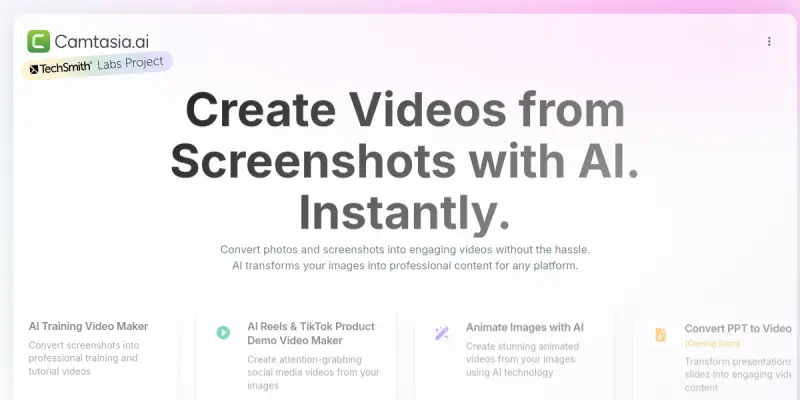
Pros
- ✓ Automates the conversion of static images and screenshots into dynamic video content.
- ✓ Eliminates the need for advanced video editing skills to produce professional-looking animations.
- ✓ Streamlines the production of social media clips and tutorial videos.
Cons
- × Generating long-form video content consumes credits quickly.
- × Motion consistency between frames can occasionally be inconsistent.
- × Users have limited control over fine-tuned character movements.
How to Use Camtasia AI in Your Workflow
Integrating Camtasia AI into your professional toolkit enhances efficiency by automating manual steps. By configuring it to suit your specific project requirements, you can optimize output quality and reduce project cycle times. Standard workflows involve testing the tool on simple tasks before scaling its use to complex operations.
Frequently Asked Questions
What is Camtasia AI used for?
Turn images and screenshots into professional videos using AI. Create animated tutorials, presentations, and social media clips without video editing skills.
What is the pricing model for Camtasia AI?
Camtasia AI uses a Freemium pricing model.
What are the main advantages of Camtasia AI?
The key benefits of Camtasia AI include: Automates the conversion of static images and screenshots into dynamic video content., Eliminates the need for advanced video editing skills to produce professional-looking animations., Streamlines the production of social media clips and tutorial videos..
What are the main limitations of Camtasia AI?
Some limitations or cons of Camtasia AI are: Generating long-form video content consumes credits quickly., Motion consistency between frames can occasionally be inconsistent., Users have limited control over fine-tuned character movements..
Alternative AI Tools
Hippo Video AI
Convert PPTs, PDFs, and prompts into high-quality videos in minutes, featuring lifelike AI avatars—no expensive studio setups or editing hassles | Hippo Video
Soul Machines
Soul Machines creates lifelike digital humans for customer service and training. The platform uses neural avatars to generate realistic video from text scripts. It is designed for enterprises needing scalable virtual agents.

Jupitrr AI
Jupitrr AI offers an all-in-one video operating system that helps businesses research, script, edit, and publish videos daily. It integrates AI agents, automated cutting tools, and an AI-powered video editor. The platform is suitable for teams seeking a streamlined video production workflow.
Rating Details
Based on 0 ratings
Related Tools
More AI tools from the same workflow, industry, or category.
ClipTrend.ai
ClipTrend.ai is an AI image-to-video workspace for creators, marketers, and short-form video teams.
SongR
SongR is a text-to-song app that generates custom music tracks from a few keywords. It is designed for content creators and social media users who need quick, royalty-free songs in genres like pop, rock, hip-hop, and chant. Its key differentiator is instant generation without requiring musical expertise.
Quantum Capture
Quantum Capture generates AI-powered talking head videos from text input. It is designed for content creators and marketers who need quick, studio-quality video clips without expensive equipment. The platform specializes in creating realistic avatars with consistent lip-sync and facial expressions.
Kaltura AI
Kaltura is an enterprise video platform that combines cloud hosting with AI tools for content creation, marketing, and learning management. It helps businesses create branded video experiences for webinars, social media, and internal training.
Reviews
No reviews submitted yet. Be the first to share your experience.
Write a Review
Share Your Experience
Join the community to write reviews, submit ratings, and bookmark your favorite AI tools.