

Kaltura AI
Use Kaltura AI as the anchor for a real shortlist.
Instead of returning to a broad directory, jump straight into the strongest adjacent matchups for pricing, workflow fit, and differentiation.
Overview
Overview
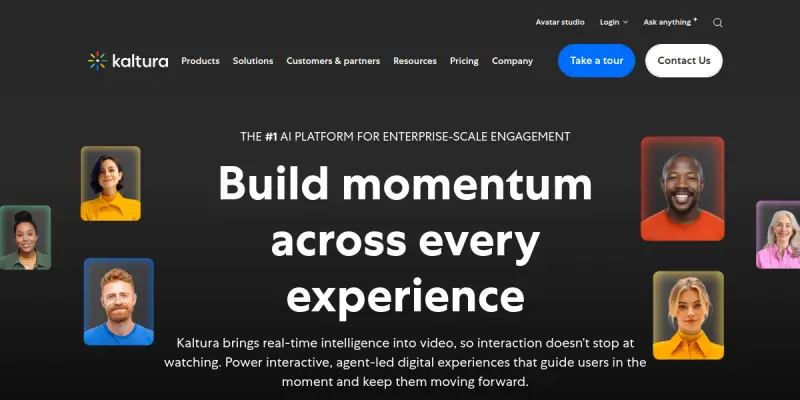
Kaltura is a comprehensive enterprise video platform that integrates cloud-based hosting, creation, and management tools with artificial intelligence. It provides a unified solution for businesses to manage video content across webinars, marketing campaigns, learning management systems, and live events. The platform focuses on delivering branded, interactive video experiences that enhance audience engagement and operational efficiency.
Key Features
- Text-to-Video Generation: Create video clips and animations directly from text prompts using AI capabilities.
- Live Streaming and Recording: Capture, stream, and archive live events with interactive features such as polls and Q&A.
- Video Player Customization: Fully branded video players with customizable layouts, skins, and branding elements.
- Analytics and Insights: Track viewer engagement, retention rates, and content performance with detailed metrics.
- AI-Powered Editing: Automate video editing tasks to reduce overhead and create marketing-ready clips.
- LMS Integration: Host training videos, courses, and SCORM packages seamlessly within learning management systems.
- Enterprise Security: Robust security controls, DRM support, and compliance features for sensitive corporate content.
Use Cases
Corporate Training and Education
Organizations use Kaltura to host training videos, onboarding materials, and compliance courses. The platform supports various learning formats and provides tools to track learner progress and completion rates, ensuring knowledge retention across the workforce.
Marketing and Webinars
Marketing teams leverage Kaltura for webinars, virtual events, and product launches. The tool enables the creation of branded video experiences that drive engagement and reach wider audiences on social media channels.
Customer Support
Businesses embed video content directly into support portals to answer customer queries more effectively. This reduces ticket volume and improves the resolution time for support staff by providing visual demonstrations.
Internal Communications
Companies use the platform to distribute internal updates, town halls, and HR announcements to employees. Centralized hosting ensures all staff have access to the latest company communications regardless of their location.
Pricing & Plans
Kaltura operates on a Freemium model, allowing users to start with basic features for free. Paid tiers (Pro and Enterprise) offer advanced features such as increased storage, advanced analytics, security controls, and priority support. Specific pricing is often customized based on the volume of usage and required features.
Integrations & Compatibility
The platform integrates with major content management systems (CMS), learning management systems (LMS), customer relationship management (CRM) tools, and social media platforms. It also offers a robust API for custom integrations, allowing developers to build bespoke solutions on top of the video infrastructure.
Who Is It For?
Kaltura is designed for enterprises, educational institutions, and media companies looking to centralize their video strategy. It is suitable for marketing teams, HR departments, and instructional designers who need a scalable, secure, and integrated video solution.
Limitations
- The platform is feature-rich, which can make the interface feel complex for users seeking simple, consumer-grade video editing tools.
- Advanced features and support are primarily geared toward enterprise clients, which may limit accessibility for small businesses.
- Customization options, while extensive, may require technical expertise to configure fully.
Final Verdict
Kaltura serves as a powerful enterprise video solution that blends traditional hosting capabilities with modern AI tools. It is particularly well-suited for organizations that require a robust, secure, and integrated platform for managing video across marketing, learning, and communication channels.
Tool Facts
Screenshots & Interface
Pros
- ✓ All-in-one platform combining video hosting and creation tools
- ✓ Enterprise-grade security and compliance features
- ✓ Supports live streaming and interactive video experiences
- ✓ Robust API allows for deep integrations with other business systems
- ✓ Centralized management for marketing, learning, and internal comms
Cons
- × Interface may feel complex and overwhelming for users new to enterprise video platforms
- × Pricing scales significantly for enterprise features and support
- × May require technical assistance to fully configure advanced customization options
How to Use Kaltura AI in Your Workflow
Integrating Kaltura AI into your professional toolkit enhances efficiency by automating manual steps. By configuring it to suit your specific project requirements, you can optimize output quality and reduce project cycle times. Standard workflows involve testing the tool on simple tasks before scaling its use to complex operations.
Frequently Asked Questions
What is Kaltura AI used for?
Kaltura is an enterprise video platform that combines cloud hosting with AI tools for content creation, marketing, and learning management. It helps businesses create branded video experiences for webinars, social media, and internal training.
What is the pricing model for Kaltura AI?
Kaltura AI uses a Freemium pricing model.
What are the main advantages of Kaltura AI?
The key benefits of Kaltura AI include: All-in-one platform combining video hosting and creation tools, Enterprise-grade security and compliance features, Supports live streaming and interactive video experiences, Robust API allows for deep integrations with other business systems, Centralized management for marketing, learning, and internal comms.
What are the main limitations of Kaltura AI?
Some limitations or cons of Kaltura AI are: Interface may feel complex and overwhelming for users new to enterprise video platforms, Pricing scales significantly for enterprise features and support, May require technical assistance to fully configure advanced customization options.
Alternative AI Tools

Creatomate
Creatomate provides 75+ AI tools for generating content, marketing campaigns, and business growth. It is designed for entrepreneurs and agencies seeking an all-in-one AI platform. A key differentiator is its wide tool set under one subscription.

Snapy.ai
Snapy.ai converts long-form content into short videos with automatic editing and silence removal. It helps creators produce social media clips quickly using generative AI animations.

Plask
Plask performs AI motion capture using a webcam or video files, creating rigged 3D characters without hardware.
Rating Details
Based on 0 ratings
Quick Comparisons
Related Tools
More AI tools from the same workflow, industry, or category.
ClipTrend.ai
ClipTrend.ai is an AI image-to-video workspace for creators, marketers, and short-form video teams.
Quantum Capture
Quantum Capture generates AI-powered talking head videos from text input. It is designed for content creators and marketers who need quick, studio-quality video clips without expensive equipment. The platform specializes in creating realistic avatars with consistent lip-sync and facial expressions.
Timebolt
Timebolt is a video editing tool that automatically removes silence and filler words from talking-head videos, podcasts, and presentations. It uses AI to generate jump cuts, enabling creators to trim content in a fraction of the time required for manual editing. The tool is designed for content creators and podcasters who want to speed up their post-production workflow.
SongR
SongR is a text-to-song app that generates custom music tracks from a few keywords. It is designed for content creators and social media users who need quick, royalty-free songs in genres like pop, rock, hip-hop, and chant. Its key differentiator is instant generation without requiring musical expertise.
Reviews
No reviews submitted yet. Be the first to share your experience.
Write a Review
Share Your Experience
Join the community to write reviews, submit ratings, and bookmark your favorite AI tools.