

MuleSoft AI
Use MuleSoft AI as the anchor for a real shortlist.
Instead of returning to a broad directory, jump straight into the strongest adjacent matchups for pricing, workflow fit, and differentiation.
Overview
Overview
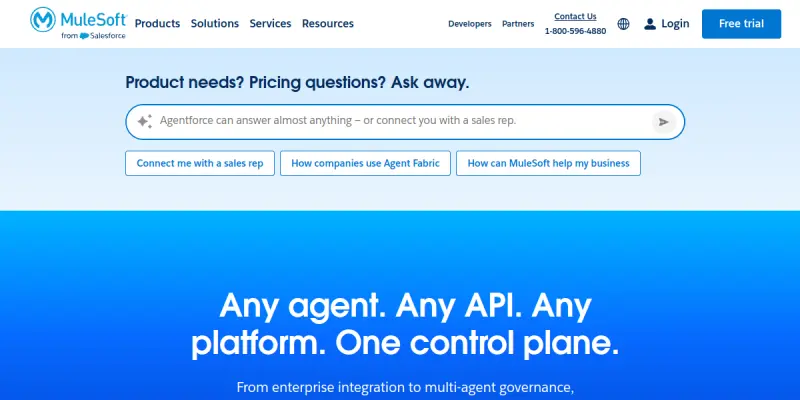
MuleSoft AI is an enterprise integration platform (iPaaS) that enables organizations to connect applications, data, and devices across on-premises and cloud environments. It provides a unified control plane for designing, building, and managing APIs and integrations, and has recently expanded to support AI agent orchestration and governance. The platform is used by IT teams, software architects, and business analysts to automate workflows, synchronize data, and accelerate digital transformation projects.
Key Features
- AI Agent Orchestration: Manage and govern AI agents alongside traditional integrations from a single platform.
- Anypoint Platform: A comprehensive suite for API design, implementation, deployment, and management.
- Anypoint Exchange: A marketplace of pre-built connectors, templates, and APIs from Salesforce and community contributors.
- DataWeave: A powerful data transformation language for mapping between different data formats (XML, JSON, CSV, etc.).
- Anypoint Studio: A visual, drag-and-drop integration design environment based on Eclipse.
- CloudHub: A fully-managed, cloud-based runtime environment for deploying and running integrations.
- API Manager: Control traffic, enforce policies (SLA, rate limiting), and secure APIs.
- Monitoring & Analytics: Real-time dashboards for integration performance, error tracking, and usage analytics.
Use Cases
API-led Connectivity
MuleSoft enables organizations to adopt an API-led approach, creating reusable APIs that expose data and functionality from legacy systems, SaaS applications, and databases. This accelerates integration projects and reduces technical debt.
AI Agent Orchestration
Enterprises can connect AI agents (e.g., chatbots, inference models) to backend systems, data sources, and business processes, all governed by MuleSoft’s centralized control plane. This ensures consistent security, logging, and lifecycle management.
Data Synchronization
Sync customer, product, or order data between Salesforce, ERP systems (SAP, Oracle), databases, and third-party applications. MuleSoft’s pre-built connectors and DataWeave simplify complex mapping and transformation.
Legacy System Modernization
Connect mainframes, on-premises databases, and legacy applications to modern cloud services, enabling step-by-step modernization without rip-and-replace.
B2B/EDI Integration
Support for industry-standard EDI protocols (AS2, SFTP) allows businesses to integrate with partners and suppliers, automating purchase orders, invoices, and shipment notifications.
Pricing & Plans
MuleSoft offers a Freemium model. A free tier provides limited API calls and connectors. Paid plans are based on subscription tiers that scale with usage (number of API calls, workers, or data volume). Specific pricing for team and enterprise plans must be obtained from Salesforce’s sales team, as it varies by deployment size and required features.
Integrations & Compatibility
MuleSoft provides hundreds of pre-built connectors for popular SaaS platforms including Salesforce, Workday, ServiceNow, SAP, Oracle, NetSuite, Microsoft Dynamics, AWS, Azure, Google Cloud, and many more. It supports REST, SOAP, file-based (CSV, XML, JSON), databases (SQL, NoSQL), and messaging systems (JMS, Kafka).
Who Is It For?
The platform is designed for integration developers, software architects, IT operations teams, and business analysts who need to automate complex business processes across diverse systems. It is also suitable for enterprises undergoing digital transformation or adopting API-first and AI-driven strategies.
Limitations
- Learning curve: The full Anypoint platform requires training to master; casual users may find DataWeave syntax challenging.
- Cost: Enterprise-grade plans can become expensive as usage scales, particularly for high-volume API calls.
- On-premises runtime: While CloudHub is fully managed, on-premises workers require dedicated infrastructure and maintenance.
- Dependency on internet: CloudHub deployments need stable internet connectivity; offline capabilities are limited.
Final Verdict
MuleSoft AI is a powerful and mature iPaaS solution, particularly strong for organizations already in the Salesforce ecosystem. Its AI agent orchestration features are innovative, but the platform’s depth may be overkill for simple integrations. The free tier is useful for trials, but serious usage will require a paid subscription. Overall, it is a top-tier choice for enterprise integration projects.
Tool Facts
Screenshots & Interface
Pros
- ✓ Offers a robust public API (Anypoint API) for automating platform administration and integration tasks.
- ✓ Includes over 300 pre-built connectors for common SaaS, databases, and legacy systems, reducing custom coding.
- ✓ Provides a visual, drag-and-drop integration designer (Anypoint Studio) that accelerates development.
- ✓ Supports AI agent orchestration and governance alongside traditional API management.
- ✓ Delivers enterprise-grade security, SLA management, and monitoring through the API Manager.
Cons
- × The full power of MuleSoft requires a significant learning curve; novice users may need formal training.
- × Enterprise pricing tiers can become expensive for high-volume integration workloads.
- × On-premises deployments require dedicated infrastructure and IT maintenance resources.
- × The platform is heavily optimized for Salesforce integrations; non-Salesforce environments may feel secondary.
How to Use MuleSoft AI in Your Workflow
Integrating MuleSoft AI into your professional toolkit enhances efficiency by automating manual steps. By configuring it to suit your specific project requirements, you can optimize output quality and reduce project cycle times. Standard workflows involve testing the tool on simple tasks before scaling its use to complex operations.
Frequently Asked Questions
What is MuleSoft AI used for?
MuleSoft AI is a unified integration platform that connects applications, data, and devices across on-premises and cloud environments. It enables enterprises to build, automate, and govern APIs and AI agents with pre-built connectors and a visual design interface. The platform is designed for IT architects, developers, and business analysts seeking to streamline digital transformation.
What is the pricing model for MuleSoft AI?
MuleSoft AI uses a Freemium pricing model.
What are the main advantages of MuleSoft AI?
The key benefits of MuleSoft AI include: Offers a robust public API (Anypoint API) for automating platform administration and integration tasks., Includes over 300 pre-built connectors for common SaaS, databases, and legacy systems, reducing custom coding., Provides a visual, drag-and-drop integration designer (Anypoint Studio) that accelerates development., Supports AI agent orchestration and governance alongside traditional API management., Delivers enterprise-grade security, SLA management, and monitoring through the API Manager..
What are the main limitations of MuleSoft AI?
Some limitations or cons of MuleSoft AI are: The full power of MuleSoft requires a significant learning curve; novice users may need formal training., Enterprise pricing tiers can become expensive for high-volume integration workloads., On-premises deployments require dedicated infrastructure and IT maintenance resources., The platform is heavily optimized for Salesforce integrations; non-Salesforce environments may feel secondary..
Alternative AI Tools

HelloSign AI
Dropbox Sign (formerly HelloSign) offers secure e-signatures and document workflow automation. It is ideal for businesses needing legally binding agreements with minimal setup.

RemNote AI
RemNote combines note-taking with AI to generate flashcards, quizzes, and summaries. It features built-in spaced repetition for long-term retention.

Evernote AI
Evernote AI summarizes notes and searches content instantly, helping knowledge workers manage projects and tasks efficiently.
Rating Details
Based on 0 ratings
Quick Comparisons
Related Tools
More AI tools from the same workflow, industry, or category.
Mailbutler AI
Mailbutler AI is an email extension that integrates AI-powered writing, scheduling, and tracking features directly into your existing inbox. It helps professionals and teams streamline email workflows and save time on routine communication tasks.
Lucidspark AI
Lucidspark AI is a virtual whiteboard tool that helps teams brainstorm, organize ideas, and move from concept to execution. It is designed for remote and hybrid teams seeking a structured yet flexible collaboration space. Its integration with Lucidchart sets it apart for end-to-end visual workflow planning.
SignNow AI
SignNow AI automates document signing and workflow management for businesses. It uses AI to extract fields, send documents for signature, and track completion. Ideal for HR, legal, and sales teams.
ProtonMail AI
ProtonMail AI is an integrated writing assistant for secure email, leveraging Swiss privacy standards to draft, summarize, and translate messages within the Proton Mail interface.
Reviews
No reviews submitted yet. Be the first to share your experience.
Write a Review
Share Your Experience
Join the community to write reviews, submit ratings, and bookmark your favorite AI tools.