

Picsart AI
Use Picsart AI as the anchor for a real shortlist.
Instead of returning to a broad directory, jump straight into the strongest adjacent matchups for pricing, workflow fit, and differentiation.
Overview
Overview
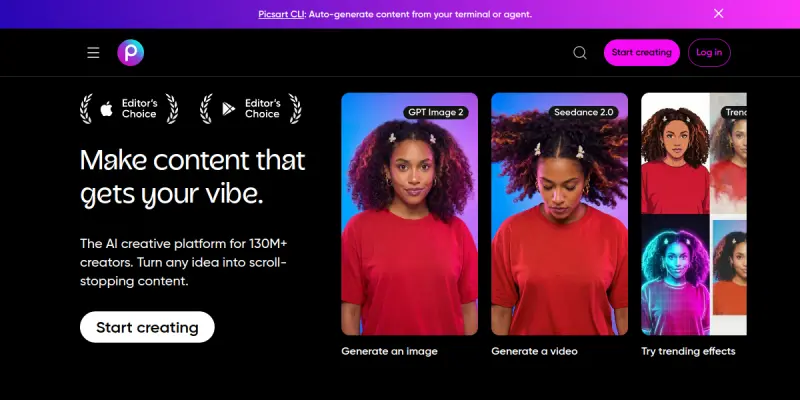
Picsart AI is an image generation and design platform that brings artificial intelligence to the fingertips of creators, marketers, and small business owners. Integrated into the widely used Picsart ecosystem, this tool leverages advanced AI models to generate images, edit photos, remove backgrounds, enhance resolution, and apply artistic effects with minimal effort. It serves as a versatile solution for anyone needing fast, high-quality visual content without requiring advanced design skills.
Key Features
- AI Image Generation: Create original images from text prompts using state-of-the-art models.
- Background Removal: Instantly isolate subjects and replace or remove backgrounds.
- AI Enhance: Upscale and improve image resolution and clarity automatically.
- Artistic Effects: Apply a wide range of AI-powered filters and styles to transform photos.
- Text to Image: Generate visuals based on descriptive text, useful for concept art and marketing assets.
- Object Removal: Erase unwanted objects or blemishes from images with smart fill.
- Template Library: Access thousands of customizable templates for social media, ads, and more.
- Collaboration Tools: Share and edit projects with team members in real time.
Use Cases
Social Media Content Creation
Marketers and social media managers can quickly produce eye-catching posts, stories, and banners using AI-generated images and templates, saving time and maintaining brand consistency.
E-commerce Product Photography
Online sellers can remove backgrounds, enhance product images, and create lifestyle scenes without a professional photoshoot, improving listing quality and conversion rates.
Graphic Design for Small Businesses
Entrepreneurs and freelancers can design flyers, logos, and promotional materials using AI-assisted tools, reducing the need for expensive design software or hiring designers.
Personal Photo Editing
Consumers can retouch personal photos, apply artistic filters, and generate fun AI avatars for social media profiles.
Rapid Prototyping for Designers
Professional designers can use AI image generation to brainstorm concepts and create mood boards quickly before final execution.
Pricing & Plans
Picsart AI operates on a freemium model. The free tier provides access to basic editing tools and limited AI features with watermarked exports. Paid plans, such as Picsart Gold and Team plans, unlock advanced AI capabilities, remove watermarks, and offer higher resolution exports. Specific pricing is available on the Picsart website and varies by region and subscription length (monthly or yearly).
Integrations & Compatibility
Picsart AI is available as a web-based platform compatible with all major browsers. It also offers mobile apps for iOS and Android. While it does not have a public API listed, it integrates with social media platforms for direct sharing and publishing.
Who Is It For?
Picsart AI is designed for a broad audience: content creators, social media managers, small business owners, e-commerce sellers, graphic designers, and casual users who want to enhance their photos with AI. It is suitable for both beginners and experienced creators.
Limitations
- Does not offer a dedicated API for custom integrations.
- Free plan includes watermarked exports and limited AI feature access.
- Advanced features may require a subscription, which might be costly for occasional users.
- Output quality can vary depending on input prompt specificity and editing complexity.
Final Verdict
Picsart AI is a powerful and accessible tool for AI-driven image creation and editing. Its integration within the Picsart ecosystem gives it an edge for users already familiar with the platform. While the free tier is useful for basic tasks, serious creators will benefit from the paid plans. The lack of an API and some advanced features may limit its use for enterprise-scale automation, but for individual and small-team creative work, it is a strong contender.
Tool Facts
Screenshots & Interface
Pros
- ✓ AI-powered features such as text-to-image generation and background removal streamline creative workflows.
- ✓ Intuitive interface allows users with no design experience to produce professional-looking visuals quickly.
- ✓ Extensive library of templates helps maintain brand consistency across social media and marketing materials.
- ✓ Real-time collaboration tools enable teams to work together on design projects efficiently.
- ✓ Freemium pricing provides access to basic editing without upfront cost, lowering the barrier to entry.
Cons
- × Free tier exports are watermarked, limiting use for professional projects without a subscription.
- × No dedicated API is available, making integration with other platforms or automation workflows difficult.
- × Advanced AI features such as higher resolution and object removal are only available on paid plans.
- × Output consistency can vary with complex prompts or challenging image edits.
How to Use Picsart AI in Your Workflow
Integrating Picsart AI into your professional toolkit enhances efficiency by automating manual steps. By configuring it to suit your specific project requirements, you can optimize output quality and reduce project cycle times. Standard workflows involve testing the tool on simple tasks before scaling its use to complex operations.
Frequently Asked Questions
What is Picsart AI used for?
Picsart AI is an image generation and design tool that helps users create graphics, edit photos, and generate AI-powered visuals. It is suitable for marketers, content creators, and small businesses looking to streamline their visual content production. Its key differentiator is the seamless integration of advanced AI models with an intuitive design interface.
What is the pricing model for Picsart AI?
Picsart AI uses a Freemium pricing model.
What are the main advantages of Picsart AI?
The key benefits of Picsart AI include: AI-powered features such as text-to-image generation and background removal streamline creative workflows., Intuitive interface allows users with no design experience to produce professional-looking visuals quickly., Extensive library of templates helps maintain brand consistency across social media and marketing materials., Real-time collaboration tools enable teams to work together on design projects efficiently., Freemium pricing provides access to basic editing without upfront cost, lowering the barrier to entry..
What are the main limitations of Picsart AI?
Some limitations or cons of Picsart AI are: Free tier exports are watermarked, limiting use for professional projects without a subscription., No dedicated API is available, making integration with other platforms or automation workflows difficult., Advanced AI features such as higher resolution and object removal are only available on paid plans., Output consistency can vary with complex prompts or challenging image edits..
Alternative AI Tools

Overflow AI
Overflow AI is a Mexican company that specializes in developing custom chatbots and AI-powered applications. It offers tailored solutions for businesses looking to automate customer interactions and streamline operations through conversational AI.

BlueWillow
BlueWillow is a free AI image generator that lets you create artwork from text prompts. It serves users who want a no-cost alternative to Midjourney, with a focus on Discord-based generation. Its key differentiator is providing high-quality outputs without a subscription.

Brandify
Brandify is an AI-powered brand visibility platform that helps businesses appear in AI-driven search results and reach high-intent audiences. It offers omnichannel ad delivery across CTV, OTT, geofencing, display, search, and social media. The tool is designed for marketers seeking to capture attention across multiple digital channels through a single interface.
Rating Details
Based on 0 ratings
Quick Comparisons
Related Tools
More AI tools from the same workflow, industry, or category.
Createimg.ai
Createimg.ai provides text-to-image generation and photo editing tools including background removal. It is designed for e-commerce sellers and creators needing free visual assets.
JetBrains AI
JetBrains AI is an AI-powered toolset integrated into JetBrains IDEs, offering code completion, debugging assistance, and intelligent suggestions for developers. It leverages large language models to help teams write, understand, and refactor code more efficiently. A key differentiator is its seamless integration with JetBrains' existing development environment.
Stable Diffusion Inpaint
Stable Diffusion Inpaint is an AI-powered tool that uses diffusion models to intelligently fill in or replace parts of an image. It is designed for photographers, designers, and content creators who need precise and context-aware image editing. Its key differentiator is the ability to generate new content that seamlessly blends with the existing image.
Crello AI
VistaCreate (formerly Crello) is a cloud-based design tool using AI to generate graphics from text prompts. It features 100K+ templates for social media and marketing.
Reviews
No reviews submitted yet. Be the first to share your experience.
Write a Review
Share Your Experience
Join the community to write reviews, submit ratings, and bookmark your favorite AI tools.