

QuillBot
Use QuillBot as the anchor for a real shortlist.
Instead of returning to a broad directory, jump straight into the strongest adjacent matchups for pricing, workflow fit, and differentiation.
Overview
Overview
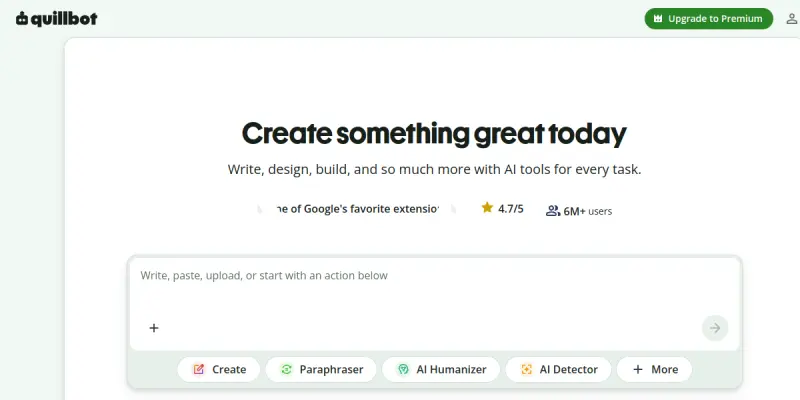
QuillBot is a comprehensive AI-powered writing assistant designed to help users paraphrase, check grammar, and summarize text. Launched in 2017, it has become a popular tool among students, academics, and professionals who want to improve their writing clarity and efficiency. The tool uses advanced natural language processing to understand context and offer multiple paraphrasing options, setting it apart from simpler rewriting tools.
Key Features
- Paraphrasing Modes: Offers free modes (Standard, Fluency) and premium modes (Formal, Simple, Creative, Expand, Shorten, Custom).
- Grammar Checker: Scans text for spelling, punctuation, and grammatical errors, with suggestions for correction.
- Summarizer: Condenses long articles, papers, or documents into key points while preserving meaning.
- Citation Generator: Helps users create citations in MLA, APA, Chicago, and other formats directly within the editor.
- Plagiarism Checker (Premium): Compares text against billions of web pages to detect potential plagiarism.
- Translator: Provides translations for 30+ languages, though premium unlocks full capabilities.
- Browser Extensions: Available for Chrome, Firefox, Edge, and Safari, enabling use across websites.
- Integration Support: Works with Google Docs and Microsoft Word via add-ons for seamless writing workflows.
Use Cases
Academic Writing
Students and researchers use QuillBot to rephrase sentences for clarity, avoid plagiarism, and generate citations for papers and theses. The Summarizer helps extract key points from lengthy research articles.
Professional Content Creation
Marketers, bloggers, and copywriters leverage QuillBot to quickly rewrite content for different channels, adjust tone, and ensure grammatical accuracy before publishing.
English Language Learning
Non-native speakers use the Paraphraser to see alternative phrasing and improve their vocabulary and writing style. The Fluency mode helps achieve more natural-sounding English.
Business Communication
Professionals use QuillBot for polishing emails, reports, and proposals, ensuring professional tone and error-free communication.
SEO and Content Rewriting
Digital marketers use the tool to generate multiple versions of articles or product descriptions without duplicating content, aiding in search engine optimization efforts.
Pricing & Plans
QuillBot operates on a freemium model. The free plan offers limited paraphrasing modes (Standard, Fluency) and word limits. The Premium plan is available as a monthly subscription at $19.95/month, semi-annual at $13.33/month, or annual at $8.33/month. Premium unlocks all paraphrasing modes, unlimited words, plagiarism checker, and faster processing. A team plan is not explicitly listed, but enterprise pricing is not publicly disclosed. There is also a student discount available.
Integrations & Compatibility
QuillBot integrates with Google Docs, Microsoft Word, Chrome, Firefox, Edge, and Safari. It also offers a web-based editor accessible from any browser. API access is not publicly advertised for end users, but the tool supports import/export from .docx, .txt, and directly from web pages via browser extensions.
Who Is It For?
QuillBot is designed for students, academics, writers, content marketers, ESL learners, and business professionals who need to paraphrase, check grammar, or summarize content efficiently. It suits non-native speakers seeking writing improvement and anyone producing large volumes of written content.
Limitations
- Free version limitations: Word count caps and restricted paraphrasing modes may frustrate heavy users.
- Context sensitivity: The paraphraser may misinterpret nuance in technical or creative writing, requiring manual review.
- Plagiarism checker quality: While useful, it is not as comprehensive as dedicated tools like Turnitin.
- No offline mode: Requires an internet connection to function.
Final Verdict
QuillBot is a solid choice for anyone needing a reliable paraphrasing and grammar tool. Its variety of modes and integrations make it versatile for academic, professional, and creative use. While the free tier is useful, heavy users will benefit from the affordable premium plan. It is not a replacement for human editing but a powerful assistant that speeds up writing tasks."
Tool Facts
Screenshots & Interface
Pros
- ✓ Offers multiple paraphrasing modes (e.g., Formal, Creative, Shorten) to match different writing needs.
- ✓ Integrates with Google Docs, Microsoft Word, and major browsers for seamless workflow.
- ✓ Includes a built-in citation generator supporting MLA, APA, and Chicago styles.
- ✓ Provides a plagiarism checker on the premium plan to help ensure originality.
- ✓ Supports 30+ languages in its translator feature, helping non-native speakers.
Cons
- × Free plan restricts word count per paraphrase (max 125 words) and only offers two modes.
- × Plagiarism checker is less comprehensive than dedicated tools like Turnitin or Grammarly.
- × Paraphraser may not handle highly technical or creative content with full accuracy.
How to Use QuillBot in Your Workflow
Integrating QuillBot into your professional toolkit enhances efficiency by automating manual steps. By configuring it to suit your specific project requirements, you can optimize output quality and reduce project cycle times. Standard workflows involve testing the tool on simple tasks before scaling its use to complex operations.
Frequently Asked Questions
What is QuillBot used for?
QuillBot is an AI-powered paraphrasing tool that also checks grammar and summarizes text. It helps students, writers, and professionals produce clearer and more polished writing. Its key differentiator is multiple modes for customizing the tone and style of paraphrased output.
What is the pricing model for QuillBot?
QuillBot uses a Freemium pricing model.
What are the main advantages of QuillBot?
The key benefits of QuillBot include: Offers multiple paraphrasing modes (e.g., Formal, Creative, Shorten) to match different writing needs., Integrates with Google Docs, Microsoft Word, and major browsers for seamless workflow., Includes a built-in citation generator supporting MLA, APA, and Chicago styles., Provides a plagiarism checker on the premium plan to help ensure originality., Supports 30+ languages in its translator feature, helping non-native speakers..
What are the main limitations of QuillBot?
Some limitations or cons of QuillBot are: Free plan restricts word count per paraphrase (max 125 words) and only offers two modes., Plagiarism checker is less comprehensive than dedicated tools like Turnitin or Grammarly., Paraphraser may not handle highly technical or creative content with full accuracy..
Alternative AI Tools

Virtual Writing Tutor
This tool provides real-time grammar and punctuation checks for non-native English speakers. It includes a paraphrasing feature to improve writing clarity and flow.

ConvertKit AI
ConvertKit AI is a text and writing tool designed for content creators and marketers. It streamlines copywriting tasks such as drafting, editing, and adjusting tone. A key differentiator is its integration with ConvertKit's email marketing platform, enabling seamless content workflows.

Pictory
Pictory is an AI-powered video generator for content creators and marketers. It transforms text, URLs, presentations, and media into professional branded videos with automatic captions and voiceovers, reducing production time from hours to minutes.
Rating Details
Based on 0 ratings
Quick Comparisons
Related Tools
More AI tools from the same workflow, industry, or category.
fablepilot
FablePilot is a free AI story generator that turns a single prompt into a complete story — no sign-up required. Add illustrations or generate a plot outline.
Ghosts.app
Ghosts is an AI ghostwriter for agencies, creators, and law firms. It produces researched, cited drafts in a specific voice without requiring prompts. Users brief a specialist agent and approve a finished draft.
GrowthBar
GrowthBar is an AI tool for content generation, designed to boost productivity and streamline workflows for writers and content creators, with features like editing and tone adjustment.
GetGenie AI
GetGenie AI is an AI-powered writing and SEO assistant that helps content creators and marketers generate optimized content quickly. It includes built-in keyword research and SERP analysis to improve organic search performance.
Reviews
No reviews submitted yet. Be the first to share your experience.
Write a Review
Share Your Experience
Join the community to write reviews, submit ratings, and bookmark your favorite AI tools.