

ReportPortal
Use ReportPortal as the anchor for a real shortlist.
Instead of returning to a broad directory, jump straight into the strongest adjacent matchups for pricing, workflow fit, and differentiation.
Overview
Overview
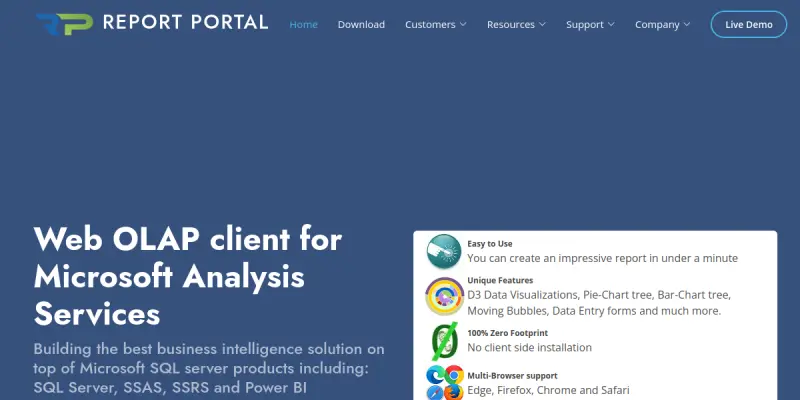
ReportPortal is a zero-footprint OLAP (Online Analytical Processing) client specifically designed for Microsoft SQL Server Analysis Services (SSAS). It provides business users with the ability to create, customize, and share interactive reports and dashboards directly from a web browser, eliminating the need for desktop software installations. By connecting directly to SSAS cubes, ReportPortal enables real-time data exploration and decision-making without requiring extensive technical expertise. The tool caters to organizations that rely on Microsoft BI infrastructure and need a lightweight, browser-based reporting solution.
Key Features
- Zero-Footprint Architecture: No installation is required on client machines; everything runs in a modern web browser, reducing IT overhead and deployment complexity.
- Direct SSAS Connectivity: Connects natively to Microsoft SQL Server Analysis Services (both multidimensional and tabular models) for real-time data access.
- Interactive Dashboards: Users can build drag-and-drop dashboards with charts, grids, and filters to visualize key metrics and trends.
- Report Scheduling & Distribution: Automate report generation and delivery via email or shared links at defined intervals.
- Role-Based Security: Leverages existing SSAS security to control user access to data and reports at the cube, dimension, or measure level.
- Export Options: Reports can be exported to commonly used formats such as PDF, Excel, and CSV for offline analysis or sharing.
- Multi-Language Support: The interface is available in multiple languages, supporting global teams.
- Custom Branding: Organizations can apply their own logos, colors, and styling to match corporate identity.
Use Cases
Financial Reporting and Analysis
Finance teams can connect ReportPortal to their SSAS cubes containing budget, actuals, and forecast data. They can build dynamic financial statements, variance reports, and dashboards that update in real time, enabling faster month-end close and executive reporting.
Sales and Marketing Analytics
Sales and marketing departments can use ReportPortal to visualize pipeline data, customer segmentation, and campaign performance. Interactive filters allow users to drill down by region, product line, or time period without writing complex MDX queries.
Operations and Supply Chain Monitoring
Operations teams can monitor key performance indicators such as inventory levels, production throughput, and order fulfillment rates. Alerts and scheduled reports help identify bottlenecks and support proactive decision-making.
Executive Dashboards
C-level executives can access high-level dashboards that consolidate data from multiple SSAS cubes. The browser-based interface allows them to view critical metrics on any device, making it a convenient tool for leadership review meetings.
Pricing & Plans
Pricing information for ReportPortal is not publicly disclosed on the official website. Interested organizations are encouraged to contact the vendor directly for a customized quote based on deployment size and feature requirements. A free trial may be available upon request.
Integrations & Compatibility
ReportPortal is purpose-built for integration with Microsoft SQL Server Analysis Services (SSAS), including both multidimensional (OLAP) and tabular models. It works with any modern web browser (Chrome, Firefox, Edge, Safari) and can be deployed on-premises or in a cloud environment. Export integration includes PDF, Excel, CSV, and image formats. Active Directory or SSAS native authentication can be used for user management.
Who Is It For?
This tool is ideal for business analysts, data analysts, financial professionals, and executives who work with Microsoft BI stack (SSAS) and need fast, browser-based reporting. IT teams that manage SSAS deployments will also benefit from reduced client software maintenance and simplified user provisioning.
Limitations
- Vendor Lock-in: ReportPortal is tightly coupled with Microsoft SSAS, so it is not suitable for organizations using other OLAP engines or cloud-native databases.
- Limited Advanced Visualization: The tool focuses on standard charts and grids; it may not offer the extensive visualization library found in enterprise BI platforms like Tableau or Power BI.
- No Mobile App: While the web interface is mobile-responsive, there is no dedicated native mobile application for iOS or Android.
- Dependency on SSAS Setup: Users must have a properly configured and accessible SSAS instance; any issues on the database side directly impact report availability.
Final Verdict
ReportPortal is a focused, lightweight reporting solution that excels in its niche: Microsoft SSAS environments. Its zero-footprint browser architecture simplifies deployment and reduces IT overhead, making it an attractive option for organizations already invested in the Microsoft BI stack. While it lacks some advanced visualization and broad database support, it delivers solid, reliable OLAP reporting for teams that need quick, secure access to corporate data. Organizations evaluating report portals for SSAS should include ReportPortal in their shortlist, especially if they prioritize ease of use and minimal infrastructure requirements.
Tool Facts
Screenshots & Interface
Pros
- ✓ Zero-footprint browser architecture eliminates the need for client software installation.
- ✓ Direct integration with Microsoft SSAS (multidimensional and tabular) enables real-time OLAP reporting.
- ✓ Role-based security leverages existing SSAS permissions, simplifying user access management.
- ✓ Supports scheduled report generation and automatic distribution via email.
- ✓ Multi-language interface and custom branding options support global enterprise deployments.
Cons
- × Tightly coupled with Microsoft SSAS, making it unsuitable for other OLAP engines or databases.
- × Limited advanced visualization options compared to enterprise BI platforms like Tableau or Power BI.
- × No dedicated native mobile application is available for on-the-go access.
- × Pricing information is not publicly disclosed, which may hinder budget planning.
How to Use ReportPortal in Your Workflow
Integrating ReportPortal into your professional toolkit enhances efficiency by automating manual steps. By configuring it to suit your specific project requirements, you can optimize output quality and reduce project cycle times. Standard workflows involve testing the tool on simple tasks before scaling its use to complex operations.
Frequently Asked Questions
What is ReportPortal used for?
ReportPortal is a zero-footprint OLAP client built for Microsoft SQL Server Analysis Services (SSAS). It enables business users to create interactive reports and dashboards without installing any software. The tool focuses on simplifying BI workflows through an intuitive browser-based interface.
What is the pricing model for ReportPortal?
ReportPortal uses a Free pricing model.
What are the main advantages of ReportPortal?
The key benefits of ReportPortal include: Zero-footprint browser architecture eliminates the need for client software installation., Direct integration with Microsoft SSAS (multidimensional and tabular) enables real-time OLAP reporting., Role-based security leverages existing SSAS permissions, simplifying user access management., Supports scheduled report generation and automatic distribution via email., Multi-language interface and custom branding options support global enterprise deployments..
What are the main limitations of ReportPortal?
Some limitations or cons of ReportPortal are: Tightly coupled with Microsoft SSAS, making it unsuitable for other OLAP engines or databases., Limited advanced visualization options compared to enterprise BI platforms like Tableau or Power BI., No dedicated native mobile application is available for on-the-go access., Pricing information is not publicly disclosed, which may hinder budget planning..
Alternative AI Tools

Carrd AI
Carrd is a free, no-code platform that lets users build simple, fully responsive one-page websites. It is designed for individuals and small businesses who need a quick online presence without technical skills. Its key differentiator is the ability to create polished, mobile-friendly pages with minimal effort.

Test.ai
Test.ai automates software testing through AI agents that execute real browser tests. It identifies bugs and visual defects to improve code quality.

Devin AI
Devin is an autonomous AI coding agent that builds, tests, and deploys full-stack software projects end-to-end. It leverages cloud-based parallel agents to handle complex engineering tasks.
Rating Details
Based on 0 ratings
Quick Comparisons
Related Tools
More AI tools from the same workflow, industry, or category.
AICode
AICode is a spec-driven AI coding copilot for developers using Visual Studio Code. It enforces a disciplined workflow to prevent AI-generated technical debt and ensures maintainable code. Its key differentiator is forcing line-by-line human review before changes are applied.
Opik
Opik is an open-source platform for LLM observability and evaluation. It helps developers trace, test, and monitor AI applications and autonomous agents throughout development and production.
PlanetScale AI
PlanetScale provides serverless cloud hosting for Vitess and PostgreSQL databases. It targets developers and engineering teams requiring high-performance, scalable database infrastructure. The platform enables instant scaling and branching workflows.
CodeReview AI
CodeReview AI is a tool that uses artificial intelligence to analyze code and suggest improvements. It helps developers identify bugs, security issues, and style inconsistencies automatically. The tool integrates with popular version control systems to fit into existing workflows.
Reviews
No reviews submitted yet. Be the first to share your experience.
Write a Review
Share Your Experience
Join the community to write reviews, submit ratings, and bookmark your favorite AI tools.