

Sisense AI
Use Sisense AI as the anchor for a real shortlist.
Instead of returning to a broad directory, jump straight into the strongest adjacent matchups for pricing, workflow fit, and differentiation.
Overview
Overview
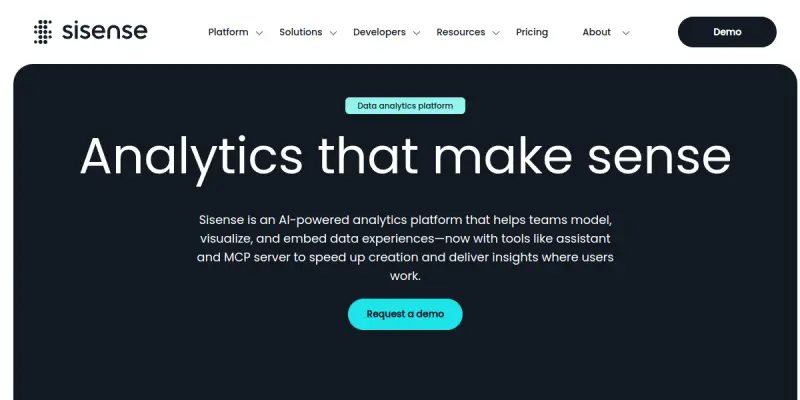
Sisense is a comprehensive business intelligence and analytics platform designed to empower organizations with data-driven decision-making. Unlike traditional BI tools that focus solely on reporting, Sisense specializes in embedded analytics, allowing companies to build data-driven applications and interactive dashboards directly into their own software products. Its proprietary in-chip technology enables the tool to process large volumes of data locally on the device, ensuring high performance even with complex datasets.
Key Features
- AI-Powered Analytics: Leverages machine learning to automatically detect anomalies and trends within your data.
- Embedded Analytics: Seamlessly integrates analytics into third-party applications and websites via a widget or embed code.
- No-Code Interface: Intuitive drag-and-drop interface allows business users to build dashboards without programming knowledge.
- Pro-Code Support: Provides a robust API and SDKs for developers to customize visualizations and create bespoke data applications.
- In-Chip Technology: Processes data locally on the device to reduce latency and improve query speed for large datasets.
- Data Preparation: Includes built-in tools to clean, structure, and prepare raw data before visualization.
- Real-Time Dashboards: Connects to live data sources to provide up-to-the-minute insights.
- Collaborative Features: Allows teams to share insights, annotate dashboards, and comment on data points.
Use Cases
Embedded Dashboarding
Sisense is the preferred choice for software companies looking to add analytics layers to their products. By embedding Sisense dashboards, product teams can offer customers actionable insights without building a complex analytics engine from scratch.
Business Intelligence Reporting
For internal teams, Sisense allows for the creation of executive dashboards that track KPIs across the organization. Its ability to handle complex SQL databases and join disparate data sources makes it ideal for uncovering deep business insights.
Customer 360 Views
Marketers and sales teams use Sisense to aggregate customer data from various touchpoints. This unified view helps in understanding customer behavior patterns and optimizing revenue strategies.
Operational Analytics
Operational managers utilize Sisense to monitor real-time production metrics, supply chain logistics, or service performance, enabling quick corrective actions based on live data.
Pricing & Plans
Sisense operates on a paid model, primarily targeting mid-market and enterprise businesses. They offer a Community Edition that is free for small teams and personal use, featuring limited functionality. The Professional and Enterprise plans are subscription-based and include advanced features such as in-chip processing, collaboration tools, and technical support. While specific pricing tiers are customized based on the number of users and data volume, the Enterprise tier often involves a significant annual investment.
Integrations & Compatibility
Sisense connects to a vast array of data sources, including cloud data warehouses (Snowflake, Amazon Redshift, Google BigQuery), relational databases (SQL Server, PostgreSQL), and flat files. It also offers connectors for popular business applications like Salesforce, HubSpot, and Google Analytics. The platform is compatible with both web-based applications and mobile environments, ensuring analytics are accessible anywhere.
Who Is It For?
Sisense is designed for Data Analysts, Business Intelligence Developers, CTOs, and Product Managers who need to deliver powerful analytics to end-users. It is particularly suitable for organizations that require a high degree of customization and the ability to embed analytics within their own proprietary platforms.
Limitations
- Resource Intensity: Running Sisense on local in-chip technology can consume significant processing power on the user's device.
- Steep Learning Curve: While the no-code interface is user-friendly, advanced data modeling and feature engineering require significant technical expertise.
- High Cost: The enterprise pricing model may be cost-prohibitive for small startups or very small teams.
- Data Quality Dependency: Like all BI tools, the accuracy of insights is entirely dependent on the quality and structure of the input data.
Final Verdict
Sisense stands out in the crowded BI market due to its superior performance on large datasets and its focus on embedded analytics. It strikes a balance between ease of use for business users and flexibility for developers. While it comes with a higher price tag and a learning curve, it offers a robust solution for organizations looking to embed data intelligence directly into their software.
Tool Facts
Screenshots & Interface
Pros
- ✓ Offers a unified in-chip architecture for fast query performance on large datasets
- ✓ Highly customizable via both a visual interface and pro-code API access
- ✓ Best-in-class embedded analytics capabilities for building data-driven applications
- ✓ Intuitive drag-and-drop interface lowers the barrier for non-technical users
Cons
- × Pricing is premium and may be prohibitive for small teams or startups
- × The learning curve for advanced data modeling and feature engineering is steep
- × Local processing can be resource-intensive on end-user devices
- × Setup time for initial dashboard configuration can be lengthy
How to Use Sisense AI in Your Workflow
Integrating Sisense AI into your professional toolkit enhances efficiency by automating manual steps. By configuring it to suit your specific project requirements, you can optimize output quality and reduce project cycle times. Standard workflows involve testing the tool on simple tasks before scaling its use to complex operations.
Frequently Asked Questions
What is Sisense AI used for?
Sisense provides AI-powered embedded analytics for creating interactive dashboards. It supports pro-code, low-code, and no-code data visualization.
What is the pricing model for Sisense AI?
Sisense AI uses a Paid pricing model.
What are the main advantages of Sisense AI?
The key benefits of Sisense AI include: Offers a unified in-chip architecture for fast query performance on large datasets, Highly customizable via both a visual interface and pro-code API access, Best-in-class embedded analytics capabilities for building data-driven applications, Intuitive drag-and-drop interface lowers the barrier for non-technical users.
What are the main limitations of Sisense AI?
Some limitations or cons of Sisense AI are: Pricing is premium and may be prohibitive for small teams or startups, The learning curve for advanced data modeling and feature engineering is steep, Local processing can be resource-intensive on end-user devices, Setup time for initial dashboard configuration can be lengthy.
Alternative AI Tools

HubSpot AI
HubSpot AI integrates machine learning into the HubSpot CRM platform to automate data analysis, predict customer behavior, and optimize marketing campaigns. It is designed for sales and marketing teams seeking actionable insights without manual data wrangling. A key differentiator is its seamless integration with HubSpot's existing suite of marketing, sales, and service tools.
Dataiku
Dataiku is an AI and machine learning platform that enables data teams to build, deploy, and manage analytics projects. It helps organizations transform raw data into actionable insights through collaborative workflows and built-in governance. The platform differentiates itself with a visual interface that supports both code-first and no-code development.

Domo AI
Domo AI is an enterprise platform for building, deploying, and governing AI agents using your business data. It features visual analytics and natural language query capabilities.
Rating Details
Based on 0 ratings
Quick Comparisons
Related Tools
More AI tools from the same workflow, industry, or category.
NewsData.io
NewsData.io delivers structured global news data via a real-time API. It supports 100,000+ sources across 200+ countries with filtering by keyword and date. This tool helps developers integrate news intelligence into applications and dashboards.
Wisegrid
Wisegrid is a work management platform that combines spreadsheet functionality with application features like dashboards and automations. It allows teams to manage projects and data using rows and columns, including AI-driven formulas, with a flat pricing model.
TradeBB
TradeBB is a All-in-One Trading Journal and analysis tool that helps traders seamlessly record each transaction, deeply analyze trading data, and review trading processes.
Pinecone
Pinecone is a fully managed vector database for AI applications, enabling fast similarity search and retrieval-augmented generation (RAG). It targets developers and data scientists who need scalable vector storage without managing infrastructure.
Reviews
No reviews submitted yet. Be the first to share your experience.
Write a Review
Share Your Experience
Join the community to write reviews, submit ratings, and bookmark your favorite AI tools.