

Smartsheet AI
Use Smartsheet AI as the anchor for a real shortlist.
Instead of returning to a broad directory, jump straight into the strongest adjacent matchups for pricing, workflow fit, and differentiation.
Overview
Overview
Smartsheet AI is an advanced layer built on the Smartsheet platform, designed to enhance project management through artificial intelligence. It integrates predictive analytics and natural language processing directly into the workflow to help teams manage complex projects more efficiently. By automating routine tasks and providing data-driven insights, Smartsheet AI empowers organizations to move faster and make better decisions without leaving their familiar project management environment.
Key Features
- Predictive Analytics: Uses historical data to forecast project timelines and identify potential risks before they occur.
- Natural Language Processing: Allows users to create and update tasks using simple conversational prompts.
- Automated Workflows: Triggers specific actions based on changes in data, streamlining repetitive processes.
- AI-Powered Insights: Analyzes project health to highlight bottlenecks and resource gaps automatically.
- Smart Attachments: Provides AI-generated summaries and insights from attached documents and images.
- Dynamic Reporting: Generates real-time, customized reports based on user-defined criteria.
- Collaborative Editing: Ensures all team members have access to the latest information with seamless updates.
Use Cases
Project Planning
Teams can use Smartsheet AI to generate initial project schedules and Gantt charts instantly from high-level requirements. The tool can suggest task dependencies and estimated durations based on similar past projects, significantly reducing the time spent on initial setup.
Resource Management
Managers can leverage predictive models to forecast resource availability and workload distribution. This helps in preventing team burnout and ensuring that the right personnel are assigned to the right tasks at the right time.
Automated Reporting
Instead of manually compiling weekly status updates, users can utilize AI to aggregate data from various sheets and generate comprehensive reports. This ensures stakeholders always have visibility into project progress without manual data entry.
Pricing & Plans
Smartsheet operates on a paid subscription model. The platform offers various tiers, including Business, Enterprise, and Connector plans, with pricing typically based on the number of users and feature sets required. Specific pricing details vary by organization and are available on the official website. There is no standalone "AI-only" pricing; AI features are bundled into the paid tiers.
Integrations & Compatibility
Smartsheet AI is deeply integrated with the broader Smartsheet ecosystem. It connects seamlessly with popular third-party tools such as Microsoft 365 (Excel, Teams), Salesforce, Google Workspace, and Zapier. This ensures that data flows smoothly between different applications, creating a unified workflow for teams already using these tools.
Who Is It For?
Smartsheet AI is ideal for project managers, operations teams, and enterprise departments looking to scale their project management capabilities. It is particularly suited for organizations that have moved beyond basic spreadsheets and require a more sophisticated solution for managing complex workflows and cross-functional collaboration.
Limitations
- Complexity: The platform offers a wide array of features that can have a steep learning curve for new users compared to simpler, linear tools.
- Cost: Advanced AI capabilities and full feature sets are locked behind premium enterprise tiers, which may be cost-prohibitive for small teams.
- Data Dependency: The accuracy of AI predictions relies heavily on the quality, structure, and consistency of the data entered into the system.
Final Verdict
Smartsheet AI is a robust solution for organizations that need to elevate their project management from basic tracking to strategic forecasting. While it requires an investment in time to learn and a budget for premium plans, the return on investment comes through increased efficiency, reduced manual effort, and improved project outcomes.
Tool Facts
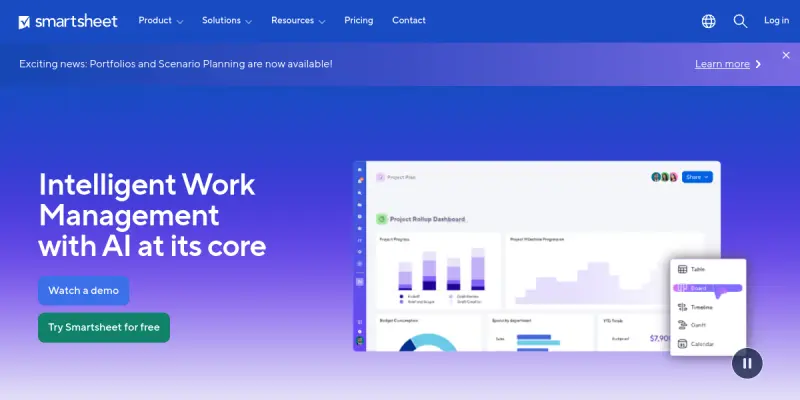
Screenshots & Interface
Pros
- ✓ Leverages predictive analytics to forecast project timelines and resource needs accurately.
- ✓ Streamlines task creation through natural language processing and automated workflow rules.
- ✓ Provides centralized project visibility and real-time collaboration features for distributed teams.
Cons
- × Advanced AI features often require a premium subscription tier, limiting access for small teams.
- × Relies heavily on structured data entry; unstructured inputs may result in lower accuracy.
- × Can feel complex for users accustomed to simpler, linear spreadsheet tools.
How to Use Smartsheet AI in Your Workflow
Integrating Smartsheet AI into your professional toolkit enhances efficiency by automating manual steps. By configuring it to suit your specific project requirements, you can optimize output quality and reduce project cycle times. Standard workflows involve testing the tool on simple tasks before scaling its use to complex operations.
Frequently Asked Questions
What is Smartsheet AI used for?
Smartsheet AI augments project management with predictive insights and automated workflow personalization for teams of all sizes.
What is the pricing model for Smartsheet AI?
Smartsheet AI uses a Paid pricing model.
What are the main advantages of Smartsheet AI?
The key benefits of Smartsheet AI include: Leverages predictive analytics to forecast project timelines and resource needs accurately., Streamlines task creation through natural language processing and automated workflow rules., Provides centralized project visibility and real-time collaboration features for distributed teams..
What are the main limitations of Smartsheet AI?
Some limitations or cons of Smartsheet AI are: Advanced AI features often require a premium subscription tier, limiting access for small teams., Relies heavily on structured data entry; unstructured inputs may result in lower accuracy., Can feel complex for users accustomed to simpler, linear spreadsheet tools..
Alternative AI Tools

Sembly AI
Sembly AI is an AI-powered meeting assistant that automatically transcribes, summarizes, and extracts action items from conversations. It helps professionals in consulting, legal, and other service industries turn meeting recordings into client-ready deliverables. Its key differentiator is the ability to generate bespoke work products tailored to specific client needs.

Cal.com AI
Cal.com AI provides customizable scheduling with intelligent automation for businesses and developers. It features conflict detection and AI-driven booking suggestions.

Dynalist AI
Dynalist is an AI-enhanced note-taking and task management tool for individuals and teams. It uses smart list organization to help users capture ideas and manage to-dos efficiently. A live demo is available with no sign-up required.
Rating Details
Based on 0 ratings
Related Tools
More AI tools from the same workflow, industry, or category.
Mailbutler AI
Mailbutler AI is an email extension that integrates AI-powered writing, scheduling, and tracking features directly into your existing inbox. It helps professionals and teams streamline email workflows and save time on routine communication tasks.
Lucidspark AI
Lucidspark AI is a virtual whiteboard tool that helps teams brainstorm, organize ideas, and move from concept to execution. It is designed for remote and hybrid teams seeking a structured yet flexible collaboration space. Its integration with Lucidchart sets it apart for end-to-end visual workflow planning.
SignNow AI
SignNow AI automates document signing and workflow management for businesses. It uses AI to extract fields, send documents for signature, and track completion. Ideal for HR, legal, and sales teams.
ProtonMail AI
ProtonMail AI is an integrated writing assistant for secure email, leveraging Swiss privacy standards to draft, summarize, and translate messages within the Proton Mail interface.
Reviews
No reviews submitted yet. Be the first to share your experience.
Write a Review
Share Your Experience
Join the community to write reviews, submit ratings, and bookmark your favorite AI tools.