

Softr AI
Use Softr AI as the anchor for a real shortlist.
Instead of returning to a broad directory, jump straight into the strongest adjacent matchups for pricing, workflow fit, and differentiation.
Overview
Overview
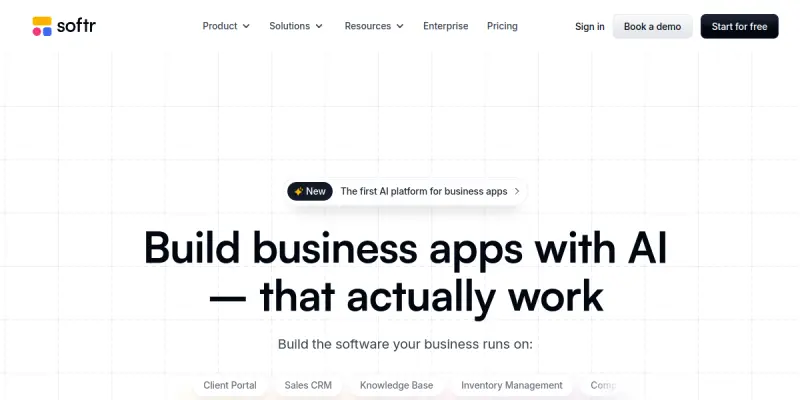
Softr AI is a no-code platform designed to help users build custom web applications, internal tools, and portals. It allows users to connect to data sources like Airtable and Google Sheets and turn that data into interactive user interfaces without writing a single line of code. The platform focuses on speed and ease of use, utilizing a drag-and-drop interface and AI-assisted features to streamline the development process for small businesses and non-technical teams.
Key Features
- Drag-and-Drop Interface: Intuitive visual editor to build pages and components without coding.
- Data Source Integration: Connect to Airtable, Google Sheets, Google Drive, and more.
- AI-Assisted Features: Utilize AI to generate content, layouts, and responses within the builder.
- Pre-built Templates: Access a library of templates for common use cases like CRMs, dashboards, and lead generation.
- Custom Domain & Authentication: Host sites on custom domains and manage user access and security.
- Interactive Elements: Add buttons, forms, galleries, and calculators to create functional apps.
Use Cases
Internal Business Dashboards
Teams can use Softr AI to create internal dashboards that visualize data from spreadsheets or databases. This allows non-technical staff to track KPIs, manage inventory, or monitor project status in real-time without relying on IT developers.
Client Portals
Agencies and freelancers can build secure client portals to share project updates, deliverables, or invoices. These portals can be restricted to specific users with custom login flows, providing a professional way to manage client relationships.
Lead Generation Websites
Small businesses can rapidly launch landing pages and lead capture sites using pre-configured templates. By connecting the site to a CRM or database, leads are automatically saved, streamlining the sales funnel.
SaaS MVPs
Startups can use Softr to quickly prototype a Minimum Viable Product (MVP) for a software service. It allows founders to validate ideas by creating functional interfaces that handle user authentication and data management before writing custom code.
Data-Driven Applications
Developers and power users can leverage Softr to build applications that sit on top of data. This is useful for creating specialized tools for inventory management, event registration, or internal knowledge bases that pull from existing data sources.
Pricing & Plans
Softr offers a tiered pricing structure to accommodate different project needs. The platform typically provides a Free tier for basic testing, a Starter plan for small projects, and Pro and Business plans for scaling teams with advanced features like custom domain usage and higher limits.
Integrations & Compatibility
Softr is compatible with various third-party services and data sources. Key integrations include Airtable and Google Sheets for data storage, Google Drive for file storage, Slack for notifications, and Zapier for extending functionality to thousands of other apps.
Who Is It For?
This tool is ideal for non-technical entrepreneurs, small business owners, and agency professionals who need to build web applications quickly. It is also suitable for developers looking to prototype ideas rapidly without the overhead of setting up a development environment.
Limitations
- Customization Limits: The visual editor restricts the level of custom design compared to hand-coded websites.
- Data Logic Complexity: Implementing complex custom formulas or logic can be challenging without custom code.
- Performance: Complex applications with heavy data loads may experience performance limitations compared to natively coded solutions.
Final Verdict
Softr AI serves as a robust entry point for building functional web applications without coding. While it may lack the deep customization of a full-code stack, its speed, ease of use, and strong data integration make it a top contender for internal tools and business portals.
Tool Facts
Screenshots & Interface
Pros
- ✓ Direct synchronization with Airtable and Google Sheets ensures real-time data consistency.
- ✓ Extensive template library allows users to launch functional apps in minutes.
- ✓ Drag-and-drop interface significantly reduces the time required for UI development.
Cons
- × Design flexibility is limited compared to building applications with a custom codebase.
- × Complex business logic and calculations can be difficult to implement without custom code.
- × Reliance on third-party data sources like Airtable may limit flexibility for some users.
How to Use Softr AI in Your Workflow
Integrating Softr AI into your professional toolkit enhances efficiency by automating manual steps. By configuring it to suit your specific project requirements, you can optimize output quality and reduce project cycle times. Standard workflows involve testing the tool on simple tasks before scaling its use to complex operations.
Frequently Asked Questions
What is Softr AI used for?
Softr AI is a no-code platform for building AI-powered portals and internal tools. It connects directly to data sources like Airtable and Google Sheets. Users can build custom interfaces using a drag-and-drop editor.
What is the pricing model for Softr AI?
Softr AI uses a Paid pricing model.
What are the main advantages of Softr AI?
The key benefits of Softr AI include: Direct synchronization with Airtable and Google Sheets ensures real-time data consistency., Extensive template library allows users to launch functional apps in minutes., Drag-and-drop interface significantly reduces the time required for UI development..
What are the main limitations of Softr AI?
Some limitations or cons of Softr AI are: Design flexibility is limited compared to building applications with a custom codebase., Complex business logic and calculations can be difficult to implement without custom code., Reliance on third-party data sources like Airtable may limit flexibility for some users..
Alternative AI Tools

EdgeDB AI
EdgeDB AI (now Gel) is an open-source database that simplifies data modeling with a more ergonomic alternative to traditional SQL. It targets developers who want strong type safety and high performance without the complexity of relational databases. Its key differentiator is a declarative query language that reduces boilerplate code.

TeleportHQ AI
TeleportHQ AI is a low-code website builder that combines a visual editor with headless content modeling and clean code export. It helps developers and designers create, manage, and scale custom websites efficiently. The platform's AI assists with design generation and content structuring.

Prisma AI
Prisma AI provides a computer vision platform, Gryphos, for developers and businesses that need predictive visual analytics. It offers pre-trained and custom models to analyze images and video for use cases like object detection and facial recognition.
Rating Details
Based on 0 ratings
Quick Comparisons
Related Tools
More AI tools from the same workflow, industry, or category.
AICode
AICode is a spec-driven AI coding copilot for developers using Visual Studio Code. It enforces a disciplined workflow to prevent AI-generated technical debt and ensures maintainable code. Its key differentiator is forcing line-by-line human review before changes are applied.
Opik
Opik is an open-source platform for LLM observability and evaluation. It helps developers trace, test, and monitor AI applications and autonomous agents throughout development and production.
PlanetScale AI
PlanetScale provides serverless cloud hosting for Vitess and PostgreSQL databases. It targets developers and engineering teams requiring high-performance, scalable database infrastructure. The platform enables instant scaling and branching workflows.
CodeReview AI
CodeReview AI is a tool that uses artificial intelligence to analyze code and suggest improvements. It helps developers identify bugs, security issues, and style inconsistencies automatically. The tool integrates with popular version control systems to fit into existing workflows.
Reviews
No reviews submitted yet. Be the first to share your experience.
Write a Review
Share Your Experience
Join the community to write reviews, submit ratings, and bookmark your favorite AI tools.