

VictorOps AI
Use VictorOps AI as the anchor for a real shortlist.
Instead of returning to a broad directory, jump straight into the strongest adjacent matchups for pricing, workflow fit, and differentiation.
Overview
Overview
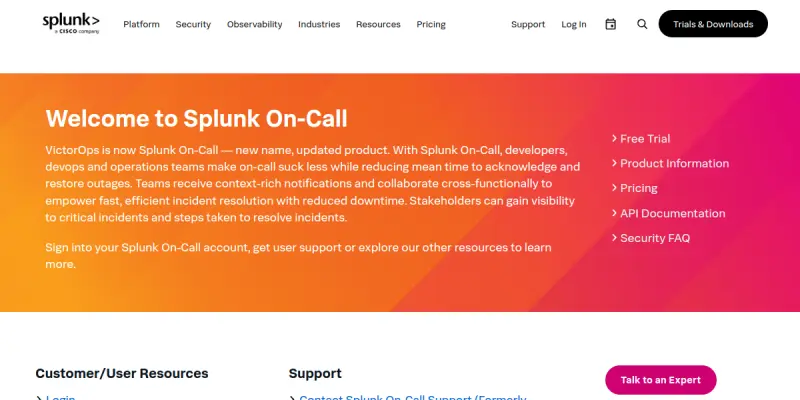
Splunk On-Call (formerly VictorOps) is an AI-powered incident management platform designed to streamline on-call operations and reduce alert fatigue for DevOps teams. Acquired by Splunk in 2019, it has evolved into a robust solution that replaces manual workflows with automated on-call processes. The platform provides a centralized view of system health and empowers teams to respond to incidents faster.
Key Features
- On-call Scheduling: Manages rotation schedules to ensure 24/7 coverage and distribute alert volume evenly.
- Incident Response Automation: Automates initial response steps and runbook execution for incoming alerts.
- SLO Management: Tracks Service Level Objectives (SLOs) and SLIs to measure system reliability and performance.
- Noise Reduction: Filters out false positives and reduces alert fatigue through smart alert routing.
- Post-Incident Reviews: Facilitates documentation and collaboration after incidents occur to prevent recurrence.
- Real-time Mobile Support: Allows on-call staff to respond to alerts and view schedules from mobile devices.
- Root Cause Analysis: Leverages AI to help identify the root cause of incidents quickly.
Use Cases
Managing Rotational Shifts
DevOps teams use this tool to assign and track on-call rotations, ensuring that no single person is overwhelmed by alert volume and that coverage is maintained around the clock.
Incident Response Automation
When a critical alert triggers, the tool can automatically notify the on-call engineer and attempt predefined runbook actions, reducing Mean Time to Acknowledge (MTTA).
Ensuring SLA Compliance
The platform tracks uptime and SLO performance, providing visibility into whether systems are meeting reliability targets and helping teams maintain service level agreements.
Post-Incident Analysis
After an incident, teams use the built-in review tools to document lessons learned, assign action items, and improve future incident response processes.
Pricing & Plans
Splunk On-Call operates on a Freemium model, allowing teams to start with basic incident management features without immediate financial commitment. Advanced capabilities, such as custom alert routing, deep SLO integration, and advanced noise reduction, are available in paid tiers. Enterprise-level support and custom deployment options are also available for larger organizations.
Integrations & Compatibility
The platform integrates natively with major communication platforms like Slack and Microsoft Teams to streamline communication. It also connects with existing monitoring tools and Splunk Cloud to ingest alert data and provide rich context for every incident.
Who Is It For?
This tool is designed for Site Reliability Engineers (SREs), DevOps engineers, on-call managers, and DevOps teams who need a centralized system to manage incident response, reduce alert fatigue, and ensure operational stability.
Limitations
- The setup process requires a pre-existing monitoring infrastructure and alerting data sources to be configured correctly.
- New users may need time to configure complex alerting rules and on-call schedules.
- While the free tier is useful for small teams, full automation features and advanced analytics require a paid subscription.
- The tool relies on external data sources, so downtime in those integrations can affect the platform's utility.
Final Verdict
Splunk On-Call offers a comprehensive and modern solution for teams looking to overhaul their on-call operations. Its strong integration with the Splunk ecosystem, focus on SLO management, and AI-driven insights make it a strong contender for any DevOps team serious about reliability.
Tool Facts
Screenshots & Interface
Pros
- ✓ Streamlines on-call rotation management to reduce alert fatigue.
- ✓ Integrates deeply with Splunk for rich incident context.
- ✓ Automates post-mortem documentation to speed up reviews.
- ✓ Provides real-time visibility into on-call status.
Cons
- × Steep learning curve for new users regarding configuration.
- × Requires existing monitoring infrastructure to be set up.
- × Can be expensive for large enterprise teams requiring custom support.
How to Use VictorOps AI in Your Workflow
Integrating VictorOps AI into your professional toolkit enhances efficiency by automating manual steps. By configuring it to suit your specific project requirements, you can optimize output quality and reduce project cycle times. Standard workflows involve testing the tool on simple tasks before scaling its use to complex operations.
Frequently Asked Questions
What is VictorOps AI used for?
Splunk On-Call (formerly VictorOps) automates on-call operations and incident management for DevOps teams using AI-driven insights.
What is the pricing model for VictorOps AI?
VictorOps AI uses a Freemium pricing model.
What are the main advantages of VictorOps AI?
The key benefits of VictorOps AI include: Streamlines on-call rotation management to reduce alert fatigue., Integrates deeply with Splunk for rich incident context., Automates post-mortem documentation to speed up reviews., Provides real-time visibility into on-call status..
What are the main limitations of VictorOps AI?
Some limitations or cons of VictorOps AI are: Steep learning curve for new users regarding configuration., Requires existing monitoring infrastructure to be set up., Can be expensive for large enterprise teams requiring custom support..
Alternative AI Tools

Redis AI
Redis AI is a database solution for developers, offering advanced capabilities and blazing fast app development, with a key differentiator in its robust developer API.

Perfecto AI
Perfecto.io automates mobile and web app testing using AI-driven quality assurance on a cloud device fleet. It integrates with CI/CD pipelines for continuous testing.

PlanetScale AI
PlanetScale provides serverless cloud hosting for Vitess and PostgreSQL databases. It targets developers and engineering teams requiring high-performance, scalable database infrastructure. The platform enables instant scaling and branching workflows.
Rating Details
Based on 0 ratings
Related Tools
More AI tools from the same workflow, industry, or category.
AICode
AICode is a spec-driven AI coding copilot for developers using Visual Studio Code. It enforces a disciplined workflow to prevent AI-generated technical debt and ensures maintainable code. Its key differentiator is forcing line-by-line human review before changes are applied.
Opik
Opik is an open-source platform for LLM observability and evaluation. It helps developers trace, test, and monitor AI applications and autonomous agents throughout development and production.
PlanetScale AI
PlanetScale provides serverless cloud hosting for Vitess and PostgreSQL databases. It targets developers and engineering teams requiring high-performance, scalable database infrastructure. The platform enables instant scaling and branching workflows.
CodeReview AI
CodeReview AI is a tool that uses artificial intelligence to analyze code and suggest improvements. It helps developers identify bugs, security issues, and style inconsistencies automatically. The tool integrates with popular version control systems to fit into existing workflows.
Reviews
No reviews submitted yet. Be the first to share your experience.
Write a Review
Share Your Experience
Join the community to write reviews, submit ratings, and bookmark your favorite AI tools.